


The Comet browser is an AI-powered web browser developed by Perplexity that combines traditional web browsing with an intelligent assistant. Instead of simply opening websites and displaying search results, it helps users understand webpages, summarize information, compare sources, and work through certain online tasks using natural-language instructions. Its main attraction is the ability to bring AI assistance directly into the browsing experience.
For students, researchers, marketers, developers, and everyday internet users, this approach can reduce the time spent switching between browser tabs and separate AI tools. However, an AI browser is not automatically more accurate, private, or secure than a conventional browser. Its usefulness depends on the quality of its answers, the permissions granted to its assistant, and the user’s ability to verify important information.
This guide explains how Comet works, its major features, practical applications, privacy considerations, limitations, and the situations in which it may be worth using.
What Is Comet Browser?
Comet is a web browser built by Perplexity around the idea of making AI a central part of browsing. It combines a conventional browser interface with Perplexity’s search and conversational assistance capabilities.
In a traditional browser such as Google Chrome or Mozilla Firefox, users generally navigate between websites, search engines, extensions, and separate AI applications. Comet aims to bring more of those activities into one environment.
For example, imagine researching the best laptops for university. You might open several product pages, compare specifications, read reviews, and check prices. With Comet, you can ask its assistant to summarize the information on relevant pages and identify differences without manually copying every detail into another application.
The browser still relies on websites and online information. Its AI assistant interprets requests and helps process that information, but it does not guarantee that every answer is correct or that every online task can be completed automatically.
Comet is particularly relevant to people who spend much of their day researching, reading, comparing products, or working across multiple browser tabs.

How Does Comet Browser Work?
The Comet browser combines ordinary web browsing with AI-assisted information processing. Understanding the distinction between these functions helps explain both its benefits and its limitations.
1. Traditional Web Browsing
Like other modern browsers, Comet opens websites, displays web content, manages tabs, and supports everyday internet activities. Its browser foundation uses Chromium technology.
This matters because Comet is not simply a chatbot with a search box. It is designed to function as a browser in which users can navigate the web normally while accessing AI assistance when needed.
2. AI-Powered Search and Answers
Comet uses Perplexity’s search experience to help users investigate questions and understand information. Rather than requiring users to search for individual pages and read each one independently, the assistant can help synthesize relevant information into a more direct response.
For example, a student researching renewable energy could ask for a comparison of solar and wind power. The assistant may help organize the available information into differences in installation, energy production, costs, and environmental considerations. Important claims should still be checked against the underlying sources.
3. Context-Aware Assistance
One of Comet’s central ideas is allowing users to ask questions about the page they are viewing or information spread across open tabs. This gives the assistant additional context beyond the wording of a standalone question.
Suppose a marketer has five competitor websites open. Instead of describing every page manually, the marketer can ask the assistant to compare their product positioning, pricing information, and main selling points.
The result depends on what information the assistant can access, how the websites present their content, and whether the relevant details are available. Context-aware AI can make research easier, but it does not eliminate the need to check the original pages.
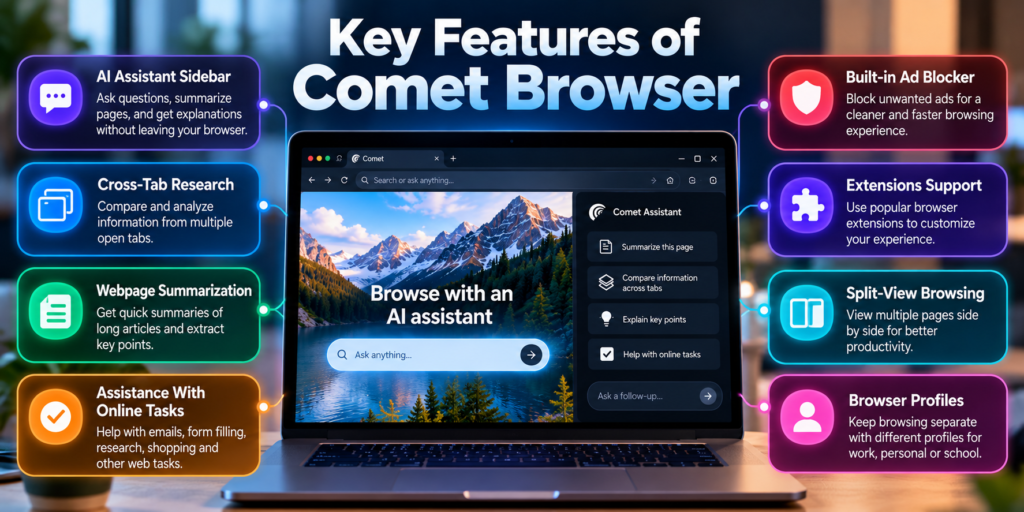
Key Features of Comet Browser
Comet’s main advantage is its integration of AI into ordinary browsing. Its features are designed to make research and online work more convenient.
AI Assistant for Webpages
The built-in assistant can help explain unfamiliar terms, summarize long articles, and answer questions about the content you are reading.
This is useful when a webpage contains technical language or a long explanation that would otherwise take considerable time to understand. You can ask follow-up questions to explore specific details without restarting your research.
Summarization Across Multiple Tabs
Comet can help synthesize information across open tabs, rather than limiting every request to one page. This can be particularly useful when researching a topic that requires information from several sources.
For instance, a buyer comparing three smartphones could ask for a structured comparison of their processors, cameras, battery capacities, and prices. The user should still verify that the specifications come from reliable sources and that the products are being compared fairly.
Natural-Language Task Assistance
Instead of navigating every step manually, users can describe a task in ordinary language. Comet can assist with activities such as email drafting, planning, research, and shopping, depending on the available features and permissions.
A useful distinction is that asking an AI to prepare something is not the same as authorizing it to complete an action. Review any proposed email, purchase, booking, or form submission before allowing the assistant to proceed.
Voice Interaction on Android
Comet’s Android app includes voice interaction, allowing users to communicate with the assistant by speaking. This can be convenient when reading on a phone or when typing is impractical.
Built-In Ad Blocking on Android
The Android version includes an ad-blocking feature and allows users to permit ads on selected websites. This may help reduce distractions, although it should not be assumed to block every advertisement, tracker, or malicious website.
Feature availability can differ between desktop and mobile versions. Check the installed browser version before relying on a particular capability.
Practical Ways to Use Comet Browser
The most useful way to evaluate Comet is to consider the actual tasks it can help simplify.
1. Research and Studying
Students can ask Comet to explain difficult concepts, summarize reading material, and compare different explanations. A sensible workflow is to request a summary, identify the original sources, and then read the sections that support the main conclusions.
2. SEO and Content Research
A content marketer can compare competitor articles, identify recurring topics, and organize publicly available information into a research outline. Comet can help with analysis, but it does not guarantee accurate keyword volumes, search rankings, or SEO results.
3. Programming and Technical Learning
Developers can ask for explanations of documentation, compare implementation approaches, and clarify unfamiliar error messages. Any generated code should be tested, especially when it handles authentication, payments, user data, or production systems.
4. Shopping and Product Comparisons
Comet can help organize product information and compare options. Before purchasing, check the final price, delivery terms, seller reputation, warranty, and return policy directly on the retailer’s website.
5. Everyday Office Work
Professionals can use the assistant to understand reports, organize research, or prepare drafts from relevant information. Sensitive company documents should only be processed when organizational policies and the browser’s data-handling arrangements permit it.
These are practical applications of AI-assisted browsing, not guarantees that every workflow will succeed automatically.
How to Download and Get Started With Comet Browser
Comet is available through Perplexity, with desktop and mobile versions offered. The exact availability and system requirements may change over time.
Follow these steps to get started:
- Find the official download page. Search for the Comet browser on Perplexity’s official website.
- Check system requirements. Confirm that your operating system supports the current release.
- Install the browser. Download it from the official source or use the relevant official app store.
- Complete the setup. Follow the on-screen instructions and review any account or permission requests.
- Import browsing data if needed. If you are switching from another browser, check the available import options for bookmarks and other supported data.
- Try a simple task. Open a public article and ask the assistant to summarize its main argument and identify important supporting details.
- Review privacy settings. Check browsing-data controls and decide which permissions and integrations you actually need.
You do not need to begin by giving an AI assistant access to your email, calendar, or other sensitive accounts. Start with public webpages and expand its permissions only when a particular task justifies doing so.
Is Comet Browser Free?
Yes. Perplexity announced that Comet became available to download for everyone for free in October 2025. However, free browser access does not mean every AI assistant feature is free or unlimited.
Perplexity offers subscription options, including Standard (Free), Pro, and Max. Access to advanced features and usage limits can vary by plan.
| Plan | What to Expect |
|---|---|
| Standard (Free) | Basic Perplexity search and access to selected features, with restrictions on some advanced capabilities |
| Pro | Higher access to advanced AI features and assistant capabilities |
| Max | The highest published usage limits for advanced AI features |
Exact pricing and usage limits can change. Check the current subscription information in your Perplexity account before paying.
For casual browsing and occasional AI-assisted research, start with the free option. A paid subscription makes more sense if you regularly depend on advanced research or browser-agent features and repeatedly reach the free tier’s limits.
Comet Browser vs. Google Chrome vs. Microsoft Edge
They all support everyday web browsing, but their main priorities differ. Comet emphasizes Perplexity’s AI assistant, while Chrome focuses on Google’s browser ecosystem and Edge integrates Microsoft’s services.
| Feature | Comet Browser | Google Chrome | Microsoft Edge |
|---|---|---|---|
| Main focus | AI-assisted browsing and research | General-purpose browsing and Google integration | General-purpose browsing and Microsoft integration |
| AI integration | Perplexity assistant | Google’s AI features, depending on availability | Microsoft Copilot features, depending on availability |
| Page summarization | Available through AI assistance | Depends on available AI features | Depends on available AI features |
| Multiple-tab analysis | Supported for relevant assistant tasks | Depends on available AI features | Depends on available AI features |
| Best suited to | Research-heavy workflows | Everyday browsing and Google services | Microsoft-centered workflows |
| Main consideration | AI permissions, accuracy, and plan limits | Feature availability and ecosystem dependence | Feature availability and ecosystem dependence |
AI capabilities change frequently, and not every feature is available to every user, device, or region. The table compares the browsers’ general positioning rather than claiming that one has every feature another lacks.
If you already use Chrome and are satisfied with it, switching is not essential. Comet becomes more compelling when you regularly want an assistant to work with information across webpages instead of using a separate AI chat window.
Comet Browser Privacy: What Should You Know?
Privacy deserves particular attention because an AI browser may process information from the pages you ask it to analyze.
Perplexity’s published privacy information explains that browsing data can be stored locally while relevant page content or browsing context may be sent to its services when needed to fulfill searches and tasks. It also describes credential storage and controls for managing browsing data.
The practical lesson is that local storage and cloud processing are different things. Information can remain on your device in ordinary use while selected content is still processed remotely when you invoke an AI feature.
Important Privacy Considerations
- Webpage content: The assistant may need to process the text or information on a page to answer your request.
- Browsing history: Relevant browsing context may be used for personal searches and requested tasks.
- Connected accounts: Integrations can involve additional permissions and data access.
- Credentials: Perplexity describes its credential-storage approach as using a local secure vault.
- Data controls: Review privacy settings and use the available options to clear browsing history, cookies, and cached data.
These are descriptions from Perplexity’s own documentation, not an independent guarantee that every possible data-handling risk has been eliminated.
Is Comet Safe to Use?
Comet can be used for ordinary browsing and research, but its AI agent introduces security questions that do not arise in exactly the same way with a browser that only displays webpages.
One important risk is indirect prompt injection. This occurs when a webpage contains malicious instructions designed to manipulate an AI assistant that reads or acts on that page. The instructions may be hidden in webpage content or embedded in material that appears harmless.
Security researchers have previously reported prompt-injection vulnerabilities involving Comet. These historical findings demonstrate why agentic browsers need strong security controls, but they should not automatically be interpreted as proof that a particular vulnerability remains exploitable in the current version.
Research into agentic browsers has also highlighted the risks that emerge when untrusted webpage content can influence actions across websites.
For safer use:
- Avoid giving the assistant unnecessary access to banking, health, or other sensitive accounts.
- Review its requested permissions and connected services.
- Check the destination and content before approving payments, purchases, messages, or account changes.
- Treat instructions found inside webpages as untrusted content, not as commands you must follow.
- Keep the browser updated and use strong passwords with multifactor authentication.
These precautions are useful for other AI-powered browsers as well. No browser should be assumed immune to prompt injection or other security flaws.
Advantages and Limitations of Comet Browser
Comet offers a different way to interact with the internet, but its value depends on the tasks you perform and how much control you are comfortable giving an AI assistant.
Main Advantages
- Less manual research: Summaries and cross-tab analysis can reduce the effort involved in reviewing multiple sources.
- Convenient explanations: You can ask questions about unfamiliar terms or complex webpages without leaving the browsing workflow.
- Natural-language interaction: Describing a task can be easier than navigating several menus and applications.
- Integrated AI assistance: You can use AI while browsing instead of repeatedly copying content into a separate chatbot.
- Desktop and mobile access: Comet is offered across desktop and mobile platforms, although individual features vary.
Main Limitations
- AI answers can be wrong: A fluent summary may contain errors, omit important qualifications, or misunderstand a source.
- Automation is not infallible: Multi-step tasks can fail because of changing website layouts, login requirements, or unexpected page behavior.
- Privacy requires attention: AI features may process selected browsing information on remote servers.
- Security risks remain: Agentic browsing introduces additional exposure to prompt injection and unintended actions.
- Usage limits may apply: Some advanced assistant capabilities depend on the user’s subscription plan.
- AI is not always faster: For a simple task, opening a website or using a normal search engine may be more efficient than asking an assistant.
The most important distinction is between assistance and reliability. Comet can reduce the amount of manual work involved in a task, but it does not remove the responsibility to verify information and review consequential actions.
Best Comet Browser Alternatives
If Comet does not fit your workflow, several established browsers offer different approaches to AI-assisted browsing.
Google Chrome
Chrome is a strong general-purpose option for people who rely on Google services, established extensions, and familiar browsing features. Its AI capabilities depend on the features available to the user.
Best for: Everyday browsing and Google integration.
Microsoft Edge
Edge is a Chromium-based browser with integration into Microsoft’s ecosystem, including Copilot features where available.
Best for: Windows users and Microsoft 365 workflows.
Brave Browser
Brave is a browser with a strong emphasis on privacy, built-in ad and tracker blocking, and its Leo AI assistant.
Best for: Users who prioritize privacy and browsing controls.
Mozilla Firefox
Firefox is an independent browser option with extensive customization and privacy controls. AI features and integrations depend on the current release and configuration.
Best for: Users who value customization and browser choice.
There is no universal winner. Choose Comet if integrated AI research is central to your work. Choose a conventional browser if you prefer a more familiar workflow or do not need an AI agent to interact with websites.
Tips for Getting Better Results From Comet
The way you phrase a request can make a significant difference to the usefulness of an AI-generated answer.
Give the Assistant a Clear Objective
Vague instructions such as “research laptops” leave too much room for interpretation. A more useful request specifies the task, criteria, and desired output.
For example:
“Compare the three laptop product pages I have open. Extract the processor, RAM, storage, battery information, price, and warranty. Use only details available on those pages, identify missing information, and present the results in a table.”
This gives the assistant a defined scope and makes errors easier to spot.
Ask It to Separate Facts From Assumptions
When researching a complicated topic, ask the assistant to identify which statements are directly supported by sources and which are interpretations. Open the cited pages and verify important claims independently.
Break Complex Tasks Into Stages
For a business research project, a sensible sequence is:
- Gather information from relevant sources.
- Summarize each source separately.
- Compare the findings and identify disagreements.
- Verify the important figures and conclusions.
- Prepare the final report.
Breaking a large task into smaller steps makes it easier to catch errors before they spread into the final output.
Keep Control of Important Actions
Use AI assistance freely for low-risk tasks such as explaining an article or organizing public information. Be more cautious when a task involves personal data, financial transactions, account settings, or messages sent to other people.
Frequently Asked Questions About Comet Browser
1. What Is Comet Browser Used For?
Comet is an AI-powered browser used for web research, webpage summaries, questions about open tabs, product comparisons, and certain assisted online tasks.
2. Is Comet Browser Free?
Yes, Comet is available as a free download. However, access to advanced AI assistant features and usage limits can depend on your Perplexity subscription.
3. Who Developed Comet Browser?
Perplexity developed Comet to combine conventional web browsing with its AI-powered search and assistant technology.
4. Is Comet Browser Available on Mobile?
Yes. Comet is available for Android and iOS as well as desktop platforms. Feature availability can differ between versions.
5. Is Comet Browser Better Than Chrome?
Comet may be more convenient for AI-assisted research and cross-tab analysis. Chrome may be a better fit for users who prefer Google’s ecosystem and a conventional browsing workflow.
6. Can Comet Browser Access My Personal Information?
Depending on the features and permissions you use, Comet may process relevant browsing context or information from connected services. Review its privacy settings and integration permissions before sharing sensitive data.
7. Is Comet Browser Safe?
It can be used for everyday browsing, but AI-agent features introduce additional security risks, including prompt injection. Keep the browser updated, limit permissions, and review actions involving sensitive information.
Conclusion
The Comet browser represents a meaningful shift in how people can interact with the web. Instead of treating every webpage as something to open and read manually, it allows users to ask questions about online information, compare multiple sources, and seek help with certain tasks in the same environment.
Its strongest use cases are research, learning, content analysis, and workflows that involve several related webpages. For these activities, integrated AI assistance can save time and make complex information easier to understand.
However, Comet is not a replacement for critical thinking. Its answers can be inaccurate, automated actions can fail, and giving an AI agent access to personal accounts requires careful consideration.
The best approach is to try Comet with low-risk tasks first. If it consistently improves your workflow, expand its use gradually while keeping sensitive permissions restricted and checking important results against their original sources.





























1 comment on “Comet Browser: Features, AI Tools, Privacy and Review”