


Wan2.2 Animate is an advanced open-source video generation model designed for character animation and character replacement. It can take a character image and a driving video, then transfer body movements and facial expressions into a generated video. The project is part of the Wan2.2 family developed by the Alibaba Wan team. Unlike simple image-to-video tools, it focuses strongly on controlled human motion, facial performance, and character consistency. Its implementation includes dedicated preprocessing tools for pose and face information, making it useful for creators who need more control over generated video. Wan2.2 Animate is especially interesting for AI filmmakers, animators, developers, and digital content creators.
As of September 2026, Wan2.2 Animate remains a technically focused solution rather than a simple one-click consumer application. The model uses a 14B architecture, while community workflows have made it easier to use through interfaces such as ComfyUI. The model can reproduce movements from a reference performer and can also replace a character while maintaining the original scene. Its workflow supports pose guidance, facial motion processing, temporal conditioning, and optional acceleration methods. Therefore, Wan2.2 Animate is particularly useful for creators exploring AI filmmaking, character videos, virtual production, animation, and experimental visual effects.
Wan2.2 Animate Latest Update and Model Status
The latest project ecosystem shows that Wan2.2 Animate continues to receive support through different development tools and workflows. The project includes dedicated animation code, preprocessing utilities, model components, and inference options. The Wan2.2 Animate 14B model is also available as an open model, making it attractive to developers who want to experiment locally or integrate the technology into their own workflows. Diffusers-based usage provides another option for developers, while ComfyUI offers a visual workflow for users who prefer node-based generation instead of command-line execution. This growing ecosystem makes Wan2.2 Animate accessible to different types of advanced AI video users.
Another important development is the availability of practical ComfyUI workflows around Wan2.2 Animate. These workflows provide convenient ways to use the model for character animation and replacement. One workflow focuses on replacing a character in existing footage, while another uses movement from an input video to animate a reference character. Community workflows may also include optimized model formats and acceleration options. However, users should distinguish between official model improvements and third-party workflow changes. An optimization added by a community developer does not necessarily mean the underlying Wan2.2 Animate model itself has been upgraded. This distinction is important when evaluating current capabilities.
How Wan2.2 Animate Works
Wan2.2 Animate combines several types of visual information instead of relying only on a text prompt. The system processes a reference character, body pose information, facial information, and video conditions. Its architecture includes components for motion encoding, face encoding, pose embeddings, image embeddings, and transformer-based processing. This design helps the model understand both the character’s appearance and the movement that should be reproduced. Together, these components provide the conditioning needed to generate controlled character video rather than simply producing unrelated frames. This makes Wan2.2 Animate different from basic image-to-video systems that mainly depend on written prompts and automatically generated motion.
The process normally begins with preprocessing the driving video and reference image. For animation mode, the system creates face and pose information that can guide generation. Pose retargeting can also be enabled when the reference character and performer have noticeably different body proportions. Replacement mode uses additional background and mask information, allowing the system to place a new character into an existing environment. Good input preparation can therefore have a major effect on the final video. A clean reference image, visible body movement, suitable framing, and understandable facial expressions can make the workflow easier to process and potentially improve consistency.
Wan2.2 Animate Animation and Replacement Modes
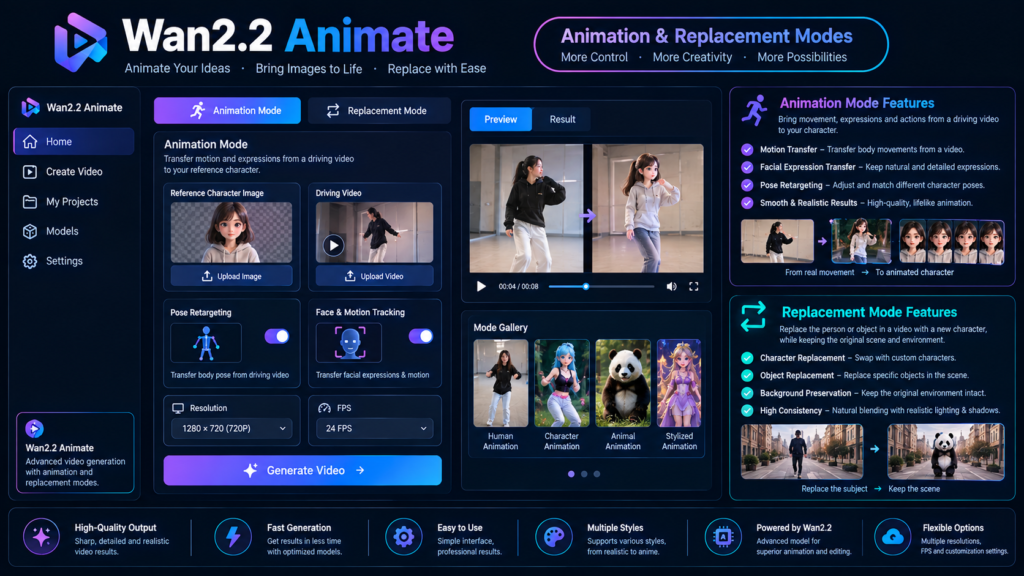
The animation mode is designed for situations where you have a character image and want that character to perform movements from another video. For example, imagine having an illustrated character, digital avatar, or fictional person and a short dance video from a performer. Wan2.2 Animate can use the performer’s movement and facial performance as guidance for generating the character’s video. The workflow uses pose and face information separately, helping the model understand body movement and facial behavior. This makes the system more controllable than basic image-to-video generation. However, quality still depends on the reference image, driving footage, preprocessing, and hardware used during inference.
The replacement mode works differently because it focuses on changing the character inside an existing video. Instead of creating the entire scene around a reference character, the workflow preserves important parts of the original environment while generating the replacement character. The preprocessing pipeline can create background and mask information for this purpose. Replacement mode is designed to work with the existing scene, which can be useful for visual effects and experimental filmmaking. However, significant differences in body proportions can still produce artifacts or deformation. Complex interactions between people and their surroundings may also require additional preparation and careful input selection.
Wan2.2 Animate Features at a Glance
Wan2.2 Animate offers several features that make it useful for controlled AI video production. Its biggest strength is the combination of character appearance with motion and facial guidance. Instead of asking a model to invent movement from a text description, creators can provide actual movement from a driving video. The architecture also includes dedicated face-related components for processing facial motion. These capabilities make the system useful for digital characters, visual effects, AI filmmaking, social media content, virtual performers, and experimental animation. However, the availability of a feature does not guarantee identical results across different hardware, workflows, resolutions, or input videos.
| Feature | Wan2.2 Animate |
|---|---|
| Character animation | Yes |
| Character replacement | Yes |
| Body motion transfer | Yes |
| Facial expression guidance | Yes |
| Pose conditioning | Yes |
| Pose retargeting | Supported |
| ComfyUI workflow | Available |
| Diffusers support | Available |
| Local inference | Supported |
| Main model size | 14B |
The feature set shows why Wan2.2 Animate is more specialized than a typical text-to-video generator. It is built around controlled character performance rather than simply creating cinematic footage from a sentence. Its open ecosystem also provides different ways to work with the model. Developers can build customized pipelines, while visual creators can use node-based interfaces. The important point is that each workflow may have different requirements and performance characteristics. Users should therefore test their chosen configuration with short clips before moving to longer or higher-resolution productions. This approach can save time, reduce hardware problems, and make it easier to identify workflow issues.
Wan2.2 Animate Workflow and Setup
A typical Wan2.2 Animate workflow requires more preparation than many browser-based AI video generators. Users generally need model checkpoints, preprocessing models, a suitable reference image, and a driving video. Depending on the selected workflow, additional components can be required for pose detection, mask extraction, image processing, and video conditioning. For animation, the preprocessing stage can create separate face and pose information from the source video. Replacement workflows can additionally use background and mask information. This preparation allows the generation model to receive structured information about movement and appearance instead of depending entirely on raw video frames.
For developers, the implementation provides configurable inference settings such as sampling steps, guidance scale, reference frames, solver selection, and model offloading. Model offloading can help reduce GPU memory pressure by moving components between the GPU and CPU. Distributed inference can also be useful for larger deployments. For ComfyUI users, the workflow provides a more visual approach to model operation. Beginners should avoid starting with extremely long videos or high resolutions. A short test clip makes it easier to understand the workflow, identify problems, and adjust settings before attempting a larger project.
Wan2.2 Animate Performance, Quality, and Realism
Wan2.2 Animate can produce convincing character motion when the source material is well prepared. Its architecture specifically processes pose and facial information, which gives creators more control over performance than systems that only use text prompts. Facial expressions are particularly important because a character can look unnatural if the body moves correctly while the face remains static. The model’s face-related components are designed to address this challenge. However, realism is not guaranteed. Results can change considerably depending on the character image, camera movement, lighting, body proportions, driving performance, preprocessing accuracy, and generated resolution. Users should therefore expect variation between different projects.
Input quality is one of the most important factors in practical use. A clear character image with visible features generally provides better information than a heavily blurred or poorly cropped reference. Similarly, a driving video with understandable body movement can make pose extraction easier. Body-proportion differences can create deformation during retargeting, while complicated scenes may create additional visual artifacts. Multi-person footage can also be more difficult to process than simple single-person scenes. Therefore, creators should treat preprocessing as part of the creative workflow rather than expecting the model to automatically correct every difficult input.
Wan2.2 Animate Hardware and Speed
Hardware requirements are an important consideration before installing Wan2.2 Animate locally. The main model is a 14B system, which means it can be substantially heavier than many lightweight image-generation models. The implementation supports single-GPU inference, while larger deployments can use distributed inference. CPU offloading can also reduce GPU memory pressure. These options show that memory management is an important part of running the model. Users with limited hardware may need optimized workflows, reduced resolutions, quantized model formats, or community solutions instead of attempting the largest configuration immediately.
Practical Performance Chart
| Workflow Factor | Expected Effect |
|---|---|
| Higher resolution | Better detail, higher resource use |
| More sampling steps | Potentially better output, slower generation |
| CPU offloading | Lower GPU memory pressure, slower processing |
| Shorter videos | Easier and faster processing |
| Clean driving footage | More reliable motion |
| Similar body proportions | Fewer retargeting problems |
| Strong reference image | Better character consistency |
Higher-quality settings generally require more processing resources. More sampling steps can improve output quality but also increase generation time. CPU offloading may reduce GPU memory requirements while increasing processing time. Shorter videos are easier to test and troubleshoot than long sequences. Similarly, clean source footage can improve motion extraction and reduce unwanted artifacts. For beginners, the best approach is to start small. Test a short clip at a manageable resolution, confirm that the character and movement work correctly, and then gradually increase quality settings as the workflow becomes stable.
Wan2.2 Animate Pros, Limitations, and Best Uses
Wan2.2 Animate has several practical advantages for advanced creators. It provides two distinct character workflows, supports detailed motion guidance, and gives developers access to the underlying model and technical workflow. The open ecosystem also allows integration with tools such as Diffusers and ComfyUI. Another advantage is the separation of pose and facial information, which gives the system structured guidance for character performance. These features can make it useful for animated characters, virtual presenters, music-video experiments, previsualization, social media content, visual effects, and AI filmmaking. However, its technical setup means it is better suited to users who are comfortable managing models, workflows, GPU resources, and preprocessing steps.
There are also clear limitations. Wan2.2 Animate is not a simple button-click solution in its native form. Preprocessing requires additional components, and difficult body proportions can introduce deformation. Multi-person replacement can be challenging, while complex interactions between characters and environments may require careful preparation. Long videos can require significantly more processing and may expose temporal inconsistencies. Community workflows can simplify operation, but third-party optimizations should not automatically be treated as official improvements to the underlying model. For beginners, it is sensible to start with short, simple footage and gradually increase resolution, duration, and workflow complexity after achieving stable results.
Wan2.2 Animate vs Traditional AI Video Tools
Wan2.2 Animate differs from ordinary text-to-video tools because its central purpose is controlled character performance. A traditional text-to-video model might generate a person walking based on a written prompt, but the exact movement can vary between generations. Wan2.2 Animate instead uses a driving video to provide structured movement information. This makes it more suitable when the creator already knows what performance should happen. The reference character can then follow that performance. This approach is valuable for animation and replacement tasks where consistency matters more than simply generating an attractive scene. However, the additional control also creates additional preprocessing and hardware requirements.
For creators choosing a workflow, the main question is whether they need direct motion control. If the goal is simply generating imaginative scenes from text, a general video generation model may be easier to operate. If the goal is transferring a specific performance onto a character, Wan2.2 Animate offers a more specialized workflow. Its Mix and Move concepts make this distinction especially clear. Move focuses on animating a reference character using motion from another video, while Mix focuses on replacing a character inside an existing video. This makes Wan2.2 Animate particularly relevant to controlled character production rather than general-purpose video creation.
Who Should Use Wan2.2 Animate?
Wan2.2 Animate is most useful for creators who need repeatable character motion and greater control over performance. AI filmmakers can experiment with character replacement and performance transfer, while animators can use real human movement as a guide for digital characters. Developers can integrate the model into Python-based workflows, and ComfyUI users can build visual node workflows around the model. It can also be useful for researchers studying controllable video generation. Because the model is open and its technical components are documented, experienced users can inspect and modify parts of the workflow rather than depending entirely on a closed online service.
Beginners can also explore Wan2.2 Animate, but they should expect a learning curve. Understanding video preprocessing, model placement, GPU memory usage, and workflow configuration can take time. Starting with a short, clear driving video is more practical than immediately attempting a long cinematic sequence. Users should also learn how pose retargeting works and why body-proportion differences matter. If you are building a broader AI video workflow, related guides about AI video generators, image-to-video AI tools, and ComfyUI workflows can provide useful background before moving into advanced character animation. This gradual approach can make the technology easier to understand and troubleshoot.
Wan2.2 Animate Review: Is It Worth Exploring?
From a technical perspective, Wan2.2 Animate stands out because it approaches character video generation as a controlled motion problem. Its combination of pose signals, facial information, reference images, and temporal conditioning gives creators considerable control over performance. The implementation also provides multiple deployment options, while the wider ecosystem supports visual and developer-focused workflows. These choices make the project flexible for both developers and creative users. However, that flexibility comes with complexity. The strongest results require careful inputs, suitable hardware, and an understanding of preprocessing rather than relying on automatic generation alone.
The model is particularly interesting for users who want character animation without manually animating every frame. Its replacement mode adds another practical use by allowing creators to work with existing footage while changing the visible character. At the same time, users should keep realistic expectations about artifacts, body proportions, multi-person scenes, and hardware limitations. The current ecosystem supports several ways to experiment with Wan2.2 Animate, including visual interfaces and developer workflows. For anyone researching advanced open-source AI video generation, Wan2.2 Animate is an important model to understand, especially when precise character movement is the main requirement.
Frequently Asked Questions About Wan2.2 Animate
What is Wan2.2 Animate?
Wan2.2 Animate is an AI video model designed for controlled character animation and replacement. It can use a reference character image and a driving video to reproduce body movements and facial expressions. It is useful for AI filmmaking, digital characters, visual effects, experimental animation, and other projects requiring controlled character movement.
Does Wan2.2 Animate support character replacement?
Yes. Wan2.2 Animate includes a replacement mode designed to change a character inside an existing video. The workflow can preserve important environmental information while generating the replacement character. Difficult scenes, large body-proportion differences, and complex interactions can still produce visible artifacts.
Can Wan2.2 Animate work with ComfyUI?
Yes. ComfyUI provides workflows for Wan2.2 Animate. These workflows make it easier to use the model through a visual node-based interface. Users can create character animation and replacement workflows without manually entering every command required by a traditional development setup.
Is Wan2.2 Animate available through Diffusers?
Yes. Wan2.2 Animate can be used through developer-focused Diffusers workflows. This allows users to work with Python-based pipelines and customize different aspects of the generation process. It is particularly useful for developers who want to integrate character animation into larger AI applications.
Does Wan2.2 Animate require a powerful GPU?
Wan2.2 Animate can require substantial hardware because its main model is based on a 14B architecture. Memory-saving options such as CPU offloading can help. Beginners should start with short clips and lower resolutions before attempting demanding projects with longer videos or higher-quality settings.
Conclusion: Wan2.2 Animate Explained
Wan2.2 Animate is a specialized AI video model built for character animation and replacement. Its biggest difference is the level of motion control provided through pose and facial information. Instead of relying only on text prompts, it can use a driving performance to guide another character. The model supports animation and replacement workflows, while its ecosystem includes visual interfaces and developer-focused tools. However, it requires suitable hardware and careful preprocessing. Results can also vary with input quality, body proportions, and scene complexity. For creators interested in controlled AI character video, Wan2.2 Animate offers a powerful open-source workflow worth exploring. It is especially valuable when precise character movement matters most.


















1 comment on “Wan2.2 Animate: Transform Images Into AI Character Videos”