



Hammer AI is an artificial intelligence platform designed for interactive conversations, creative writing, and AI-powered exploration. It allows users to chat with AI characters, develop stories, and experiment with different language models. The platform also offers local AI options for people who value privacy and offline access. Whether you are a beginner exploring AI or a creative person seeking new ideas, Hammer AI provides several useful ways to experiment. This guide explains how the platform works, its main features, pricing options, and practical benefits. You will also learn about its limitations and how to decide whether it suits your needs.
What Is Hammer AI?
Hammer AI is an AI chat platform that focuses on character conversations, storytelling, and creative interaction. Users can choose existing characters or create their own with specific personalities, backgrounds, and interests. These characters help make conversations more engaging than ordinary question-and-answer chats. The platform supports both web-based and desktop experiences, allowing users to select the environment that fits their needs. It also offers mobile applications for people who prefer chatting on smartphones. For beginners, the basic idea is simple: choose a character, start a conversation, and guide the discussion through natural messages.
The platform is different from many general AI assistants because it emphasizes interactive storytelling and personalized conversations. Users can develop fictional scenes, explore different personalities, or discuss everyday topics with AI companions. Hammer AI also supports creative tools, including writing assistance, image generation, and text-to-speech features through selected plans. Its local AI support is another important feature. Instead of sending every message to a remote server, users can run compatible models on their own computers. This option can provide more control over privacy and internet usage, although it requires suitable hardware and software.
How Does It Work?
Hammer AI works through two main approaches: cloud-based AI models and locally running models. With cloud models, your messages are processed on remote servers, and the service returns generated responses. This approach can provide access to powerful models without requiring a high-performance computer. Users can chat through a modern browser and explore different characters. The experience depends on the selected model, internet connection, and available service features. Cloud-based conversations are convenient, but users should understand how their information is handled before sharing sensitive details.
The desktop application offers another approach through local language models. Compatible models can run directly on a user’s computer, allowing conversations without an internet connection. This can be useful for privacy-conscious users and people who want to experiment with AI independently. However, local models may require substantial memory, storage, and processing power. Their quality can also vary depending on the model and computer specifications. Beginners should start with a smaller model and learn the basic settings before attempting more demanding AI tasks.
Main Features of Hammer AI
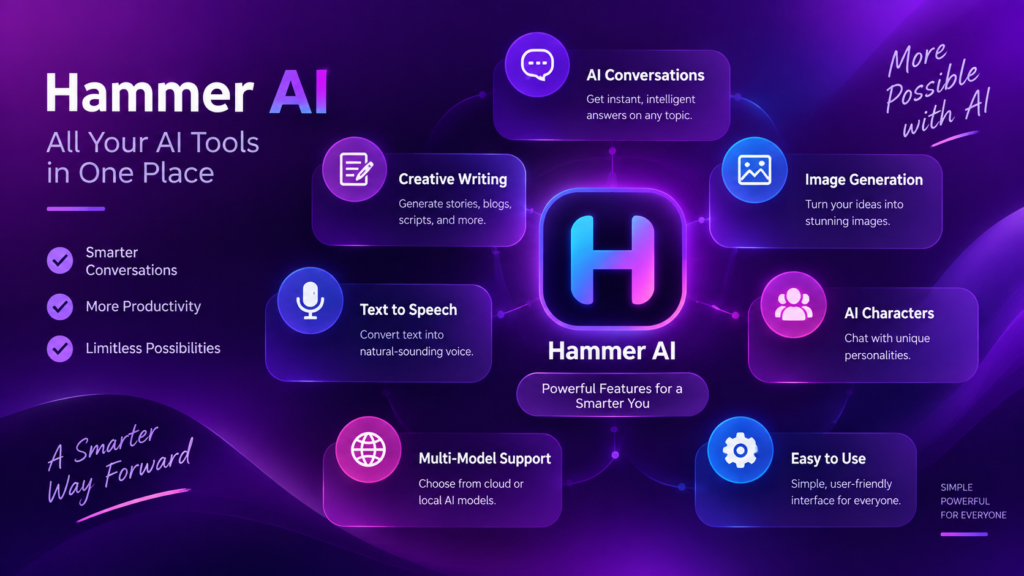
Hammer AI includes several features that make it useful for creative projects and AI exploration. Its character chat system allows users to interact with fictional personalities and develop ongoing conversations. Users can also create custom characters and define their behavior, interests, and background. Group chats provide another option for exploring conversations involving multiple characters. The platform also includes lorebooks and personas, which help organize story details and character information. These tools can be useful for writers who want to maintain consistent settings while developing longer fictional projects.
Another useful feature is the availability of different language models. Users can explore cloud-based options or run compatible local models through the desktop application. The platform also provides image generation and text-to-speech features through selected paid plans. These additions can help users create visual ideas, experiment with voices, and expand storytelling projects. However, not every feature is available on every plan. Before choosing a subscription, users should compare the current limits, supported models, and credit requirements.
Hammer AI for Creative Writing
Hammer AI can help writers develop ideas, characters, and fictional scenes. For example, a beginner writing a mystery story can ask an AI character to act as a detective. The writer can then explore possible clues, questions, and plot developments through conversation. This approach can make brainstorming more interactive and enjoyable. The platform can also help users experiment with dialogue, settings, and character motivations. However, writers should treat AI suggestions as starting points rather than finished creative work.
The platform may also support longer creative projects through lorebooks and character information. These features can help users organize important details, such as a character’s history or a fictional world’s rules. A writer could create a fantasy setting and use the same background information across multiple conversations. This can reduce repeated explanations and improve consistency. Still, AI models may forget details or produce conflicting responses. Writers should review important information and maintain their own notes for larger projects.
Hammer AI for Learning and Productivity
Hammer AI can be useful for learning through interactive questions and explanations. A student could create a fictional teacher character and ask for help understanding a difficult topic. The conversation format may encourage follow-up questions and make learning feel less formal. Users can also ask for writing ideas, simple explanations, or practice conversations. However, AI responses may contain mistakes, so important academic information should be checked against reliable educational materials.
The platform can also support everyday productivity tasks, such as brainstorming, drafting messages, and organizing ideas. A user planning a blog post might ask an AI character to suggest topics or improve a rough outline. Someone learning a language could practice simple conversations with a selected character. These uses can save time during early planning stages. However, Hammer AI should not replace careful research, professional advice, or human judgment when accuracy matters.
Hammer AI Privacy and Security
Privacy is one of the important reasons some users choose local AI applications. When compatible local models run on a desktop computer, conversations can remain on that device instead of being sent to a remote server. This may reduce exposure to online services and allow offline use. However, local privacy also depends on the user’s computer security. Strong passwords, updated software, and careful file management remain important. Running AI locally does not automatically protect a device from every security risk.
Cloud-based conversations work differently because messages are processed by remote servers. Users should review the platform’s privacy information and avoid sharing passwords, financial details, or other sensitive personal information. It is also important to understand whether a chosen feature requires an account or subscription. Beginners should compare local and cloud options before deciding how to use the service. A privacy-focused approach means understanding the technology rather than assuming every AI conversation is completely private.
Hammer AI Pricing and Subscription Plans
Hammer AI offers a free option for chatting with local models and selected cloud models. The free plan is suitable for beginners who want to explore the platform without paying immediately. Paid plans provide additional access to cloud models, larger conversation context, and premium creative features. These plans may also include monthly credits for image generation and text-to-speech. Since service limits and pricing can change, users should check the current plan details before purchasing a subscription.
The platform provides several paid options for users who need more features. The Starter plan is listed at $9 per month, while Advanced costs $18 per month and Ultimate costs $35 per month. These plans offer different credit allowances, model access, and context sizes. One-time credit packs are also available for selected features. The best option depends on how frequently you use image generation, text-to-speech, and cloud models. Beginners should start with the free option and upgrade only when they understand their needs.
Hammer AI Pricing Comparison Chart
| Plan | Monthly Price | Main Benefits |
|---|---|---|
| Free | $0 | Local models, selected cloud models, basic AI chat |
| Starter | $9 | More cloud models, larger context, monthly credits |
| Advanced | $18 | Additional models, more credits, larger context |
| Ultimate | $35 | Highest listed limits, more models, maximum context |
| Credit Packs | From $1.99 | Additional image and text-to-speech credits |
Prices and features are based on the listed plans and may change.
How Beginners Can Start Using Hammer AI
Getting started with Hammer AI is relatively simple. Begin by choosing the platform that suits your device. The web version is convenient for quick access, while the desktop application provides local model options. If you want to experiment with offline AI, check your computer’s memory and storage before downloading a model. Start with a small project, such as creating a fictional character or asking for writing ideas. This helps you understand the interface without becoming overwhelmed by advanced settings.
Once you are comfortable, try creating a character with clear instructions. Give the character a name, personality, background, and purpose. For example, you could create a friendly writing assistant that helps develop short stories. Ask focused questions and provide useful context when needed. If you use local models, test different models to compare their responses. Keep your expectations realistic because performance depends on the selected model and your hardware.
Common Mistakes When Using Hammer AI
One common mistake is expecting every AI model to produce perfect answers. Different models have different strengths, and some may struggle with detailed instructions or long conversations. Users may also assume that a character will remember every detail forever. In reality, memory and context can vary depending on the model and platform settings. To improve results, provide clear instructions and repeat important details when necessary. Reviewing generated content is especially important when accuracy or consistency matters.
Another mistake is choosing a paid plan without understanding its limits. Some features use monthly credits, while others depend on the selected model or subscription. Users should compare their expected usage with the available allowances. It is also unwise to share sensitive information simply because a platform appears private. Local models can improve privacy, but users still need to protect their devices. Careful setup and realistic expectations can make the experience more useful.
Future Opportunities With Hammer AI
Hammer AI may interest users who want to explore the growing world of personalized AI. Character-based conversations can support creative writing, entertainment, and interactive storytelling. Local models also give users more opportunities to experiment with AI without depending entirely on cloud services. As hardware improves and language models become more capable, local AI may become easier for more people to use. However, future improvements should not be assumed until they are officially available.
For beginners, the most valuable opportunity is learning how AI tools work through practical experimentation. Users can explore prompts, compare models, and discover which features support their personal projects. Writers may find value in character development, while students may use interactive conversations for practice. The platform is not a guaranteed solution for every task, but it can be a useful addition to a wider collection of AI tools. Exploring carefully can help users decide whether it deserves a regular place in their workflow.
Frequently Asked Questions
What is this platform used for?
It is mainly used for AI character conversations, creative writing, storytelling, and interactive learning. Users can explore fictional personalities, develop story ideas, and practice conversations. Selected features also support image generation, text-to-speech, and local AI experimentation.
Is it free to use?
Yes, a free option is available for AI chat. Users can explore local models and selected cloud-based features without a paid subscription. Premium plans offer additional models, larger context windows, and creative tools for users who need more functionality.
Can Hammer AI work offline?
Yes, compatible local models can run offline through the desktop application. Cloud-based features require an internet connection. Offline performance depends on your computer’s memory, storage, and processing power. Users should check model requirements before downloading larger files.
Is it good for writing?
It can help writers brainstorm ideas, create fictional characters, develop dialogue, and explore story settings. Its interactive format makes creative planning more engaging. However, AI-generated content may contain mistakes or repetitive language, so writers should review and edit important work.
Which plan should beginners choose?
The free plan is a practical starting point for beginners who want to explore AI chat. After testing the platform, users can compare paid plans based on model access, conversation limits, and creative credits. Choose an upgrade only when additional features match your needs.
Conclusion
Hammer AI offers an accessible way to explore AI conversations, creative writing, and personalized storytelling. Its character system, local model support, and additional creative features make it useful for different types of users. Beginners can start with free AI chat and gradually explore more advanced options. Local models may provide greater privacy and offline access, while cloud models offer convenience and broader capabilities. However, users should understand the platform’s limitations, review important information, and compare subscription plans carefully. If you are interested in interactive AI, Hammer AI can be a practical platform to explore and discover how it fits your creative or learning goals.





















1 comment on “Hammer AI: Complete Guide to Features, Pricing, and Benefits”