


Codeium is an AI-powered coding assistant designed to help developers write, understand, and improve software more efficiently. It became popular for offering intelligent code completion, natural-language coding assistance, and support for multiple programming languages and development environments. Instead of manually writing every line, developers can use AI suggestions to complete functions, generate code, explain unfamiliar sections, and reduce repetitive programming tasks.
However, Codeium is also a name associated with an important change in the AI development industry. The company introduced Windsurf, an AI-powered development environment that expanded beyond traditional code completion. This evolution means that understanding Codeium requires looking at both its original coding assistant and the newer Windsurf ecosystem. This article explains what Codeium is, how its technology works, its major capabilities, practical applications, limitations, and what developers should know before choosing it.
What Is Codeium?
Codeium was an AI-powered coding assistant that helped developers write software with fewer repetitive tasks. It used generative AI to predict code, suggest completions, and respond to instructions written in natural language.
For example, a developer working on a Python application could begin writing a function that calculates the average of a list. The assistant might suggest the remaining code based on the function’s name, surrounding code, and programming context.
Codeium was designed to work within developers’ existing workflows rather than requiring everyone to adopt a completely new programming environment. Its extensions supported several development tools, including Visual Studio Code and JetBrains IDEs.
The product has since evolved through several branding changes. The company became Windsurf in 2025, and Cognition subsequently acquired the Windsurf business. On June 2, 2026, the Windsurf editor was renamed Devin Desktop. The original Codeium name is therefore primarily relevant when researching the tool’s history or looking for older tutorials.
OFFICIAL WEBSITE: Codeium
Codeium, Windsurf, and Devin Desktop: What’s the Difference?
These names refer to different stages in the evolution of the same product ecosystem.
| Name | What it refers to |
|---|---|
| Codeium | The original AI coding assistant, known for code completion and editor extensions |
| Windsurf | The successor brand that expanded into an AI-powered code editor |
| Devin Desktop | The current name of the desktop editor, developed under Cognition |
| Windsurf Plugins | The name used for the former Codeium extensions that integrate AI assistance into supported development environments |
The distinction matters because older articles may describe features, interfaces, or subscription plans that have changed. If you are researching Codeium today, check whether the information applies to the original assistant, a legacy extension, or the current desktop product.
How Does Codeium Work?
Codeium relied on AI models trained to recognize programming patterns and generate code. Like other AI coding assistants, it used the surrounding development context to produce suggestions that were more relevant than generic code snippets.
Understanding the basic process helps explain both its usefulness and its limitations.
Step 1: The Developer Writes Code
The process begins when a developer types code, opens a file, or starts implementing a function.
For example, a developer might write this Python function:
def calculate_total(prices):The assistant may predict the next lines based on the function name and available programming context.
A possible suggestion is:
def calculate_total(prices):
return sum(prices)
This is a simple illustrative example, not a claim about a specific recorded Codeium session.
Step 2: The AI Uses Available Context
A useful coding assistant needs more than the current word or line. It can use relevant context, such as nearby code, function names, imports, and established programming patterns, depending on the product and its configuration.
For example, if a project already uses a particular database library, a context-aware suggestion may be more appropriate than code that introduces an unrelated library.
However, context awareness has limits. An assistant may not understand every dependency, business rule, or architectural decision in a large project. The quality of its suggestions depends partly on which information is available to it.
Step 3: The Model Generates a Suggestion
A large language model, or LLM, generates a likely continuation or response based on the information provided to it.
This is a form of inference: the model processes its input and predicts an output. It does not automatically prove that the resulting code is correct.
For instance, a suggested database query may look reasonable but fail because a column has a different name or the database uses an unexpected data type.
Step 4: The Developer Reviews and Tests the Code
The developer decides whether to accept, modify, or reject the suggestion.
A sensible workflow includes:
- Review the generated code.
- Check whether it fits the project’s requirements.
- Run relevant tests.
- Inspect error messages and unexpected results.
- Review security implications before deploying the change.
This final step is essential. AI assistance can reduce repetitive work, but responsibility for the software still rests with the people building and maintaining it.
Main Features of the Original Codeium Assistant
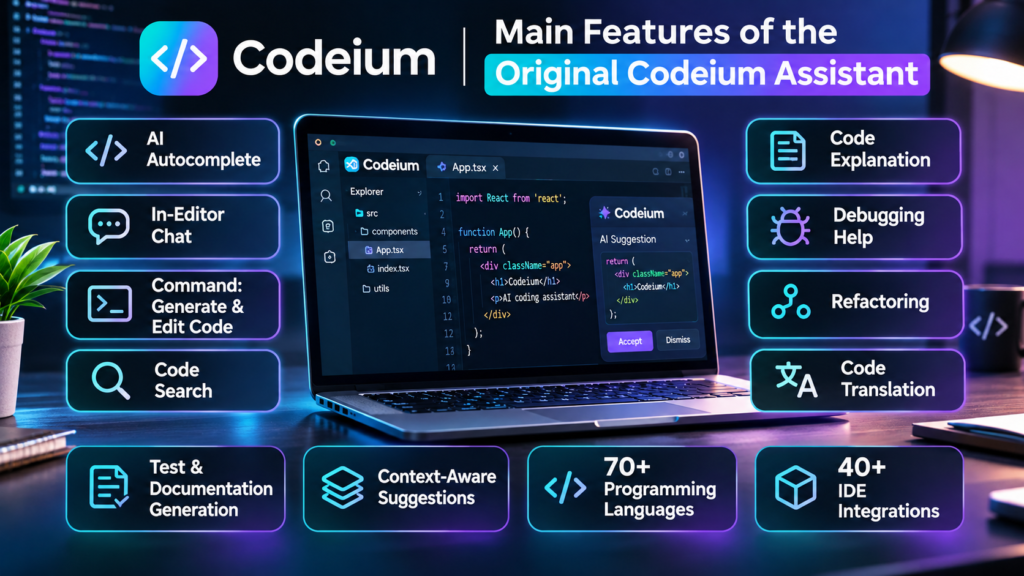
Codeium became known for bringing several AI-assisted programming capabilities into existing development environments. The exact features available depended on the extension, IDE, account, and product version.
AI Code Completion
Code completion was one of Codeium’s defining capabilities.
Instead of suggesting only a variable name or a single word, it could propose longer sections of code. Developers could review these suggestions and insert the parts they wanted.
This was particularly useful for repetitive programming patterns, such as:
- Writing similar functions across multiple files.
- Completing conditional statements and loops.
- Creating routine data transformations.
- Drafting basic unit tests.
- Writing repetitive setup or configuration code.
The benefit was not simply typing fewer characters. Good suggestions could also reduce the need to repeatedly look up familiar syntax.
However, generated code still required review, especially when implementing complex algorithms or handling sensitive data.
Natural-Language Coding Assistance
Codeium also offered in-editor chat and instruction-based coding features.
Developers could describe a task in ordinary language rather than manually writing every part of the implementation.
For example, a developer could ask for help understanding a function that processes customer orders. The assistant might explain its logic, identify possible edge cases, or suggest a clearer implementation.
A useful prompt would be:
Explain this function step by step. Identify how it handles empty input, invalid values, and unexpected errors.
This approach can be valuable when working with unfamiliar code, although the explanation should be checked against the actual implementation.
Code Explanation and Refactoring
Refactoring means improving the structure of existing code without intentionally changing its external behavior.
A developer might have a long function containing repeated conditions. An AI assistant could suggest extracting those conditions into smaller helper functions or simplifying the logic.
For example, a developer maintaining a website might ask the assistant to explain an existing form-validation function before modifying it.
This can make maintenance easier, but a cleaner-looking implementation is not automatically a better one. Refactoring should preserve expected behavior, and automated tests help verify that it does.
Support for Multiple Programming Languages and IDEs
Codeium’s original appeal included support for many programming languages and development environments. Its official 2024 announcement reported more than one million downloads across over 40 IDEs, demonstrating its early reach. That historical milestone should not be confused with current active users or present-day extension support.
The practical advantage was flexibility. Developers could explore AI-assisted coding without necessarily abandoning an editor they already understood.
Today, however, anyone choosing a legacy extension should verify its current maintenance status and compatibility before relying on it for daily development.
What Is the Difference Between Codeium and an AI Coding Agent?
One important development in AI programming is the move from tools that suggest code to systems that can carry out larger development tasks.
Traditional code completion mainly helps with the next piece of code. An AI coding agent can potentially work through several related steps, depending on its permissions and capabilities.
| Capability | Traditional AI code assistant | AI coding agent |
|---|---|---|
| Suggest code while typing | Core capability | May also be available |
| Explain existing code | Often supported | Often supported |
| Edit multiple files | Depends on the tool | Commonly supported |
| Plan a multi-step task | Limited or tool-dependent | A central use case |
| Run commands or tests | Depends on the integration | May be supported |
| Work without constant input | Generally limited | Possible within configured permissions |
| Require human review | Yes | Yes |
These are general distinctions rather than guarantees about every product.
From Code Completion to Agentic Development
The evolution from Codeium to Windsurf reflected a broader change in AI-assisted programming. Rather than focusing only on autocomplete, the Windsurf editor introduced agent-oriented workflows built around a system called Cascade.
The newer Devin Desktop product expands the experience around coordinating coding agents while retaining an integrated development environment. Its capabilities include managing agents, working with code, and reviewing changes.
Consider a developer who needs to add a password-reset feature to an existing application.
A traditional assistant might suggest the relevant function or explain how an email token works. An agent-oriented tool may be able to inspect the project, propose a plan, modify several files, and run tests when its tools and permissions allow.
That broader workflow can save time, but it also creates additional risks. A change affecting several files may introduce an unexpected dependency, modify the wrong component, or overlook a security requirement.
The more work an agent performs independently, the more important it becomes to review its plan, permissions, code changes, and test results.
Practical Uses of Codeium and Its Successor Tools
AI coding assistants are useful across several stages of software development. Their value depends on the task, the quality of the project context, and the developer’s ability to evaluate the output.
Building Website Features
A web developer can use AI assistance to draft HTML, CSS, JavaScript, or backend code.
For example, someone building a product website might request a responsive navigation menu or a form that validates required fields.
The assistant can provide a starting implementation, which the developer can then adapt to the site’s design and technical requirements.
For WordPress developers, AI coding tools may help with small PHP functions, CSS adjustments, JavaScript interactions, and debugging. However, generated code should be checked for compatibility with the active theme, plugins, and WordPress coding practices before being added to a live website.
Debugging Existing Applications
Debugging involves identifying and fixing the cause of a software problem.
Suppose an application crashes when a user submits an empty form. A developer can provide the relevant function and error message, then ask the assistant to identify likely causes.
A focused prompt might be:
Review this function and error message. Explain the likely cause, suggest the smallest safe fix, and identify tests that would confirm the solution.
This gives the assistant a clear task and encourages a verifiable answer.
Nevertheless, a plausible explanation is only a hypothesis until the developer reproduces the issue and tests the fix.
Writing Unit Tests
Unit tests check whether individual functions or components behave as expected.
AI assistants can help draft tests for normal inputs, empty values, invalid data, and boundary conditions.
For a function that calculates a shopping cart total, useful test cases might include:
- A cart containing one item.
- A cart containing multiple items.
- An empty cart.
- Items with different prices and quantities.
- Invalid or unexpected input values.
The developer must still determine the correct business rules. For example, whether an empty cart should return zero or raise an error depends on the application.
Learning an Unfamiliar Programming Language
Beginners can use coding assistants to understand syntax, compare programming approaches, and experiment with small examples.
A student learning JavaScript might ask how an array differs from an object or why an asynchronous function returns a promise.
The assistant can explain the concept and provide a sample program. The student should then run the example and modify it to see how the behavior changes.
This active approach is more useful than copying code without understanding it.
Maintaining Large Codebases
Established applications often contain code written by multiple developers over several years. Understanding why a function exists or how different components interact can take considerable time.
Context-aware coding tools may help developers locate relevant code, summarize functions, and explore potential changes.
However, large codebases can contain undocumented business rules, legacy behavior, and dependencies that are not obvious from the source code alone. AI-generated summaries should be treated as an aid to investigation, not a substitute for understanding the system.
Advantages of Codeium
The original Codeium assistant offered several practical advantages that explain why developers adopted it.
Reduced Repetitive Work
Autocomplete can reduce the effort involved in writing predictable code patterns. This is especially useful when implementing familiar structures or repetitive transformations.
The time saved varies by developer, language, task, and suggestion quality. It should not be assumed that every AI-assisted task will be faster.
Help Within the Existing Workflow
IDE integration allowed developers to use AI assistance without constantly switching between their editor and a separate website.
This can make it easier to request explanations or review suggestions while working on a particular file.
Support for Learning and Exploration
A developer can ask for an explanation of unfamiliar code, request alternative implementations, or explore how a programming concept works.
This is useful for beginners and experienced programmers alike, although the output should be checked against reliable documentation and actual program behavior.
Faster Initial Drafts
AI can produce a first draft of routine functions, test cases, comments, and configuration examples.
A first draft is not the same as production-ready software. Developers still need to consider maintainability, performance, security, and compatibility.
Potential Help With Legacy Code
When documentation is incomplete, an AI assistant may help explain existing functions and suggest areas to investigate.
This can make initial exploration easier, but the tool may miss dependencies or incorrectly infer the purpose of old code.
Limitations and Risks You Should Understand
AI coding tools can be helpful, but they introduce technical and operational risks that developers should understand before using them on important projects.
AI-Generated Code Can Be Incorrect
A model can generate code that looks convincing but contains logical errors, incorrect assumptions, or nonexistent API methods.
For example, an assistant might suggest a database query that works for one schema but fails in another.
How to reduce the risk: Run tests, consult official documentation, inspect edge cases, and review the implementation before deployment.
Security Vulnerabilities
Generated code may contain insecure input handling, weak authorization checks, unsafe file operations, or other vulnerabilities.
This is particularly important for authentication systems, payment processing, user permissions, and applications that handle private information.
How to reduce the risk: Use code review, automated security checks, dependency scanning, and established secure-development practices. Never assume that generated code is secure simply because it compiles.
Limited Understanding of Project Requirements
An AI assistant may interpret a request differently from the developer.
For example, a request to make a checkout process faster does not automatically authorize removing validation steps or changing payment behavior.
How to reduce the risk: Explain the expected behavior, identify constraints, and review proposed changes before applying them.
Privacy and Intellectual Property
Developers should understand what information a coding tool sends to its services and how that information is handled.
Source code may contain API keys, passwords, customer information, proprietary algorithms, or confidential business logic. Sending such information to an external service without authorization can create serious problems.
Before using an AI coding assistant for commercial work, review its current privacy policy, data-retention rules, model-training practices, and enterprise controls. These terms can vary by product and subscription.
Legacy Extensions May Differ From Current Products
Codeium tutorials written several years ago may show outdated menus, installation steps, pricing, or features.
The product’s rebranding also means that a guide for the original Codeium extension may not describe the current desktop editor.
Before installing a tool or paying for a subscription, confirm the current product name, supported environment, maintenance status, and official documentation.
AI Can Encourage Overreliance
Accepting suggestions without understanding them can leave developers unable to maintain or debug their own applications.
This is particularly risky for beginners who use AI to complete assignments or build projects without learning the underlying concepts.
The better approach is to use AI as a programming partner: ask questions, inspect the output, run experiments, and make sure you understand the final implementation.
Codeium Pricing and Availability in 2026
One of the reasons Codeium attracted attention was its free AI-powered coding assistance. However, its original pricing and availability should not be confused with the current plans offered by its successor products.
As of November 2026, the original Codeium brand has been retired, and the desktop product is known as Devin Desktop. Its pricing structure includes the following plans:
| Plan | Listed price | General purpose |
|---|---|---|
| Free | $0 | Trying the product and using its available free features |
| Pro | $20 per month | Individual developers who need more extensive access |
| Max | $200 per month | Individual developers with higher usage requirements |
| Teams | $80 per month plus $40 per full seat | Teams coordinating development work |
These prices may change. Features, usage limits, and model availability depend on the applicable plan and current terms.
Is Codeium Still Free?
The original Codeium experience is no longer available as a standalone product under that name. The current ecosystem has different plans and usage arrangements.
Developers should therefore avoid relying on old articles that describe unlimited free access without checking the current terms.
If your primary requirement is free code completion, compare the available free features of current tools rather than assuming that the original Codeium offer remains unchanged.
Is Codeium Suitable for Professional Developers?
Professional developers may benefit from AI assistance when writing tests, understanding unfamiliar code, or completing repetitive tasks. However, suitability depends on more than price.
Before selecting a product for professional use, consider:
- IDE compatibility: Does it work with your preferred development environment?
- Usage limits: Will the available quota support your workload?
- Privacy: Are its data-handling practices compatible with your organization?
- Code quality: Does it generate useful suggestions for your language and framework?
- Team controls: Can administrators manage permissions and access appropriately?
- Maintenance: Is the specific extension or application actively supported?
For businesses, these considerations are often more important than the number of features advertised on a product page.
Codeium Alternatives Worth Considering
Because Codeium has evolved into a different product ecosystem, developers searching for an AI coding assistant should evaluate current alternatives based on their actual workflow.
Three relevant options are GitHub Copilot, Cursor, and Claude Code.
GitHub Copilot
GitHub Copilot is an AI coding tool that provides code suggestions and other development assistance.
It is worth considering if you want AI support integrated into an established development workflow without necessarily moving to a completely different editor.
Developers should check its current supported environments, available features, and subscription terms before choosing a plan.
Cursor
Cursor is an AI-focused code editor designed to help developers work with code through suggestions, natural-language instructions, and broader codebase interactions.
It may suit developers who want an editor built around AI-assisted programming rather than relying exclusively on a conventional IDE extension.
Its suitability depends on the developer’s preferred workflow, project requirements, and budget.
Claude Code
Claude Code is an AI coding agent from Anthropic that can work with codebases through supported development interfaces, including the terminal.
It is worth evaluating if you want assistance with multi-step programming tasks, code analysis, and changes that extend beyond a single autocomplete suggestion.
Its available capabilities depend on the environment, permissions, and applicable subscription or usage arrangements.
Which Alternative Should You Choose?
| Your requirement | Option to evaluate |
|---|---|
| AI assistance within an established development workflow | GitHub Copilot |
| An editor designed around AI-assisted development | Cursor |
| An agent-oriented workflow through the terminal | Claude Code |
| Continuing with the Codeium product lineage | Devin Desktop or the applicable Windsurf Plugin |
These recommendations are starting points, not a universal ranking. Test each tool with a small project similar to your real work before committing to a paid plan.
How to Get Better Results From AI Coding Assistants
The quality of AI-generated code depends partly on how clearly you describe the task and how carefully you evaluate the result.
A vague instruction such as “fix my website” gives the assistant little information about the problem, the desired outcome, or the constraints it must respect.
A more effective prompt describes the issue, relevant technology, expected behavior, and acceptable changes.
Write Specific Prompts
For example, a developer maintaining a WordPress website could use this instruction:
Review this WordPress PHP function. Identify why it returns an empty value. Explain the likely cause, suggest a minimal correction, and check whether the solution follows WordPress coding practices. Do not modify unrelated functionality.
This prompt defines the task and limits unnecessary changes.
Provide Relevant Context
When troubleshooting, include the information needed to understand the issue, such as:
- The relevant function or code section.
- The exact error message.
- The expected result.
- The actual result.
- The programming language and framework version.
- Any relevant constraints or dependencies.
Remove passwords, API keys, personal information, and confidential data before sharing code with an external service.
Ask for Tests Alongside the Solution
A useful prompt should request verification steps, not just a code snippet.
For example:
Suggest a fix and provide test cases for normal input, empty input, invalid values, and unexpected errors. Explain how I can confirm that the original problem is resolved.
This encourages a more complete response and makes it easier to identify mistakes.
Review Every Important Change
For a small styling adjustment, visual inspection may be sufficient as an initial check. For changes to authentication, databases, payments, or user permissions, more extensive testing and security review are necessary.
When using an AI agent that can edit files or run commands, review its permissions before starting and inspect the resulting changes before merging or deploying them.
The goal is not to avoid AI assistance. It is to make AI-generated work easier to verify, maintain, and trust.
Frequently Asked Questions
1. What is Codeium used for?
Codeium was used for AI-powered code completion, code explanations, and natural-language programming assistance. It helped developers write, understand, and modify code within supported development environments.
2. Is Codeium still available in 2026?
The standalone Codeium brand has been retired. Its product lineage continued through Windsurf, and the desktop editor was subsequently renamed Devin Desktop. Related legacy extensions use the Windsurf Plugins name.
3. Is Codeium the same as Windsurf?
Codeium was the original AI coding assistant. Windsurf became the successor brand and introduced an AI-focused editor. The desktop editor is now known as Devin Desktop, while the related legacy extensions retain the Windsurf Plugins name.
4. Is Codeium free to use?
The original Codeium offering should not be confused with current subscription plans. Devin Desktop offers a free plan, but its features and usage limits differ from historical Codeium offerings.
5. Can Codeium write code automatically?
The original assistant could suggest code and generate programming responses from natural-language instructions. More advanced successor tools can support broader coding workflows, depending on the product, permissions, and available features.
6. Is Codeium suitable for beginners?
Yes, AI coding assistants can help beginners understand programming concepts, explore examples, and troubleshoot errors. However, beginners should test suggestions and learn why the code works instead of copying it without understanding.
7. Is Codeium better than GitHub Copilot?
Neither is universally better. Codeium’s original product is now historical, so a meaningful comparison should evaluate current tools such as Devin Desktop and GitHub Copilot against your preferred editor, programming language, budget, and security requirements.
Conclusion
Codeium played an important role in making AI-assisted programming accessible to developers through code completion, natural-language instructions, and IDE integration. Its history also illustrates how quickly AI development tools are changing, from simple autocomplete extensions to environments designed to support larger, multi-step coding tasks.
For anyone researching Codeium today, the most important point is to distinguish its original capabilities from those of its successors. Windsurf expanded the product into an AI-focused editor, and that editor subsequently became Devin Desktop under Cognition. Older tutorials may still explain useful concepts, but their installation instructions, pricing, and feature descriptions may no longer be current.
If you are choosing an AI coding tool, start with your actual development needs. Compare compatibility, privacy, cost, and code quality, then test the tool on a small project. AI can accelerate development, but careful review, testing, and sound programming knowledge remain essential.










1 comment on “Codeium: Everything You Need to Know About the AI Coding Assistant”