

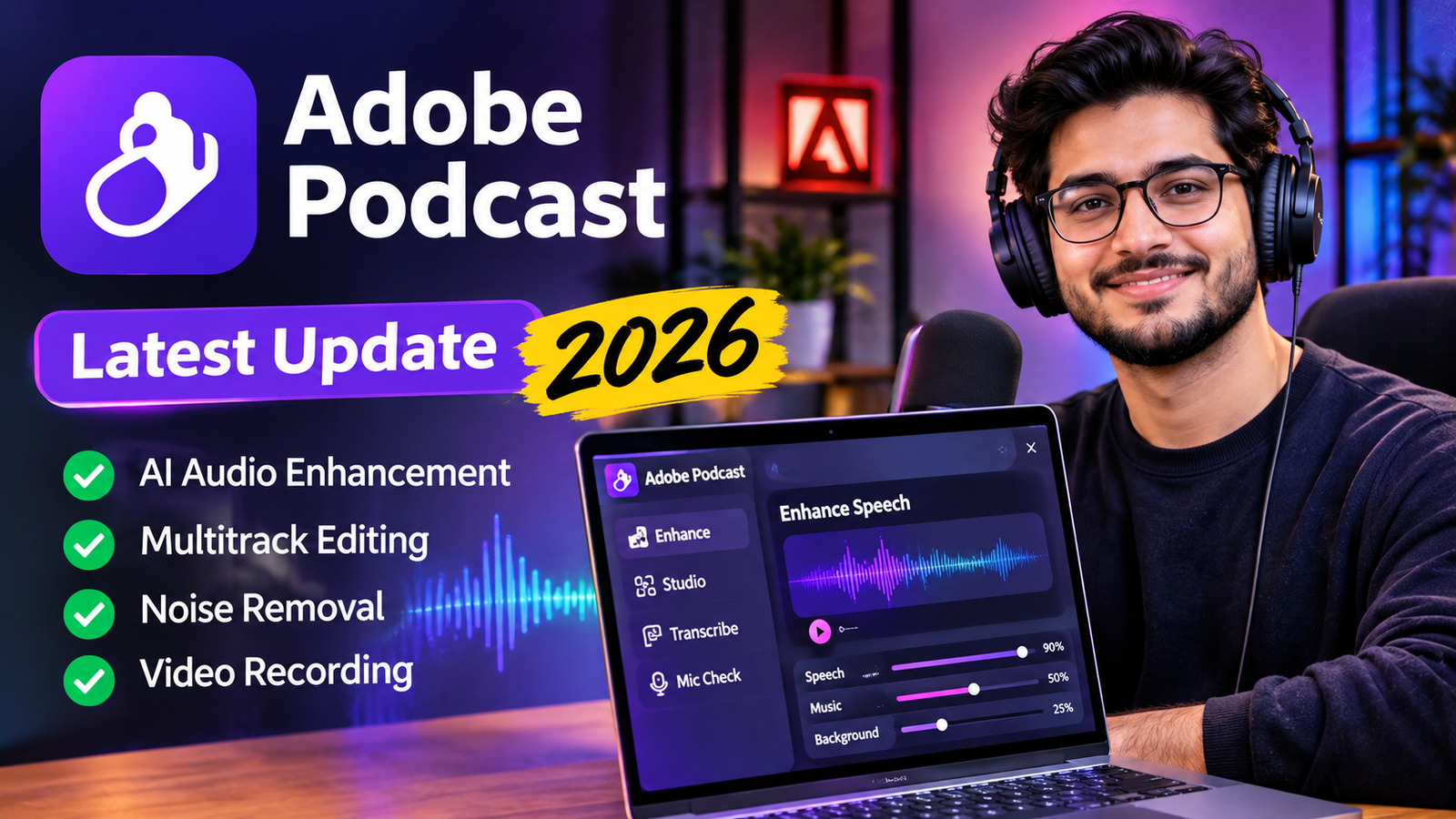
Adobe Podcast is an AI-powered audio recording and editing platform designed to help creators produce clearer, more professional-sounding audio without complicated recording equipment or advanced editing skills. It works directly in a web browser and combines artificial intelligence with practical podcast production tools.
The platform has become more capable than a simple background noise remover. Users can record remote interviews, edit audio through transcripts, improve speech quality, remove distracting sounds, and prepare content for video and social media. In March 2026, Adobe introduced important improvements, including advanced sound separation and multitrack importing in Podcast Studio. These changes give creators more control over individual audio elements and multi-speaker recordings. This guide explores what Adobe Podcast offers, how its latest features work, which tools are free, and where its limitations matter.
What Is Adobe Podcast?
Adobe Podcast is a browser-based audio production platform developed by Adobe. It uses AI to improve spoken audio, simplify editing, and make podcast recording more accessible.
Unlike traditional audio software that requires users to understand complex editing controls, Adobe Podcast focuses on voice-based workflows. Its tools are designed for podcasters, journalists, educators, marketers, content creators, and anyone who regularly records spoken content.
Its main capabilities include:
- Enhance Speech: Reduces background noise and echo while improving voice clarity.
- Podcast Studio: Records, edits, and organizes podcast projects.
- Transcription: Converts spoken words into editable text.
- Multitrack editing: Allows users to work with separate participant recordings.
- Mic Check: Uses AI to analyze microphone setup and recording conditions.
- Video tools: Supports spoken-audio enhancement and content preparation for video.
One important distinction is that Adobe Podcast is not a general-purpose AI chatbot or a tool for generating complete podcast conversations from simple text prompts. Its primary purpose is improving the recording, editing, and production of real spoken content.
What Is the Latest Adobe Podcast Update in 2026?
Latest major documented update: March 2026
Adobe’s March 5, 2026 update introduced several important improvements to its podcast production workflow. The biggest change was the expansion of Enhance Speech beyond basic voice cleanup.
1. Advanced Source Separation in Enhance Speech
One of the most important improvements is advanced source separation.
Previously, creators mainly used Enhance Speech to improve dialogue by reducing unwanted background sounds. The newer functionality provides separate controls for speech, background noise, and music.
This gives users greater flexibility when working with recordings containing multiple sound elements.
The updated workflow includes:
- Independent control over speech.
- Separate adjustment of background noise.
- Music volume control.
- The ability to download isolated audio stems.
An audio stem is an individual track containing one separated sound element. For example, a creator can export speech, music, and background noise separately rather than working with one combined recording.
This is particularly useful for video podcasters who record interviews with background music. They can adjust distracting music without necessarily changing the dialogue.
Adobe identifies advanced source separation as a Premium feature.
2. Multitrack Import in Podcast Studio
Another significant improvement is multitrack importing for audio and video recordings.
Remote podcast interviews often involve several participants recording separately. If all voices are combined into one audio file, editing individual speakers becomes difficult.
Adobe Podcast Studio now allows creators to upload separate audio and video files for participants and automatically synchronize them into one project.
The benefits include:
- Separate recordings for individual participants.
- Automatic synchronization across tracks.
- A unified transcript.
- Independent editing for each speaker.
- Better control over individual recording problems.
For example, imagine recording a three-person interview through Zoom. One participant has background noise, while another speaks too quietly. With separate tracks, the creator can work on each participant’s recording without applying the same changes to the entire conversation.
This is a meaningful improvement for interview-based podcasts, remote discussions, and video production.
3. Improved Video and Audio Workflows
Adobe has also expanded its focus beyond traditional audio-only podcasting.
The current platform supports several spoken-content workflows, including:
- Enhancing video and audio recordings.
- Transcribing spoken content.
- Editing audio and video projects.
- Adding captions to videos.
- Removing background music.
- Converting audio into shareable video formats.
Premium Enhance Speech supports video formats such as MP4 and MOV. This makes the platform useful for creators who publish interviews and educational videos alongside traditional podcast episodes.
These developments show that Adobe Podcast is increasingly positioned as a broader spoken-content production platform rather than just an audio cleanup service.
How Does Adobe Podcast Work?
Adobe Podcast uses machine learning and AI-based audio processing to improve spoken recordings. Instead of requiring users to manually adjust multiple audio filters, it automates several common production tasks.
The exact processing architecture and model details are not fully disclosed publicly, so it is better to describe its capabilities rather than assume a particular AI model is responsible for every feature.
Step 1: Upload or Record Audio
Users can upload an existing recording or start a new project in Podcast Studio.
Supported workflows include:
- Recording a solo podcast.
- Recording interviews with remote guests.
- Importing existing audio and video.
- Working with separate participant recordings.
Step 2: AI Analyzes the Recording
Enhance Speech processes spoken audio to improve clarity and reduce unwanted sound.
Depending on the recording, the processing can help with:
- Background noise.
- Echo and room reverberation.
- Inconsistent voice levels.
- Distracting background sounds.
Step 3: Edit Through Transcription
Adobe Podcast Studio converts spoken words into text. Users can then edit their recordings by changing the transcript.
For example, if a speaker repeats a sentence or uses unnecessary filler words, the creator can remove the corresponding text rather than manually locating the exact moment in an audio timeline.
This is called text-based audio editing.
Step 4: Export the Finished Content
After editing, users can download their recordings, transcripts, and supported project outputs.
Depending on the plan and workflow, creators can also export individual speaker recordings and create audiograms for social media.
Main Features of Adobe Podcast in 2026
Adobe Podcast includes several tools for different stages of audio production.
Enhance Speech

Enhance Speech is one of the platform’s best-known features. It uses AI to make spoken recordings clearer by reducing unwanted noise and improving voice quality.
It is particularly useful when someone records audio using a laptop microphone, smartphone, or an imperfect recording setup.
However, enhancement does not guarantee that every recording will sound professional. Extremely distorted audio, overlapping conversations, and very unclear speech can still produce disappointing results.
Podcast Studio
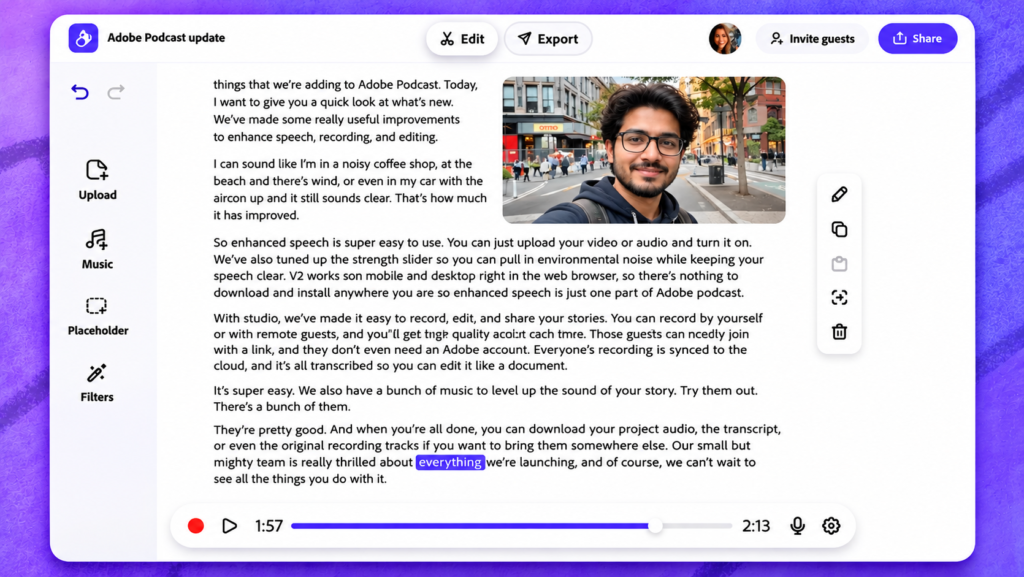
Podcast Studio brings recording and editing tools together in one browser-based workspace.
Its main capabilities include:
- Solo and remote recording.
- Separate participant audio tracks.
- Optional video recording.
- Automatic transcription.
- Text-based editing.
- Multitrack importing.
- Project sharing and collaboration workflows.
Mic Check
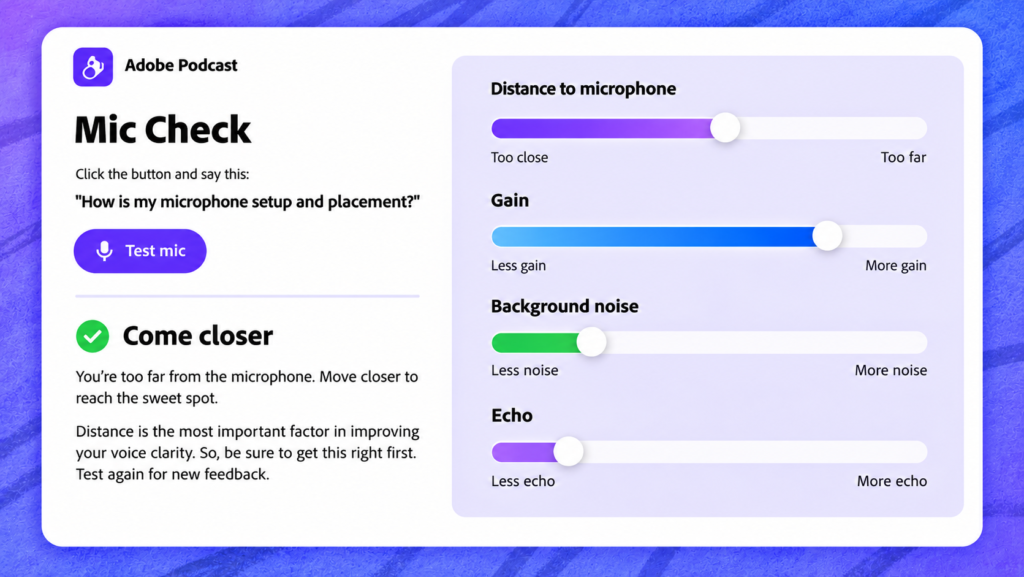
Mic Check analyzes a user’s microphone setup and provides feedback intended to improve recording quality.
This is helpful before starting an interview or podcast episode because microphone placement and recording conditions can influence the final sound.
For example, a microphone placed too far from the speaker may capture more room noise. Checking the setup before recording can help avoid problems that are harder to fix afterward.
Transcription and Speaker Detection
Adobe Podcast can convert audio and video speech into text.
Its speaker detection functionality, also called speaker diarization, identifies different speakers and labels their contributions in a transcript.
This can be useful for:
- Interview transcription.
- Meeting recordings.
- Educational lectures.
- Multi-person discussions.
- Podcast editing.
Audiograms and Captions
Audiograms turn podcast audio into short, shareable videos that can be used on social media.
Creators can use these formats to promote longer episodes without producing an entirely separate video.
Premium features include customizable audiogram themes, captions, and custom backgrounds.
Who Should Use Adobe Podcast?
Adobe Podcast is suitable for people who regularly create spoken content and want a simpler production process.
| User type | Practical use |
|---|---|
| Podcasters | Record and edit episodes |
| YouTubers | Improve spoken audio in videos |
| Students | Clean up lecture recordings |
| Teachers | Prepare clearer educational recordings |
| Journalists | Transcribe and edit interviews |
| Marketers | Produce voiceovers and promotional content |
| Businesses | Record interviews and discussions |
| Freelancers | Prepare professional voice recordings |
Example: A YouTube Creator
Imagine a YouTube creator recording an educational video at home. A nearby fan produces background noise, making the narration difficult to hear.
The creator can upload the recording to Enhance Speech, process the spoken audio, and compare the result with the original.
If the video also contains background music, Premium source separation provides additional control over the music and speech.
Example: A Remote Podcast Interview
A podcast host interviews two guests who are recording from different locations.
Instead of combining everything into one audio file, the host can work with separate recordings in Podcast Studio. This makes it easier to adjust individual voices, remove unnecessary sections, and prepare a cleaner final episode.
These are practical examples of how the documented features can be used, not claims about specific customers.
Adobe Podcast Free vs Premium: What Is the Difference?
Adobe offers a free version with useful recording and enhancement tools. However, users who need longer recordings, batch processing, video enhancement, or more advanced editing options may benefit from Premium.
Adobe’s current product pages associate Podcast Premium access with its Adobe Firefly Pro plan. The exact subscription cost can depend on region and billing arrangements.
| Feature | Free plan | Premium |
|---|---|---|
| Enhance Speech | Yes | Yes |
| Video enhancement | No | Yes |
| Bulk enhancement | No | Yes |
| Enhancement strength adjustment | No | Yes |
| Maximum file size | 500 MB | 1 GB |
| Daily enhancement allowance | 1 hour | 4 hours |
| Studio project downloads | 2 per day | Unlimited |
| Original speaker-separated recordings | Limited | Available |
| Advanced sound separation | Limited | Available |
| Custom audiogram themes | No | Yes |
Plan details reflect Adobe’s published feature comparison. Individual limits and availability should be checked before subscribing.
Is the Free Version Enough?
For beginners, the free version can be a good starting point.
It is particularly useful if you:
- Record short voiceovers.
- Want to remove basic background noise.
- Occasionally edit podcast recordings.
- Need to test AI audio enhancement before paying.
Premium becomes more relevant when you regularly produce longer episodes, work with video, process multiple files, or need separate audio stems.
Advantages of Adobe Podcast
There are several reasons creators may choose Adobe Podcast over traditional audio editing workflows.
1. Easy to use: Its browser-based interface makes audio production accessible to beginners.
2. AI-powered cleanup: Enhance Speech can improve recordings without requiring extensive manual noise reduction.
3. Text-based editing: Editing through transcripts can save time when removing unwanted speech.
4. Remote recording: Separate participant tracks provide more flexibility when recording interviews.
5. Audio and video support: Creators can work with spoken content across different media formats.
6. Useful free tools: Beginners can explore several features without immediately purchasing a subscription.
7. Integration with the Adobe ecosystem: Its workflows can complement other Adobe creative products.
Limitations and Things to Consider
Although Adobe Podcast is useful, it is not a replacement for every professional audio production tool.
AI Enhancement Can Change Natural Voices
Strong noise reduction can sometimes make voices sound artificial or overly processed. Creators should compare enhanced audio with the original and avoid assuming that maximum enhancement always produces the best result.
It Cannot Repair Every Recording Problem
If someone records with a damaged microphone, extremely low volume, severe clipping, or overlapping speech, AI processing may not fully recover the original sound.
Free Plan Restrictions
The free version has daily usage and project download limits. These restrictions can become inconvenient for creators producing content regularly.
Browser and Internet Requirements
Adobe Podcast is a web-based service, so a compatible browser and reliable internet connection are important. Microphone permissions, browser updates, extensions, and network settings can also affect recording performance.
It Is Not a Complete Professional Audio Workstation
Users who need detailed equalization, advanced compression, complex sound design, or extensive mixing may still prefer dedicated audio editing software.
Adobe Podcast Alternatives
Adobe Podcast is not the only option for recording and improving spoken audio. Several other applications serve similar audiences, although their workflows and capabilities differ.
1. Audacity
Audacity is a free, open-source audio editor suitable for recording, cutting, mixing, and applying audio effects. It offers more manual editing control.
2. Descript
Descript is an editing platform that combines transcription with text-based audio and video editing. It is useful for creators producing interviews and video podcasts.
3. Riverside
Riverside is a remote recording platform designed for interviews, podcasts, and video conversations.
4. Adobe Audition
Adobe Audition is professional audio editing software offering detailed control over recording, mixing, noise reduction, and sound production.
Which Alternative Should You Choose?
- Choose Adobe Podcast for accessible AI-powered speech enhancement and straightforward podcast workflows.
- Choose Audacity for free, hands-on audio editing.
- Choose Descript for transcript-based editing across audio and video.
- Choose Riverside for remote podcast recording.
- Choose Adobe Audition for more advanced audio production.
The right choice depends on whether your main priority is simplicity, recording quality, detailed editing, or a complete production workflow.
Adobe Podcast vs Adobe Acrobat’s AI Podcast Feature
There is one important distinction worth understanding because the two products have similar names.
Adobe Podcast is designed to record, enhance, transcribe, and edit spoken content.
Adobe Acrobat’s Generate Podcast feature is different. It uses AI to turn documents inside PDF Spaces into conversational audio summaries.
Adobe’s August 2026 documentation describes options for generating shorter highlights or longer, more detailed audio discussions from documents. The feature is available through supported Acrobat desktop, web, and mobile experiences.
This distinction matters when searching for Adobe’s AI podcast technology. One product helps creators produce podcasts, while the other helps people listen to information contained in documents.
Frequently Asked Questions About Adobe Podcast
1. Is Adobe Podcast free?
Yes. Adobe offers a free plan with access to Enhance Speech, Podcast Studio, and Mic Check, although daily usage and download limits apply.
2. Does Adobe Podcast use artificial intelligence?
Yes. It uses AI-based audio processing for speech enhancement, transcription, speaker detection, and other audio production tasks.
3. Can Adobe Podcast remove background noise?
Yes. Enhance Speech can reduce background noise, echo, and other unwanted sounds to improve spoken audio.
4. Does Adobe Podcast work with video?
Yes. Premium Enhance Speech supports video enhancement, and Podcast Studio offers video recording and editing workflows.
5. Can I use Adobe Podcast without a microphone?
You can upload existing recordings without owning a dedicated microphone. However, you still need a recording device or another source of audio.
6. Is Adobe Podcast good for beginners?
Yes. Its browser-based tools and automated enhancement features make it accessible to people without advanced audio editing experience.
7. What is the latest Adobe Podcast update?
Adobe’s latest major documented feature update in the official release guide is from March 5, 2026. It introduced advanced source separation, video recording capabilities, and multitrack audio and video importing.
Conclusion
Adobe Podcast has developed into a useful AI-powered platform for people who want to create clearer, more professional spoken content without learning complicated audio production techniques. Its March 2026 improvements are particularly important because they introduce more control over individual sound elements, remote video recording, and multitrack editing.
The free version is a practical starting point for beginners, while Premium offers additional flexibility for regular creators and professional workflows. However, AI enhancement should not be treated as a substitute for good recording practices. A suitable microphone, a quiet environment, and clear speech still make a significant difference.
For podcasters, educators, journalists, and video creators, Adobe Podcast is worth exploring, especially if simplicity and efficient audio cleanup are priorities.








1 comment on “Adobe Podcast: Latest Features, Updates, and Complete Guide (2026)”