


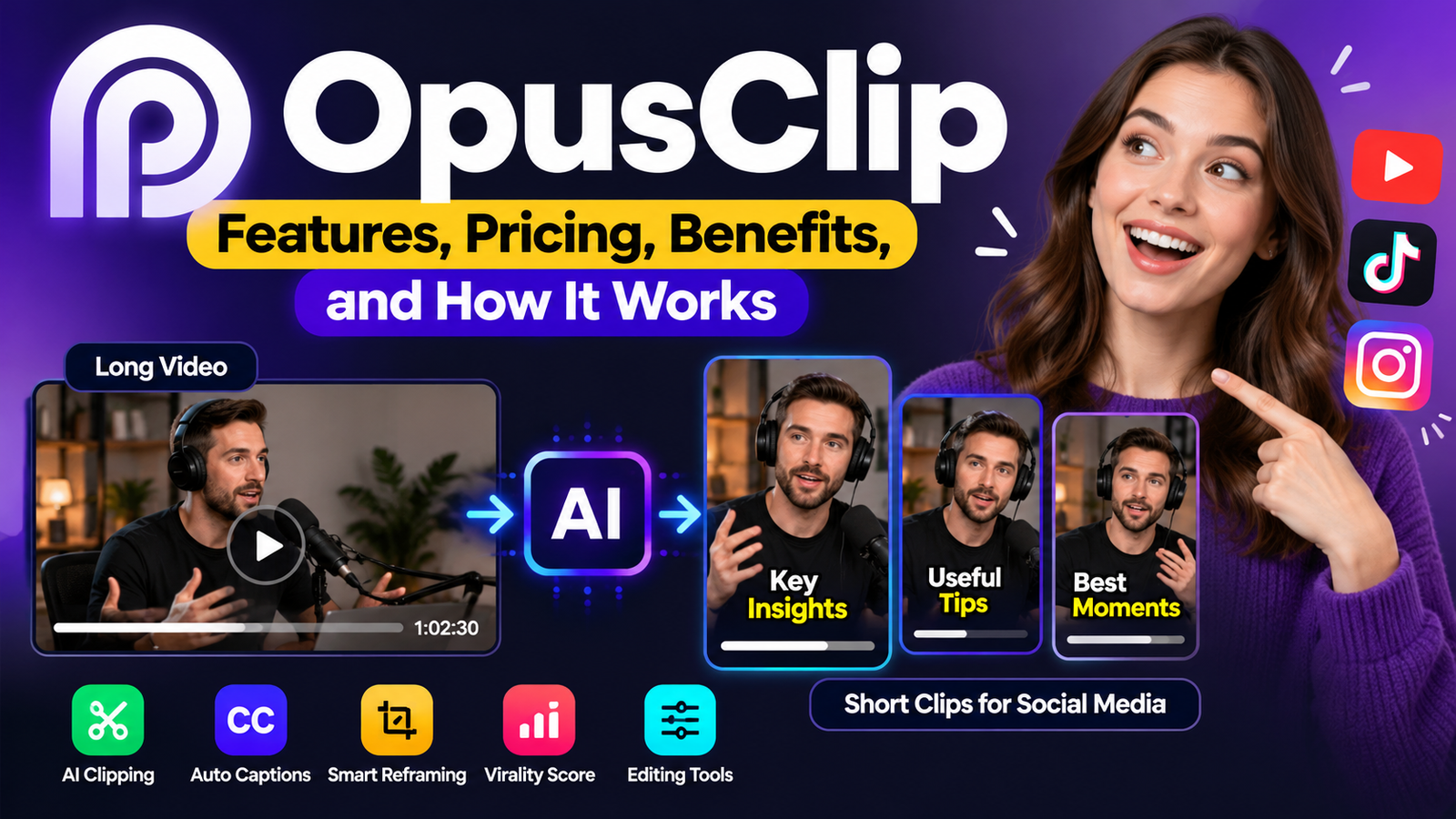
Opus Clips, commonly known as OpusClip, is an AI-powered video editing platform that helps creators turn long videos into shorter clips for social media. Instead of manually watching an entire podcast, interview, webinar, or video presentation to find interesting moments, users can let the software identify potential highlights and prepare them for platforms such as YouTube Shorts, TikTok, and Instagram Reels.
The platform combines AI-powered clip selection, automatic captions, video reframing, and editing tools to simplify the process of repurposing existing content. It is particularly useful for podcasters, YouTubers, digital marketers, educators, and businesses that want to produce more short-form videos without editing every clip from scratch.
However, automation does not guarantee quality or viral success. An AI-generated clip can miss important context, select an awkward starting point, or display captions incorrectly. Understanding how OpusClip works, what its features actually do, and where human editing remains necessary will help you decide whether it fits your content strategy.
This guide explains its main features, workflow, pricing structure, advantages, limitations, and practical alternatives so you can make an informed decision.
What Is OpusClip?
OpusClip is a browser-based video editing tool designed to transform long-form videos into shorter, social-media-ready clips. Its primary purpose is to reduce the time creators spend searching for highlights, cutting footage, resizing videos, and preparing captions.
The platform uses AI to analyze video content and identify moments that may work well as standalone clips. Depending on the available features and subscription plan, it can also generate animated captions, adjust the video layout, remove unnecessary pauses, and help prepare content for publication.
For example, imagine a creator has recorded a 60-minute podcast about personal finance. Instead of watching the entire recording and manually marking every useful moment, the creator can upload the video to OpusClip and let the platform suggest several shorter segments.
Each suggested clip can then be reviewed, edited, and exported individually.
Who Is OpusClip Designed For?
The platform can be useful for several types of users:
- YouTubers: Repurpose long videos into YouTube Shorts.
- Podcasters: Extract memorable discussions, explanations, and opinions.
- Digital marketers: Turn webinars and product demonstrations into promotional clips.
- Businesses: Create short educational videos from presentations and recorded meetings.
- Online educators: Break longer lessons into smaller learning segments.
- Social media managers: Prepare short-form content for multiple platforms.
- Content agencies: Streamline video editing across several clients.
OpusClip is particularly valuable when someone already produces long-form video content but struggles to publish short videos consistently.
Its main purpose is not to replace every part of professional video editing. Instead, it automates repetitive tasks so creators can concentrate on storytelling, accuracy, and audience engagement.
How Does OpusClip Work?
OpusClip combines automated video analysis with editing tools. Although the exact processing pipeline is proprietary, its user-facing workflow can be understood through several practical stages.
1. Upload or Import a Video
The process begins with an existing video. Depending on the plan, users can import content from supported platforms or upload a local video file.
Common source types include:
- Podcasts and interviews
- YouTube videos
- Webinars and presentations
- Educational recordings
- Vlogs and demonstrations
- Gaming and sports footage
Available import sources and file-size limits vary by subscription.
2. AI Analyzes the Content
The platform examines the video to identify potentially useful moments. This can involve analyzing spoken words, visual information, audio, and the structure of a conversation.
For dialogue-heavy videos, speech recognition can help the system understand what participants are discussing. Other AI models can help identify visual events, speakers, or moments that may be suitable for short-form content.
This is an example of multimodal AI, where a system processes more than one type of information, such as video and audio.
However, analyzing multiple signals does not mean the software understands every detail as a human editor would. Sarcasm, complex arguments, technical explanations, and jokes that depend on earlier context can still be difficult to handle correctly.
3. The Platform Generates Candidate Clips
After analyzing the footage, OpusClip selects potential highlights and turns them into shorter segments.
Depending on the tool’s available options, users may be able to specify a preferred clip length, select a particular timeframe, or provide instructions about the content they want to find.
For instance, a business owner could look for the section of a product demonstration that explains the main benefit of a product.
The system may produce several candidate clips from different parts of the original video. These suggestions are starting points rather than guaranteed final edits.
4. Captions and Video Layout Are Applied
The platform can generate captions from speech and adjust the video layout for vertical viewing.
A horizontal podcast recording, for example, can be reframed into a vertical video suitable for a mobile screen. AI-assisted reframing can help keep the active speaker or another important subject visible.
Users can then review the captions, change the framing, and make other available edits.
5. Review, Export, and Publish
The final stage involves checking the generated clips and preparing them for distribution.
Before exporting, creators should verify the opening sentence, caption accuracy, audio quality, framing, and overall meaning.
Depending on the plan, OpusClip also offers social publishing and scheduling capabilities.
The result is a more efficient workflow for repurposing existing video content without manually building every clip from the beginning.
Key Features of OpusClip
OpusClip offers several features that address common problems in short-form video production. Availability depends on the subscription plan.
1. AI Video Clipping
AI video clipping is the platform’s central feature.
It identifies promising moments in longer recordings and converts them into shorter videos. This can be especially helpful for content containing several distinct topics, explanations, stories, or discussions.
Consider a 45-minute interview about entrepreneurship. The recording might include a discussion about business planning, a personal story, and advice about finding customers.
Rather than editing all three sections manually, a creator can use AI-generated suggestions to identify potential clips and then refine the strongest ones.
The important distinction is that the software identifies potentially useful moments. It cannot guarantee that every selected segment will make sense without additional context.
2. ClipAnything
ClipAnything is an AI clipping model designed to work with different types of video content.
The platform describes it as capable of analyzing spoken content, visual elements, sound, and emotional cues to identify potential highlights. It also supports natural-language instructions that help users target specific moments.
This broadens the potential use cases beyond conventional talking-head podcasts.
For example, a creator working with a sports recording might want to identify a particular action. A gaming creator might look for an exciting moment, while a travel vlogger might focus on a specific activity or location.
These are illustrative use cases, not guarantees that the AI will identify every requested event correctly.
3. AI-Generated Captions
Captions display spoken words as text on the video.
This feature can make short videos easier to follow when viewers are watching without sound. Animated captions can also emphasize selected words to make the presentation more visually engaging.
OpusClip supports AI-generated captions and multilingual transcription. Supported languages may include English, German, Spanish, French, Portuguese, and other languages, depending on the current product configuration.
However, automatic transcription is not perfect.
Errors can occur with:
- Unusual names and technical terms
- Accents and regional pronunciation
- Multiple people speaking at once
- Background noise
- Poor recording quality
- Words that sound similar
Always proofread captions before publishing. A single incorrect word can change the meaning of a sentence, especially in educational, financial, or technical content.
4. AI Reframing
Traditional video recordings are often created in landscape format, while short-form social platforms commonly use vertical video.
AI reframing helps adapt one format to another by adjusting which part of the original frame remains visible.
OpusClip supports aspect ratios including:
- 9:16: Vertical video, commonly used for Shorts, Reels, and TikTok.
- 1:1: Square video for suitable social media placements.
- 16:9: Widescreen video for conventional video players and other compatible placements.
The platform also offers subject-tracking capabilities to help keep important people or moving objects within the frame.
This is useful when a speaker moves around or when the original recording includes several people.
Nevertheless, automated cropping can miss important visual details. If two people are speaking, a screen demonstration appears beside the presenter, or a key object moves across the scene, review the framing carefully.
5. AI Virality Score
Some OpusClip plans include a feature called Virality Score.
It provides an AI-generated assessment of a clip’s potential to perform well as short-form content. The score can help creators compare candidate clips and decide which ones deserve further review.
However, a virality score is not a reliable prediction of actual views.
Social media performance depends on many factors, including:
- Audience interests
- The strength of the opening
- Topic relevance
- Video quality
- Posting context
- Competition
- Distribution and recommendation systems
- Viewer retention and engagement
A clip with a high score may receive few views, while a clip with a lower score may perform unexpectedly well.
Use the score as a prioritization tool rather than treating it as proof that a video will become popular.
6. AI Editing and Audio Cleanup
OpusClip also offers editing capabilities that can reduce the amount of manual post-production required.
Depending on the plan, these may include:
- Removing filler words and unnecessary pauses
- Editing text and video timelines
- Adding text overlays
- Enhancing speech audio
- Incorporating B-roll
- Adjusting transitions
- Creating AI voiceovers
- Applying brand templates
B-roll refers to supplementary footage used alongside the main recording. For example, a clip explaining online shopping might include supporting visuals of someone browsing a website.
These features can improve the presentation, but automatic edits still require judgment. Removing a pause may make a speaker sound more abrupt, while excessive B-roll can distract from the main message.
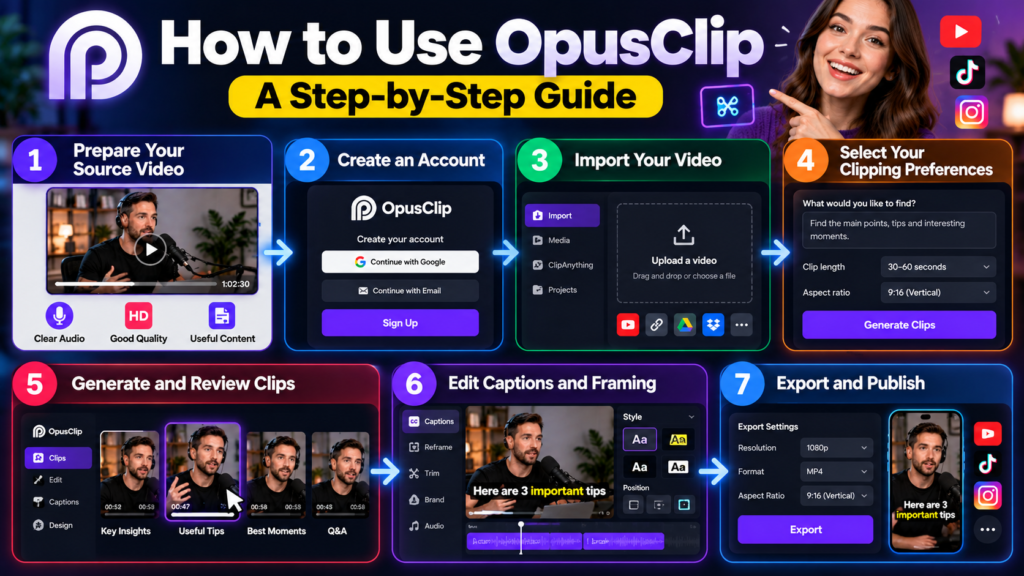
How to Use OpusClip: A Step-by-Step Guide
You do not need professional video editing experience to begin using OpusClip. The following workflow provides a practical starting point.
Step 1: Prepare Your Source Video
Choose a video that contains useful information, an interesting discussion, a clear demonstration, or an engaging story.
A recording with understandable speech and good audio quality generally provides a better starting point than footage containing heavy background noise.
Before uploading, make sure you have permission to use the video and any included music or other copyrighted material.
Step 2: Create an Account
Visit the official OpusClip platform and create an account.
Explore the available plan and check which features are included. Some functions, import sources, and export options require a paid subscription.
Step 3: Import Your Video
Upload a video file or choose a supported import source.
If you are repurposing a recording hosted on another platform, follow the available import workflow and confirm that you have the necessary rights to process the content.
Step 4: Select Your Clipping Preferences
Choose the available settings that match your intended output.
These may include clip duration, the section of the source video to analyze, or instructions describing the moments you want to find.
For example, a prompt for an educational video might be:
Find the section that explains the three main benefits of email marketing. Select a self-contained segment with a clear opening and a useful takeaway.
Specific instructions can help narrow the desired content, although the result still needs to be checked.
Step 5: Generate and Review Clips
Allow the platform to process the video and generate candidate clips.
Review each suggestion rather than automatically choosing the first result.
Ask yourself:
- Does the clip communicate a complete idea?
- Is the opening interesting and clear?
- Does the video provide enough context?
- Is the selected duration appropriate?
- Are the captions accurate?
- Does the framing show the important subject?
Discard clips that depend on missing information or repeat the same point without adding value.
Step 6: Edit Captions and Framing
Correct transcription errors and adjust the video layout where necessary.
Check that faces, demonstrations, graphics, and other important visual elements remain visible. If the original video contains multiple speakers, make sure the framing does not cut off the person who is speaking.
You should also check the beginning and end of each clip. An awkward cut can make otherwise useful content feel unfinished.
Step 7: Export and Publish
Export your approved clips using the available settings.
Before publishing, add an appropriate title, description, and any relevant hashtags. Make sure the final video complies with the requirements of your chosen platform.
After publication, monitor actual audience response and use that information to improve future clips.
Practical Ways to Get Better Results From OpusClip
The quality of the source video and the way you review AI suggestions can make a substantial difference.
Choose Videos With Clear Ideas
A long video is not automatically a good source for short-form content.
Recordings that contain specific lessons, memorable stories, useful demonstrations, or distinct discussion topics usually offer clearer opportunities for repurposing.
A video that spends 20 minutes repeating the same point may produce fewer useful clips than a shorter recording with several distinct insights.
Give the AI Clear Instructions
When the available workflow supports prompts, describe the content you want instead of giving vague instructions.
For example, instead of asking for an interesting clip, specify that you want a short explanation of a particular problem, a practical solution, or a memorable example.
This helps establish the purpose of the selection process.
Check the First Few Seconds
The beginning of a short video plays an important role in setting expectations.
A clip that starts halfway through a sentence may confuse viewers, even if the rest of the segment is informative.
Look for a natural opening that introduces the topic without removing information needed to understand the discussion.
Do not add a sensational opening that misrepresents what the speaker actually said.
Keep Captions Easy to Read
Use readable text, sensible line breaks, and appropriate contrast.
Avoid allowing captions to cover a speaker’s face, important graphics, or other essential visual information.
If the video contains specialized terminology, check the spelling manually rather than relying entirely on automatic transcription.
Make Every Clip Stand Alone
A strong short video should communicate a useful idea without requiring the viewer to watch the entire original recording.
If a speaker says, “That was the biggest reason it failed,” viewers may not understand the statement without knowing what “that” refers to.
In such cases, select a longer segment that includes the necessary context or make a careful edit that preserves the original meaning.
Test Different Content Approaches
Do not assume that one editing style will work for every audience.
For an educational channel, clear explanations may be more valuable than fast cuts. For a product demonstration, showing the product in action may matter more than animated captions.
Compare the actual performance of your published clips and use the results to guide future decisions.
What Are the Benefits of OpusClip?
OpusClip offers several practical advantages for people who regularly produce video content.
Saves Time on Repetitive Editing
Finding highlights manually can be one of the most time-consuming parts of repurposing long videos.
AI-assisted clipping can reduce the amount of time spent searching for candidate segments, particularly when a recording contains several distinct topics.
Creators can then focus their editing time on reviewing and improving the most promising suggestions.
Makes Content Repurposing Easier
One long recording can provide material for several different short videos.
For example, a webinar about website optimization might contain separate discussions about page speed, mobile usability, and search engine visibility.
A creator could turn these sections into individual clips, provided each segment makes sense on its own.
This approach helps extend the usefulness of existing content without requiring a completely new recording for every post.
Simplifies Vertical Video Production
Automatic reframing reduces the need to manually reposition a speaker for every vertical clip.
This is especially useful for creators who record horizontally but want to publish on mobile-first platforms.
Manual adjustments may still be necessary when the scene contains several people or important visual details.
Reduces the Need for Advanced Editing Skills
Beginners can use the platform to handle tasks such as generating captions, selecting candidate clips, and adjusting aspect ratios.
This makes short-form video production more accessible to people who have limited experience with traditional editing software.
However, basic editing knowledge remains valuable because it helps users recognize awkward cuts, incorrect captions, and poor pacing.
Supports a More Consistent Publishing Workflow
Creators who publish regularly can use AI-assisted clipping to prepare multiple pieces of content from a single recording.
Paid plans also offer additional editing, publishing, and scheduling capabilities.
A consistent workflow can make content production easier to manage, although publishing more videos does not automatically improve their quality or audience reach.
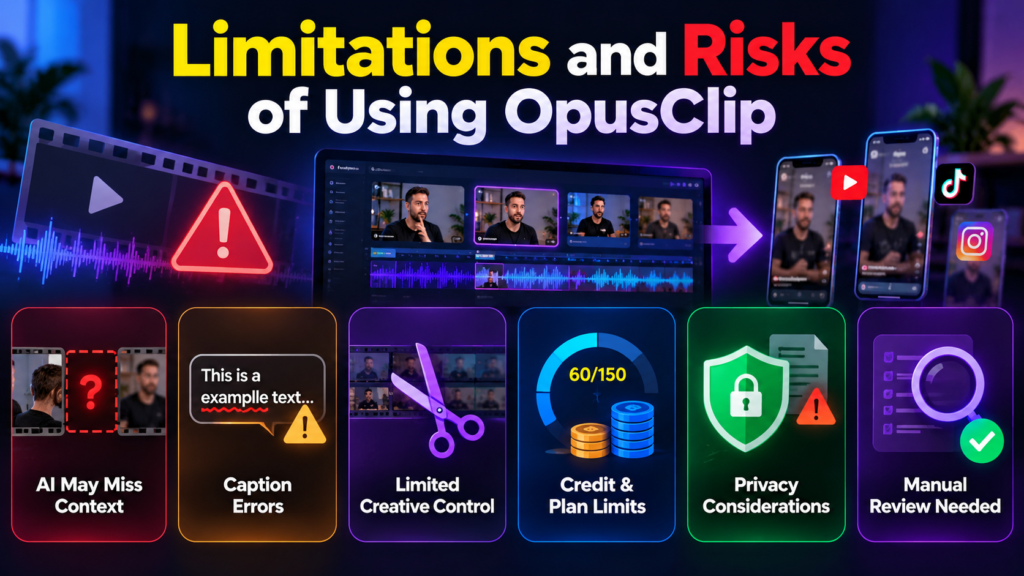
Limitations and Risks of Using OpusClip
Despite its useful features, OpusClip is not a fully autonomous content editor. Several limitations deserve attention before you depend on it for regular production.
AI Can Miss Important Context
A clip may contain accurate words but still communicate the wrong message.
This can happen when a speaker refers to an earlier point, uses sarcasm, explains an exception, or builds an argument across several minutes.
For example, a financial educator might explain that a particular investment is risky before discussing a hypothetical scenario. If the AI selects only the later section, the resulting clip could make the educator appear to recommend something they were actually warning against.
Human review is essential whenever context affects the meaning of a statement.
Automatic Captions Can Contain Errors
Speech recognition systems can misunderstand words, names, numbers, and technical expressions.
These errors are particularly important in tutorials, medical education, financial discussions, and other content where accuracy matters.
Review the captions against the original audio before publishing.
Reframing May Not Always Look Natural
Automatic cropping can struggle with multiple speakers, fast movement, unusual camera angles, or scenes in which several objects are important.
A vertical crop may also remove visual information that was essential in the original landscape recording.
Preview every clip on a mobile-sized screen to ensure that the composition remains clear.
AI Does Not Guarantee Viral Success
OpusClip can help identify potentially engaging moments, but it cannot control how social media platforms distribute videos.
An effective clip still needs a relevant topic, accurate information, good pacing, and an appropriate presentation.
Treat AI-generated scores and recommendations as suggestions rather than promises of reach or engagement.
Free-Plan Restrictions May Be Limiting
The free plan is useful for testing the workflow, but it includes restrictions on editing and exports.
Creators who need watermark-free videos, more editing control, or advanced publishing features may need a paid subscription.
Check the current plan details before building a regular production process around a particular feature.
Privacy and Copyright Require Attention
Uploading a video means processing content through an external service.
Before submitting private meetings, customer recordings, confidential presentations, or sensitive business information, review the platform’s current privacy policy and terms.
You should also make sure that you have the necessary rights to use the original footage, music, images, and other material.
Using an AI editing tool does not automatically give you permission to republish someone else’s content.
Is OpusClip Free? Pricing and Plans Explained
OpusClip offers a free plan as well as paid subscriptions. The appropriate option depends on how many videos you process, which editing features you need, and how frequently you publish.
Prices and plan features can change, so confirm the current details before subscribing. The following table summarizes the plan structure and indicative prices previously listed for the service.
| Plan | Indicative price | Main benefits |
|---|---|---|
| Free | $0 | Limited monthly credits, basic AI clipping, captions, and restricted exports |
| Starter | Around $15 per month | More credits, watermark-free exports, and additional editing features |
| Pro | Around $29 monthly, with lower effective monthly pricing on annual billing | Expanded credits, editing tools, additional import sources, and team features |
| Business | Custom pricing | Tailored usage allowances, integrations, team access, and business-oriented support |
These figures are indicative rather than guaranteed current prices. Promotional offers, billing arrangements, regional availability, and included features may differ.
Which Plan Should You Choose?
Free plan: Best for beginners who want to test AI clipping and determine whether the results meet their needs.
Starter plan: Suitable for individual creators who want to produce clips regularly and export them without a watermark.
Pro plan: Worth considering for professional creators, marketers, and teams that need more credits, advanced editing, additional import sources, or expanded publishing capabilities.
Business plan: Designed for organizations that need customized usage allowances, team arrangements, integrations, or additional business support.
Before subscribing, calculate how many credits your expected workload will require. Credits and processing limits can affect the total number of clips you can produce, so the cheapest subscription is not necessarily the most cost-effective choice.
OpusClip Alternatives: Which Tools Should You Consider?
OpusClip is not the only option for creating short videos. Other tools may be better suited to creators who want more manual control, a different editing workflow, or a broader set of video production features.
| Tool | Main purpose | Best suited for |
|---|---|---|
| OpusClip | AI-powered clipping and repurposing | Creators turning long videos into short clips |
| Descript | Transcript-based editing and recording workflows | Podcasters and creators who edit spoken content |
| CapCut | General video editing and social media content creation | Creators who want hands-on editing tools |
| VEED | Browser-based editing, captions, and video production | Teams and individuals creating online videos |
| Adobe Premiere Pro | Professional timeline-based editing | Editors who need detailed control over their projects |
The main difference is the amount of automation each workflow provides. OpusClip emphasizes identifying and preparing clips from longer recordings, while traditional editing tools provide more direct control over the editing process.
Some competing platforms also offer AI-assisted clipping, so features can overlap. Compare their current capabilities, pricing, export restrictions, and supported formats before choosing.
OpusClip vs. Manual Video Editing
Manual editing remains a strong option for projects that require precise timing, complex storytelling, detailed sound design, or carefully coordinated visuals.
However, editing every short clip manually can be inefficient when a creator regularly publishes content from long recordings.
A practical approach is to combine both methods: use OpusClip to identify candidate moments, then use its editor or another video editing application to refine the strongest selections.
This preserves the time-saving benefits of automation without sacrificing creative control.
Who Should Use OpusClip?
OpusClip is most useful when you already have a source of long-form video and want to create additional content from it.
A podcaster who publishes weekly episodes may use it to identify several discussion highlights. A teacher could turn a long lesson into shorter explanations, while a marketing team could repurpose a webinar into educational social media posts.
It may be less valuable for someone who rarely works with long recordings or whose videos depend on highly precise visual storytelling.
For example, a filmmaker editing a carefully structured short film may prefer a conventional editing application because automatically selected highlights could disrupt the narrative.
Likewise, someone creating videos entirely from scratch may need a broader production tool rather than a platform primarily focused on repurposing existing footage.
The key question is whether identifying and preparing clips from longer videos is a recurring part of your work. If it is, OpusClip may offer meaningful time savings.
Tips for Using OpusClip in a Content Marketing Strategy
OpusClip becomes more useful when it supports a clear content strategy instead of simply generating as many videos as possible.
Start With One Long-Form Recording
Choose a recording that contains several distinct ideas.
Identify the topics that matter most to your audience before processing it. This gives you a clearer standard for judging the AI’s suggestions.
Create Clips for Specific Audiences
Different viewers may care about different parts of the same recording.
A business webinar, for example, might contain advice for beginners, practical demonstrations for experienced users, and strategic insights for managers.
Create separate clips when each segment provides a distinct benefit to a particular audience.
Adapt the Content to Each Platform
A clip suitable for one platform may need changes before it works well elsewhere.
Check the aspect ratio, caption placement, video length, title, and description. Also review the latest requirements and publishing options for each platform.
Avoid assuming that every clip should be posted everywhere without modification.
Measure Real Performance
After publishing, compare the results against your content goals.
Useful measurements may include:
- Average watch time
- Audience retention
- Completion rate
- Shares and saves
- Relevant comments
- Website visits or conversions, when applicable
Views alone do not always reveal whether a clip has achieved its purpose. An educational video with a smaller audience may still be valuable if viewers watch it carefully and use the information.
Keep Your Brand Consistent
Use a recognizable visual style, accurate captions, and a consistent editorial approach.
Where the available tools permit, brand templates can help standardize fonts, colors, and other design elements.
However, consistency should not come at the expense of readability or content quality.
Frequently Asked Questions About OpusClip
1. What is OpusClip used for?
OpusClip turns longer videos into shorter clips using AI-assisted content selection, captions, reframing, and editing tools. It is commonly used to repurpose podcasts, interviews, webinars, and other recordings.
2. Is OpusClip free?
Yes. OpusClip offers a free plan with monthly credits and limited editing and export options. Paid plans provide additional features and fewer restrictions.
3. Can OpusClip automatically create YouTube Shorts?
Yes. It can generate short clips from longer videos and prepare them for vertical viewing. You should review the results before publishing them as YouTube Shorts.
4. Does OpusClip guarantee viral videos?
No. Its AI can identify potentially engaging moments, but actual performance depends on the content, audience, presentation, and platform distribution.
5. Can I use OpusClip for TikTok and Instagram Reels?
Yes. OpusClip supports workflows for creating short-form videos for TikTok and Instagram Reels, subject to the features available in your plan.
6. Are OpusClip captions always accurate?
No. Automatic transcription can make mistakes, particularly with technical terms, names, accents, and unclear speech. Check captions against the original recording before publishing.
7. Is OpusClip suitable for beginners?
Yes. Its automated clipping, captioning, and reframing tools can help beginners create short videos without advanced editing skills. Reviewing the final results remains important.
Conclusion
OpusClip is a practical AI video clipping platform for creators, marketers, educators, and businesses that want to repurpose long-form recordings into shorter videos. Its main strengths are automated highlight selection, caption generation, video reframing, and tools that simplify the preparation of content for social media.
However, automation should be treated as a starting point rather than a substitute for editorial judgment. AI-generated clips can miss context, misinterpret speech, or frame a scene incorrectly. Virality scores also cannot guarantee audience engagement or views.
For beginners, the free plan provides a way to test the workflow before paying for additional features. Regular creators may benefit from a paid plan if it saves enough editing time to justify the cost.
Ultimately, the best results come from combining AI efficiency with human review. Use OpusClip to discover promising moments, refine them carefully, and publish videos that provide genuine value to your audience.



1 comment on “OpusClip: Features, Pricing, Benefits, and How It Works”