


Making music no longer requires a recording studio, expensive instruments, or years of musical training. Today, you can make AI music using tools that turn written descriptions into songs, instrumentals, and sometimes complete tracks with vocals. Whether you want background music for YouTube videos, a soundtrack for a game, a podcast intro, or an original song, AI music generators can help you get started.
These tools use generative AI models trained to recognize patterns in music, including rhythm, melody, harmony, and vocal performance. Depending on the platform, you may be able to describe a genre, choose a mood, provide lyrics, or guide the structure of a song. However, generating a track is only the first step. The quality of your prompt, the editing process, and the tool’s licensing terms all affect the final result.
This guide explains how AI music generation works, which tools are worth exploring, how to create better songs, and what you should know before publishing or monetizing AI-generated music.
What Does It Mean to Make AI Music?
Making AI music means using artificial intelligence to generate or help produce musical content. Instead of composing every note manually, you provide instructions or musical material that an AI system uses to create audio.
Depending on the tool, you can generate:
- Complete songs: Tracks with vocals, lyrics, instruments, and a musical arrangement.
- Instrumental music: Background tracks for videos, games, presentations, or podcasts.
- Custom soundtracks: Music designed around a particular mood, scene, or activity.
- Musical ideas: Melodies, chord progressions, drum patterns, and other starting points for human composition.
- Audio variations: Alternative versions of an existing AI-generated track, where supported.
For example, you could enter a prompt requesting an upbeat electronic instrumental with a steady rhythm, bright synthesizers, and a memorable melody. A suitable generator can interpret those instructions and produce a track matching some or all of the requested characteristics.
The important distinction is that not every AI music tool works the same way. Some generate complete songs from text, while others focus on composition assistance, audio editing, or individual musical elements.
How Does AI Music Generation Work?
AI music generators use machine learning to learn patterns from musical and audio data. Many modern systems rely on deep learning, although their architectures and training methods differ.
The process generally involves three stages.
1. Understanding the Prompt
You describe what you want to hear. The prompt might include genre, mood, tempo, instruments, vocal style, and intended use.
For instance, “Create a calm acoustic instrumental with fingerpicked guitar, soft piano, and a warm cinematic atmosphere” gives the system several useful creative directions.
Some tools also accept lyrics, reference audio, or additional controls.
2. Generating the Audio
The model uses learned patterns to produce musical audio. Depending on its design, it may generate audio directly or work through intermediate representations such as musical tokens or other encoded data.
It is not simply selecting a finished song from a library. The model generates a new output based on its learned patterns and your instructions, although results can vary in originality, coherence, and quality.
3. Refining the Track
After generation, you listen to the result and decide what needs improvement. You might change the prompt, generate another version, edit the lyrics, or use audio software to adjust the arrangement.
This step matters because AI can produce awkward transitions, unclear lyrics, inconsistent vocals, or endings that feel abrupt. A strong result often requires more than one attempt.
Best Tools to Make AI Music
The best AI music generator depends on what you want to create. A beginner making a complete song has different needs from a video editor who only needs background music.
1. Suno
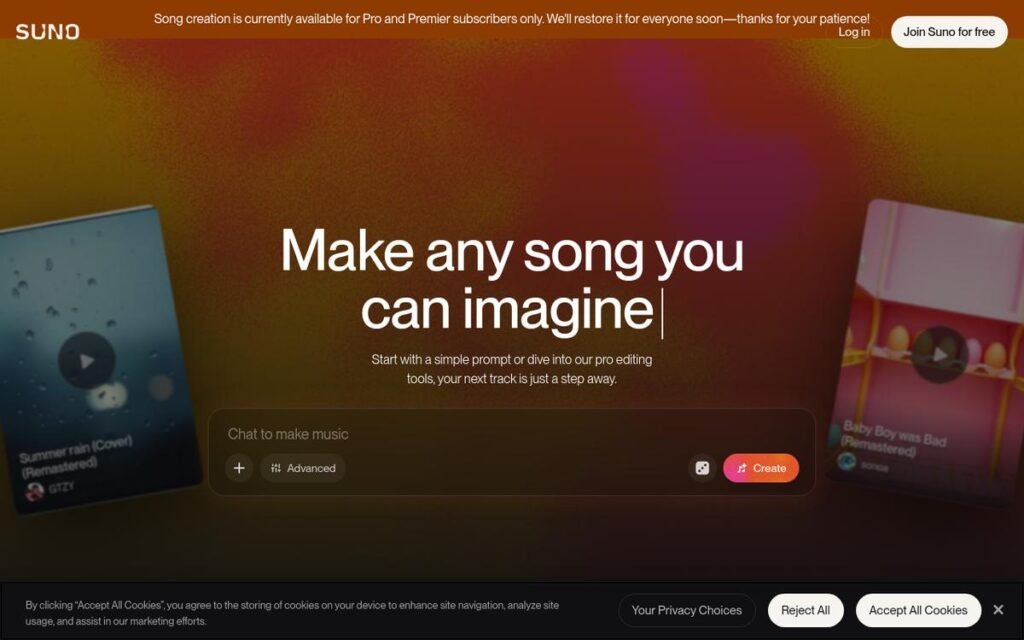
Suno is designed for creating complete songs from prompts and lyrics. It is a useful starting point for beginners who want to experiment with vocal performances, different genres, and song arrangements.
2. Udio
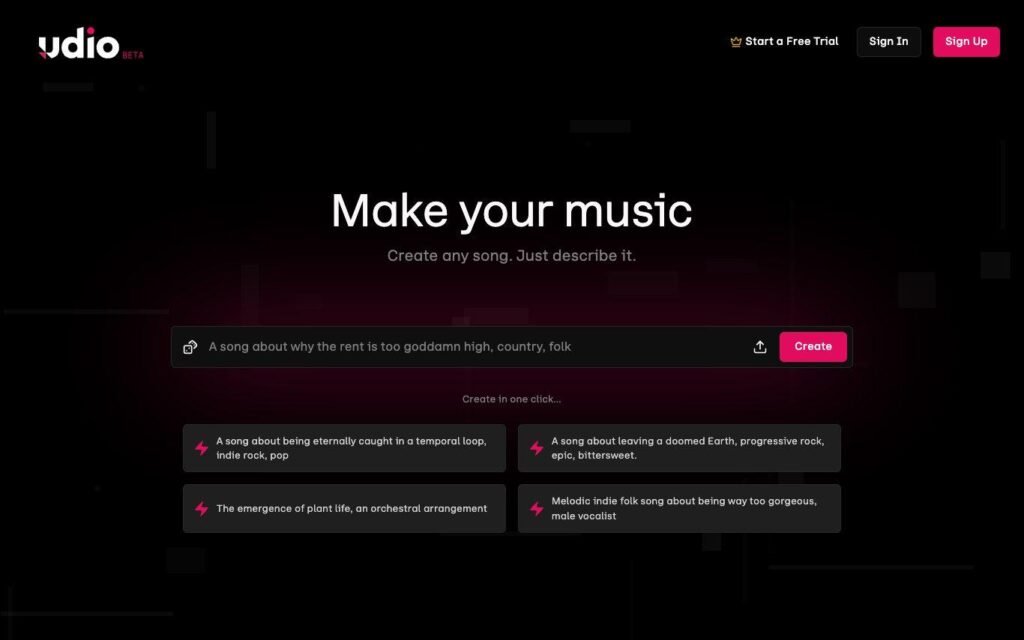
Udio supports AI music creation and audio-based workflows. Its documented tools include extending, remixing, and editing audio, subject to account and feature restrictions. It can be useful when you want to develop an initial musical idea further.
3. Google MusicFX
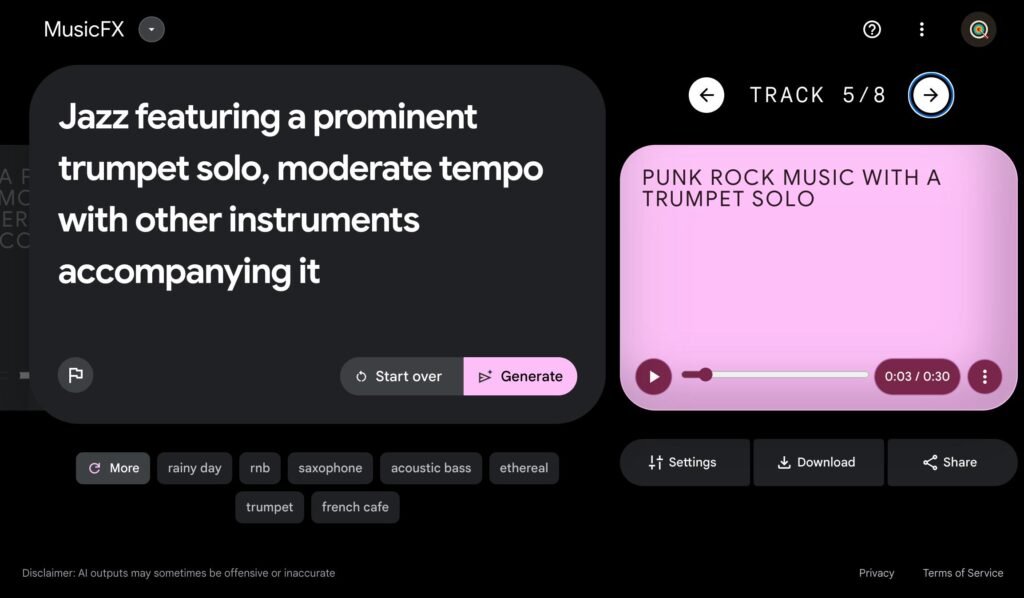
MusicFX is associated with Google’s experiments in generative music. It is worth investigating if your goal is to explore AI-generated musical ideas, but check current availability and regional access before relying on it for a project.
These tools should not be treated as interchangeable. Features, account requirements, download options, and commercial permissions can change. Check each platform’s official information before choosing a service for professional work.
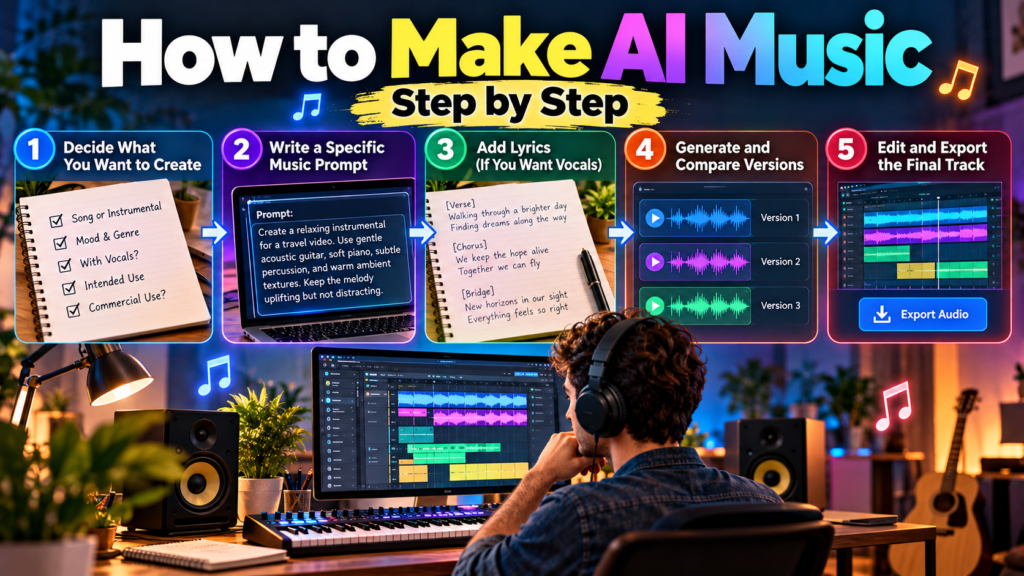
How to Make AI Music Step by Step
You can create your first AI-generated song without understanding music theory. The key is to describe your idea clearly and evaluate the result instead of accepting the first output.
Step 1: Decide What You Want to Create
Start with the purpose of the music. A song intended for a personal project may need a different arrangement from one designed for a commercial advertisement.
Consider these questions:
- Do you want a complete song or an instrumental?
- Should it include vocals?
- What mood should it create?
- Where will you publish or use it?
- Do you need permission to monetize the final track?
Your answers will help you select an appropriate generator and avoid unnecessary editing later.
Step 2: Write a Specific Music Prompt
A useful prompt describes the sound you want rather than simply naming a broad genre.
Example AI music prompt:
Create a relaxing instrumental for a travel video. Use gentle acoustic guitar, soft piano, subtle percussion, and warm ambient textures. Keep the melody uplifting but not distracting. Use a moderate tempo, a clean mix, smooth transitions, and a natural ending. Do not include vocals.
This prompt provides the generator with a genre direction, instrument choices, mood, intended use, and arrangement guidance.
Step 3: Add Lyrics if You Want a Vocal Song
If your platform supports lyrics, write your own words or use original lyrics developed with a writing assistant. Organize them into sections such as verse, chorus, and bridge when the tool supports structural instructions.
For example:
- Verse: Introduce the story or main idea.
- Chorus: Express the central message with a memorable hook.
- Bridge: Introduce a contrasting idea before returning to the chorus.
Avoid overly long lines if you want clear vocal phrasing. AI singers may pronounce unusual words incorrectly or place syllables awkwardly, so listen carefully to the generated performance.
Step 4: Generate and Compare Versions
Generate a track and listen to the whole result. If the platform provides multiple variations, compare them rather than selecting the first one automatically.
Pay attention to:
- Whether the melody fits the intended mood.
- Whether the vocals sound understandable.
- Whether the instruments complement one another.
- Whether the song develops naturally.
- Whether the ending feels complete.
If the result is close but not quite right, change one or two prompt details and try again. Making several targeted adjustments is often more effective than rewriting the entire prompt each time.
Step 5: Edit and Export the Final Track
Some AI music platforms provide built-in editing features, while others work best alongside a digital audio workstation (DAW), such as Audacity or a professional music-production application.
You may want to trim silence, adjust volume, improve transitions, or balance the audio. If your workflow supports separate instrument stems, you can edit individual musical elements instead of working with one combined audio file.
Before exporting, listen with headphones and ordinary speakers. Check for clipping, sudden volume changes, distorted vocals, and unwanted background sounds.
How to Write Better AI Music Prompts
Prompt quality can influence the musical direction, but it does not guarantee precise control. A generator may interpret the same instruction differently across attempts.
Use the following elements to make your prompts more useful.
| Prompt element | What to describe |
|---|---|
| Genre | Pop, jazz, ambient, rock, electronic or folk |
| Mood | Peaceful, energetic, emotional or suspenseful |
| Instruments | Piano, acoustic guitar, strings or synthesizers |
| Vocals | Male or female vocal range, harmonies or instrumental-only |
| Tempo | Slow, moderate or fast |
| Arrangement | Intro, verse, chorus, breakdown or gradual build |
| Production | Warm, spacious, acoustic, polished or minimal |
| Ending | Fade-out, sustained final note or decisive finish |
For instance, a creator making music for a cooking video might request light jazz with soft piano, upright bass, brushed drums, and a relaxed tempo. A gaming creator might need a darker electronic soundtrack with pulsing bass and a gradual build.
One important limitation: terms such as “120 BPM,” “exactly three minutes,” or “no instruments except piano” may not be followed precisely by every generator. If exact timing, arrangement, or instrumentation is essential, inspect the output and make corrections in editing software.
Practical Uses of AI-Generated Music
AI music is useful when you need original-sounding audio quickly or want to explore ideas without building an entire production from scratch.
Music for YouTube and Social Media
Video creators can generate background instrumentals for tutorials, travel videos, product demonstrations, and short-form content. The music should support the visuals without competing with dialogue.
Before monetizing a video, confirm that your generator’s license covers commercial use and the platform where you plan to publish.
Podcasts and Business Content
Podcasters can experiment with short introductions, transitions, and outro music. Businesses may also use generated tracks for presentations, promotional videos, or internal training materials.
For a recurring brand soundtrack, keep the musical direction consistent and save the prompts and versions that work best.
Games, Apps, and Independent Projects
Independent developers can explore background ambience, menu music, and temporary soundtrack ideas. AI-generated tracks can also serve as prototypes before a composer creates a more controlled final version.
However, interactive games may require music that loops cleanly or changes according to gameplay. Those requirements often need additional editing.
Advantages and Limitations of AI Music
AI music generation can make creative work more accessible, but it is not a complete replacement for musical judgment or production skills.
| Advantages | Limitations |
|---|---|
| Beginners can create songs without playing instruments. | Results may be inconsistent across generations. |
| Rapid experimentation with different musical styles. | Prompts do not provide perfect control over every detail. |
| Useful for background music and creative prototypes. | Vocals, lyrics, and transitions can contain errors. |
| Can help creators overcome creative blocks. | Licensing and copyright questions remain important. |
| Some tools support audio extension and editing. | Professional projects may need further mixing and mastering. |
The main benefit is speed. The main challenge is control. If you need an exact melody, precise timing, or a carefully arranged composition, a traditional music-production workflow may offer greater flexibility.
Can You Monetize AI Music?
Yes, some AI-generated music can be monetized, but the answer depends on the platform, subscription tier, applicable license, and rights associated with the material.
For example, Suno’s published terms distinguish between its free Basic tier and paid subscriptions. Its terms allow qualifying paid-tier users to commercially exploit eligible downloads, while Basic-tier outputs are restricted to personal, non-commercial use. Commercial-use permission does not guarantee copyright protection.
Before publishing a track commercially, check the following:
- Commercial license: Confirm that the specific song qualifies under the plan and terms that applied when it was generated or downloaded.
- Lyrics and samples: Use material you created yourself or have permission to use.
- Copyright protection: Commercial permission and legal copyright ownership are different issues.
- Platform rules: Music distributors and video platforms may have their own acceptance and disclosure requirements.
- Voice imitation: Avoid imitating identifiable singers without appropriate authorization.
Copyright rules differ between countries, and fully AI-generated works may receive different protection from works involving meaningful human creative contributions. Writing original lyrics, arranging music, and making substantial creative edits may be relevant, but none automatically guarantees copyright protection.
If you intend to sell music, distribute it to streaming services, or use it in paid advertising, review the current terms before investing time in a large collection of tracks.
Common Mistakes to Avoid When Making AI Music
A few simple practices can improve both the quality and reliability of your results.
- Using vague prompts: Describe the instruments, mood, and intended purpose instead of relying on a single genre label.
- Accepting the first version: Compare alternatives and listen to the entire song.
- Ignoring audio quality: Check the vocals, transitions, volume levels, and ending before publishing.
- Copying existing songs: Do not upload copyrighted recordings or use protected lyrics without the necessary rights.
- Assuming every track is unique: Generative models can produce outputs resembling other music. A new generation is not proof of exclusive originality.
- Overlooking licensing: A track that is available to listen to or share may not automatically be licensed for commercial use.
These checks are especially important if you plan to build a music channel or release AI-generated songs regularly.
Frequently Asked Questions
1. Can I make AI music for free?
Yes. Some platforms offer free access or limited generation allowances. The available features, download permissions, and commercial-use rights depend on the specific service.
2. Do I need musical experience to create AI songs?
No. You can start with a written prompt and refine the result through listening and experimentation. Musical knowledge becomes more useful when you want precise arrangements or professional-quality editing.
3. Can AI generate music with vocals and lyrics?
Yes. Some generators create complete songs with vocals and lyrics, while others focus on instrumentals or music-production assistance. Vocal clarity and lyric accuracy vary.
4. Can I upload AI music to YouTube?
Generally, yes, if you have the necessary rights and comply with the generator’s terms and YouTube’s policies. Monetization eligibility is not guaranteed merely because a song was AI-generated.
5. Is AI-generated music copyright-free?
Not automatically. A track may have commercial-use permission without qualifying for copyright protection. The legal position depends on the jurisdiction, human contributions, and any third-party material.
6. How can I make AI music sound more professional?
Use specific prompts, compare multiple versions, remove unwanted sections, check audio levels, and edit the arrangement where possible. Professional results often require human review.
7. Can I make AI music using my phone?
Many AI music generators are accessible through mobile-friendly websites or apps, depending on the service. You can create songs on a phone and use compatible editing software for further adjustments.
Conclusion
Learning to make AI music is an accessible way to explore songwriting, create background tracks, and develop musical ideas without expensive equipment. Start by choosing a generator that matches your needs, writing a detailed prompt, and testing several versions. Then listen critically and refine the best result rather than relying entirely on automatic generation.
For casual projects, a simple text prompt may be enough. For professional work, audio editing, careful quality checks, and a clear understanding of licensing become much more important. If you plan to publish or monetize your music, verify the platform’s current terms and avoid using material you do not have permission to use.
The most effective approach is to treat AI as a creative tool: let it accelerate experimentation while you make the decisions that give the finished music purpose and character.
1 comment on “Make AI Music: How to Create Songs With Artificial Intelligence”