


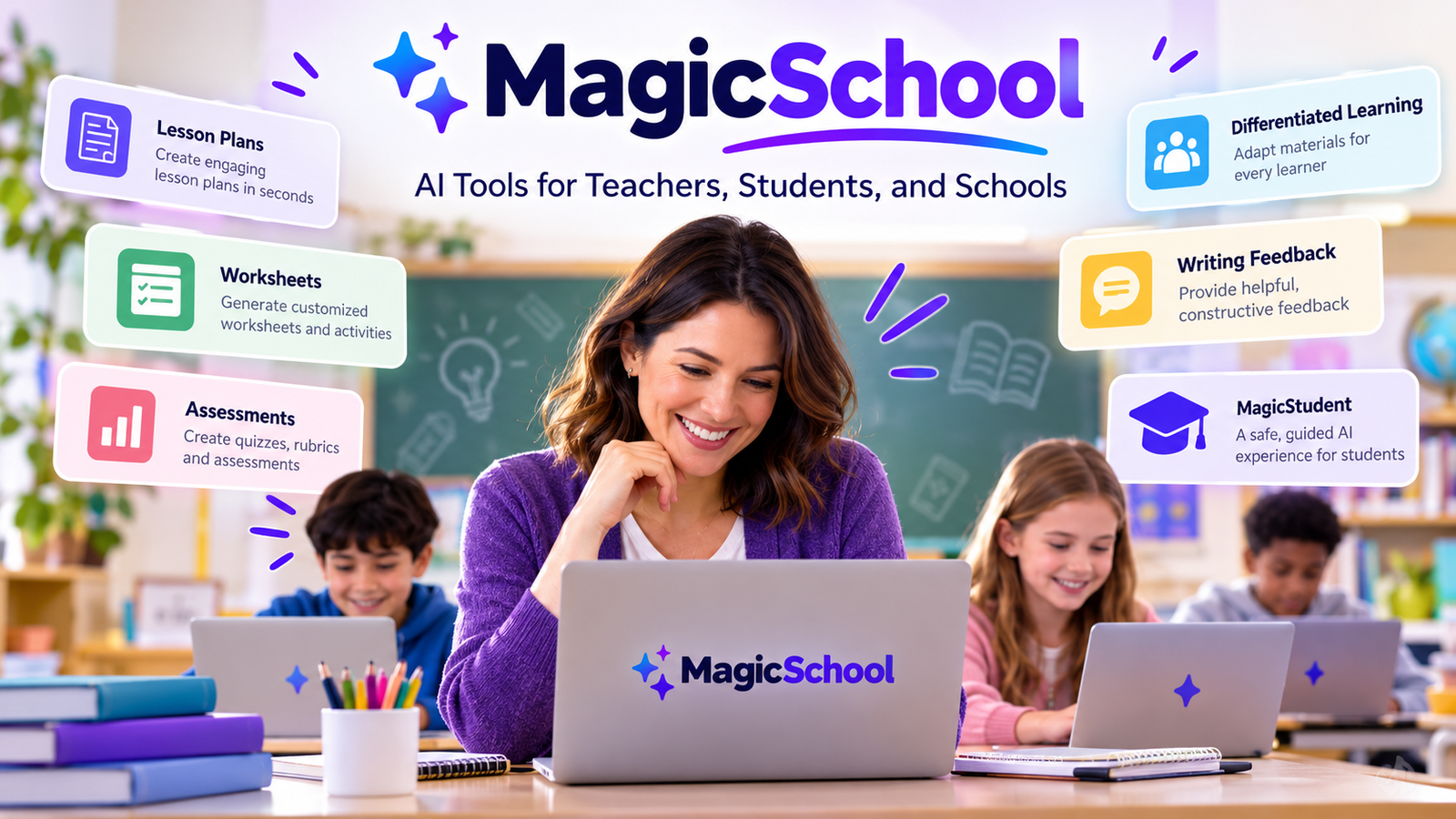
MagicSchool is an artificial intelligence platform designed to help teachers, school administrators, and students use AI for educational purposes. Instead of requiring educators to write complicated prompts for a general-purpose chatbot, it offers specialized tools for everyday classroom tasks, including lesson planning, worksheet creation, assessment design, writing feedback, and differentiated learning materials.
The platform also provides a student-focused experience called MagicStudent, where learners can explore subjects, practice skills, and interact with AI under teacher guidance. This makes MagicSchool particularly relevant for schools that want to introduce AI without relying entirely on unrestricted chatbots.
However, using AI in education involves more than generating content quickly. Teachers still need to check accuracy, protect student information, and ensure that AI supports learning rather than replacing independent thinking. In this guide, you will learn how MagicSchool works, which features are useful, what it costs, how it compares with other AI assistants, and what educators should consider before using it.
What Is MagicSchool AI?
MagicSchool AI is an education-focused AI platform that helps teachers prepare instructional materials, adapt content to different learning needs, and manage repetitive writing tasks.
Its main purpose is to make AI useful within real teaching workflows. Rather than starting with a blank chatbot and figuring out what to ask, educators can select a tool designed for a particular job, provide relevant information, and edit the generated result.
For example, a teacher preparing a science lesson can use an AI lesson planner to create an initial structure, a worksheet generator to prepare practice questions, and a quiz generator to check students’ understanding.
MagicSchool provides more than 80 teacher tools and more than 50 student tools, according to its published product information. The exact tools and available capabilities may change as the platform develops.
Official website: MagicSchool AI
Who Is MagicSchool Designed For?
MagicSchool primarily serves the K–12 education sector, which covers kindergarten through the final years of secondary school.
Its main audiences include:
- Teachers: Prepare lesson plans, worksheets, quizzes, rubrics, and classroom communications.
- School administrators: Support staff workflows and coordinate AI adoption across schools.
- Students: Practice concepts, receive writing feedback, and explore topics through teacher-guided tools.
- Special education professionals: Adapt instructional materials to different learning needs and abilities.
- Curriculum coordinators: Develop resources aligned with instructional objectives and relevant curriculum standards.
Although some tools may also be useful to tutors and educational content creators, the platform’s primary focus is school-based teaching and learning.
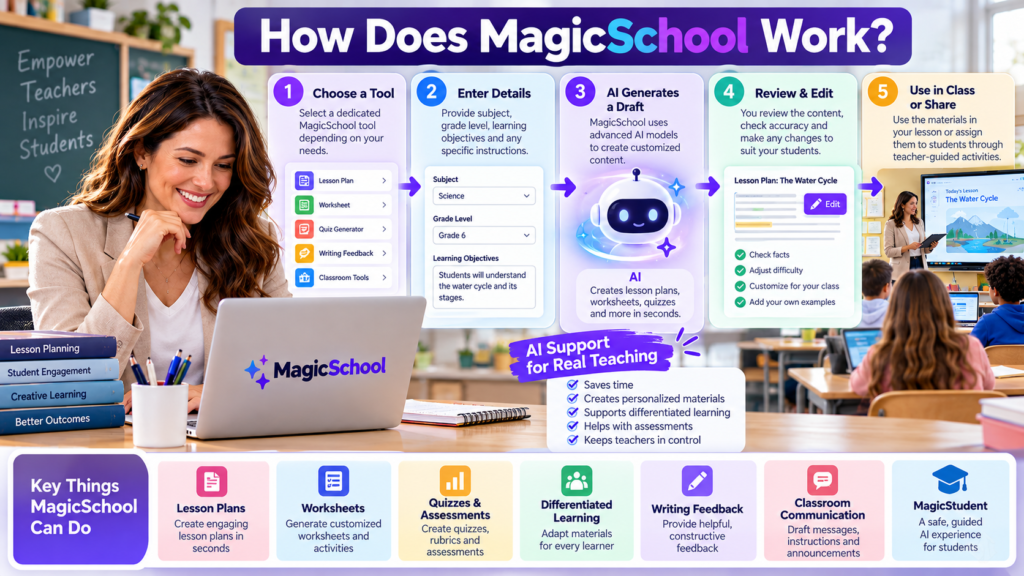
How Does MagicSchool Work?
MagicSchool uses generative AI to turn user instructions and educational context into useful drafts. Generative AI refers to systems that create new content, such as text, questions, explanations, and lesson outlines, in response to instructions.
The platform uses AI models from different providers, depending on the task and product configuration. Its educational tools add task-specific guidance and classroom context to the process.
A typical workflow involves four steps.
1. Choose an educational tool. Select a lesson planner, quiz generator, worksheet creator, or another tool that matches your task.
2. Provide the relevant details. Enter the subject, grade level, learning objective, topic, or other requested information.
3. Generate a draft. The AI processes your instructions and produces content based on the tool’s design and the information supplied.
4. Review and customize the result. Check the facts, adjust the difficulty, correct mistakes, and make sure the material suits your students.
A Practical Example
Imagine that a teacher needs to introduce fractions to a class of 10-year-old students.
The teacher could request a lesson plan explaining equivalent fractions, followed by a worksheet containing simple practice questions and a short quiz.
MagicSchool can help prepare these materials in one workflow. The teacher would then check that the questions match the students’ abilities, confirm that the answers are correct, and add examples from previous lessons.
This distinction is important: MagicSchool accelerates preparation, but the teacher remains responsible for the quality of instruction.
Key Features of MagicSchool AI
MagicSchool’s tools cover several stages of the teaching process, from preparing lessons to helping students practice what they have learned.
1. AI Lesson Plan Generator
Lesson planning is one of the platform’s main uses. Teachers can generate a starting plan based on the subject, grade level, learning objectives, and classroom requirements.
A useful lesson plan might include:
- Learning objectives
- A lesson introduction
- Teaching activities
- Guided and independent practice
- Discussion questions
- An assessment or exit ticket
For example, a history teacher preparing a lesson on ancient civilizations could generate a sequence of activities that introduces the topic, encourages discussion, and checks students’ understanding.
The teacher should still confirm that the plan matches the required curriculum and the time available.
2. Worksheet and Quiz Generators
Creating practice materials can be time-consuming, especially when students have different levels of understanding.
MagicSchool offers tools for generating worksheets, multiple-choice questions, quizzes, and other assessment materials.
Teachers can use these tools to prepare:
- Vocabulary exercises
- Reading comprehension questions
- Mathematics practice problems
- Short-answer assessments
- Revision activities
- Questions at different difficulty levels
The practical benefit is flexibility. Instead of preparing every question manually, a teacher can generate an initial set and select the questions that best match the lesson.
However, AI-generated assessments need careful checking. A question may have ambiguous wording, an incorrect answer key, or a difficulty level that does not match the intended class.
3. Differentiated Learning Materials
Students do not all learn at the same pace. Some need simpler explanations, while others benefit from more challenging questions or additional background information.
MagicSchool can help educators adapt content to different reading levels, explain concepts in alternative ways, and develop additional practice activities.
Consider a teacher using a complex passage about climate change. The teacher could create a simpler version for students who need additional language support while keeping the central scientific ideas intact.
This can make lesson preparation more manageable, but simplification requires judgment. Teachers should ensure that important concepts remain accurate and that the revised material does not become misleading.
4. Writing Feedback and Rubric Creation
Giving useful feedback is essential to learning, but writing individual comments for every student can take considerable time.
MagicSchool includes tools for writing feedback and creating assessment rubrics. These can help teachers develop consistent criteria and draft comments that explain where a student’s work could improve.
For example, a teacher assessing persuasive essays could create a rubric covering argument quality, supporting evidence, organization, and grammar.
AI can help prepare the rubric and suggest feedback language. The teacher should determine the final assessment and check whether the feedback reflects the student’s actual work.
MagicSchool should support the teacher’s evaluation, not make high-stakes academic decisions independently.
5. Classroom Communication
Teachers regularly write messages to parents, instructions for assignments, classroom announcements, and reminders about upcoming activities.
MagicSchool can help draft these communications in a clear, professional tone.
For instance, a teacher could request a friendly message explaining what students should bring for a science project. The teacher can then adjust the wording to match the school’s communication style.
This is a relatively straightforward use case because it reduces repetitive writing without requiring the AI to make educational decisions.
Even so, teachers should verify dates, deadlines, names, and other specific details before sending a message.
6. Raina AI Assistant
Raina is MagicSchool’s AI assistant, designed to help educators find relevant tools and work through teaching tasks using natural-language instructions.
Instead of navigating directly to a particular generator, a teacher can describe the task and use the assistant to identify an appropriate workflow.
For example, a teacher might explain that they need a short reading activity, five comprehension questions, and an extension task for students who finish early.
The assistant can help organize that request and direct the teacher toward suitable tools.
Its usefulness depends on the quality of the instructions and the context provided. As with other generative AI assistants, it may misunderstand a request or produce content that needs revision.
MagicStudent: How Students Can Use MagicSchool
MagicSchool is not limited to teachers. Its student-facing experience, called MagicStudent, is designed to help learners use AI in a structured educational environment.
Rather than giving students unrestricted access to a general chatbot, the platform supports teacher-guided activities with educational goals and built-in safeguards.
Student Tools and Learning Activities
Depending on the available tools and the way a teacher configures access, students can use MagicStudent for activities such as:
- Guided research: Explore a topic and develop questions for further investigation.
- Independent practice: Review a concept and work through additional exercises.
- Writing feedback: Receive suggestions that help improve a draft.
- Quiz practice: Test their understanding of a subject.
- Character-based learning: Explore historical or literary perspectives through guided conversations.
- AI literacy: Learn how AI responds to instructions and why its answers need to be evaluated critically.
The goal is to make AI a learning aid rather than a shortcut around learning.
For example, a student studying the water cycle could ask for a simpler explanation of evaporation and condensation, then complete a teacher-assigned activity to demonstrate understanding.
The student still needs to explain the concepts in their own words and verify important facts.
How Teachers Maintain Oversight
MagicStudent supports teacher-guided access and classroom controls. Educators can use structured activities and available supervision features to guide how students interact with AI.
This structure can help schools establish clear boundaries around acceptable AI use. It also gives teachers opportunities to discuss mistakes, evaluate AI-generated answers, and encourage independent reasoning.
However, a supervised platform is not a substitute for classroom rules. Teachers should explain when AI assistance is permitted, which tasks must be completed independently, and how students should acknowledge AI use when required by school policy.
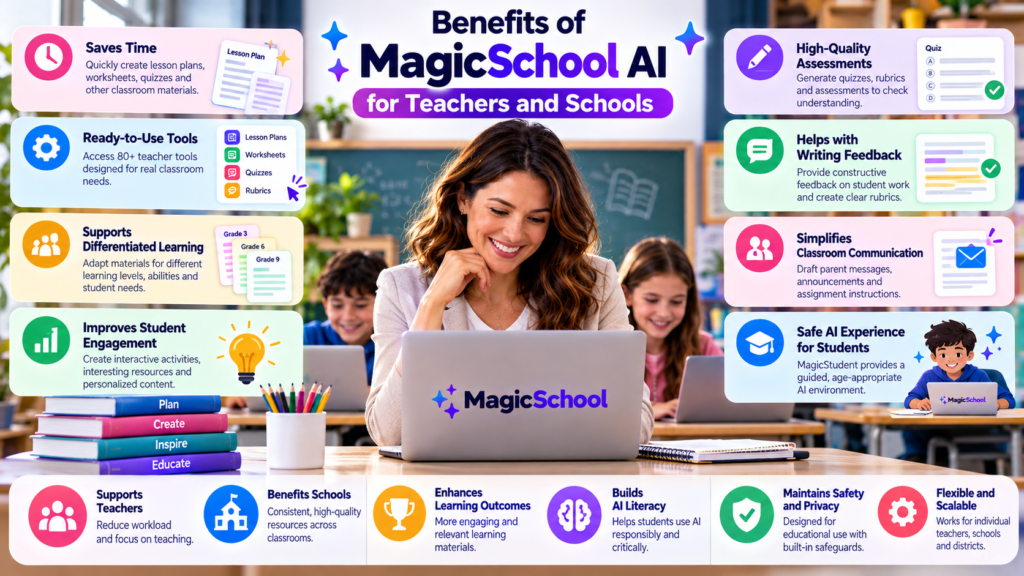
Benefits of MagicSchool AI for Teachers and Schools
The strongest case for MagicSchool is not that AI can replace educators. It is that purpose-built tools can reduce repetitive preparation and help teachers develop resources more efficiently.
Less Time Spent on Repetitive Tasks
Teachers frequently create similar types of materials for different lessons. A worksheet generator, lesson planner, or communication assistant can provide a starting point without requiring every item to be written from scratch.
The time saved will vary according to the task, the teacher’s workflow, and the amount of editing required. AI-generated content still needs review.
More Flexible Learning Resources
Teachers can prepare alternative explanations, extra exercises, and different versions of instructional material more easily.
This is particularly useful when one lesson needs to support students with varied reading abilities or different levels of subject knowledge.
A More Structured Approach to AI
General-purpose AI chatbots can be useful, but teachers must often design their own prompts and decide how to apply the responses.
MagicSchool organizes many common educational tasks into dedicated tools. This makes it easier for educators who are new to generative AI to get started without learning complex prompting techniques.
Support for Responsible AI Literacy
Students need to understand that AI-generated information can be incomplete, biased, or incorrect.
A teacher-guided platform provides opportunities to practice evaluating answers, improving instructions, and distinguishing useful assistance from unsupported claims.
These benefits are potential advantages, not guarantees. The results depend on how teachers integrate the tools into instruction and whether the generated materials genuinely improve the learning experience.
Is MagicSchool AI Free? Pricing and Plans
MagicSchool offers a free plan for individual educators, a paid Plus subscription, and Enterprise options for schools and districts.
The following prices have been listed for its plans, but pricing and included features may change.
| Plan | Price | Main Benefits |
|---|---|---|
| Free | $0 | Core teacher tools, standard usage limits, and basic features |
| Plus | $12.99 per month or $8.33 per month when billed annually | Expanded features, additional tools, output history, and higher usage allowances |
| Enterprise | Custom pricing | School or district management, integrations, administrative controls, and implementation support |
The annual Plus price is equivalent to $99.96 per year, billed annually. Enterprise pricing depends on the school’s requirements and arrangement with MagicSchool.
Which Plan Should You Choose?
The Free plan is a sensible starting point for teachers who want to test lesson planning, worksheet creation, and other basic tools.
Plus may be more appropriate for educators who use AI frequently and need higher usage allowances, additional features, or more extensive output history.
Enterprise is intended for schools and districts that require centralized administration, integrations, and organization-wide controls.
Before subscribing, review the current plan details and feature availability. A feature available on a paid plan may not be necessary for every teacher.
MagicSchool AI vs. ChatGPT: Which Is Better for Teachers?
Both help educators prepare learning materials, but their approaches differ.
MagicSchool focuses on education-specific workflows, while ChatGPT is a general-purpose AI assistant that can support a much broader range of tasks.
| Feature | MagicSchool AI | ChatGPT |
|---|---|---|
| Primary purpose | Teaching and school workflows | General-purpose assistance |
| Lesson planning | Dedicated educational tools | Can create plans through prompts |
| Worksheet creation | Specialized generators | Can generate questions and exercises |
| Assessment support | Rubric, quiz, and feedback tools | Can help draft rubrics and assessments |
| Student use | Teacher-guided educational environment | Depends on the product, account, and school arrangements |
| Flexibility | Focused on educational tasks | Broad range of subjects and tasks |
| School administration | Enterprise education controls | Depends on the selected product and configuration |
When Is MagicSchool the Better Choice?
MagicSchool may be the better option when teachers regularly create lesson plans, worksheets, differentiated resources, and assessment materials.
Its dedicated tools reduce the need to develop detailed prompts for common classroom tasks.
When Is ChatGPT the Better Choice?
ChatGPT may be more suitable when educators need broader assistance, such as explaining technical subjects, brainstorming school projects, analyzing information, or working on tasks beyond lesson preparation.
It can also generate educational materials, but teachers may need to provide more specific instructions to obtain the desired format.
The important distinction is that neither tool is automatically better for every task. The right choice depends on the teacher’s workflow, school policies, privacy requirements, and preferred way of working.
Is MagicSchool AI Safe for Students?
Student safety and privacy deserve particular attention because educational AI may process information belonging to children.
MagicSchool states that it provides safeguards designed for school environments, including content moderation, teacher oversight, and privacy protections. Its published policies also state that student data is not sold for commercial purposes or used to train AI models.
These are meaningful commitments, but schools should still review the relevant policies and agreements rather than assuming that every AI platform is automatically appropriate for every classroom.
Important Privacy Considerations
Before introducing MagicSchool, teachers and school administrators should consider the following:
- Student information: Avoid entering names, personal circumstances, grades, or other identifiable information unless the school’s approved procedures permit it.
- School policies: Confirm that the platform meets the institution’s requirements for student data protection and acceptable AI use.
- Teacher oversight: Review student activities and AI-generated materials according to the school’s procedures.
- Accuracy: Check factual claims, answer keys, examples, and explanations before using them in lessons.
- Age-appropriate use: Ensure students access tools through an approved educational arrangement.
- Data management: Understand how information is stored, who can access it, and how retention or deletion requests are handled.
Can MagicSchool AI Give Incorrect Answers?
Yes. Like other generative AI systems, MagicSchool can produce inaccurate information, misleading explanations, or unsuitable educational content.
For example, a history tool might simplify an event so much that it loses important context. A mathematics quiz could contain an incorrect answer key. A generated reading passage might include an unsupported factual claim.
These problems occur because language models generate responses based on learned patterns and instructions. They do not guarantee that every statement is true.
The safest approach is to treat generated content as a draft, verify important facts against reliable materials, and use the teacher’s subject knowledge to make the final decision.
Limitations of MagicSchool AI
MagicSchool can make some teaching tasks easier, but it does not eliminate the need for professional judgment.
1. Generated Content Requires Review
A well-formatted lesson plan can still contain factual errors or activities that do not meet the learning objective.
Teachers should review the content before sharing it with students.
2. It Cannot Fully Understand Every Classroom
A teacher knows how students respond to particular explanations, which concepts they find difficult, and what classroom conditions affect learning.
AI can work with the information provided, but it may miss important context. A generic lesson plan may need substantial adaptation to fit a real class.
3. Personalization Depends on the Information Provided
If a teacher asks for a worksheet without specifying the students’ grade level, existing knowledge, or learning objectives, the result may be too easy, too difficult, or poorly aligned with the lesson.
Clear instructions generally produce more useful results.
4. Students May Become Overdependent on AI
If students use AI to produce answers without thinking through the questions, they may miss opportunities to develop research, writing, and problem-solving skills.
Teachers can reduce this risk by asking students to explain their reasoning, check AI-generated claims, revise drafts, and complete selected tasks independently.
5. Some Features Require a Paid Plan
The free plan has usage limits, while Plus provides additional features and higher allowances. Some school-level management capabilities are available through Enterprise.
Educators should check the current plan details before building an important workflow around a feature.
How to Get Started With MagicSchool AI
Getting started is relatively straightforward. The best approach is to begin with one recurring task rather than attempting to use AI for every part of teaching.
Step 1: Create an Account
Visit the official MagicSchool platform and review the tools available for educators. Create an account using the available registration options.
Step 2: Select a Tool
Choose a task that takes considerable time in your regular workflow. A lesson planner, worksheet generator, or quiz generator is a practical starting point.
Step 3: Provide Clear Instructions
Include the information necessary for a useful result.
For example, a teacher could use the following hypothetical prompt:
Create a 40-minute science lesson for Grade 6 students about the water cycle. Include three learning objectives, a simple explanation of evaporation and condensation, one classroom activity, five assessment questions, and a short exit ticket. Use age-appropriate language and identify any materials needed.
This prompt specifies the subject, grade, lesson duration, learning objectives, and expected output.
Step 4: Review the Generated Material
Check the scientific explanations, confirm that the activity is practical, and ensure the assessment questions measure the stated learning objectives.
Revise anything that does not suit the class.
Step 5: Refine Your Workflow
Once you are comfortable with one tool, try another that complements the same lesson.
For example, you might use the lesson planner first, create a worksheet from the resulting material, and then develop a short quiz.
This approach helps you evaluate whether the platform genuinely improves your workflow rather than simply producing more content.
Alternatives to MagicSchool AI
MagicSchool is not the only option for AI-assisted teaching. Other tools may suit different classroom requirements.
ChatGPT
ChatGPT can help teachers explain concepts, brainstorm classroom activities, create questions, and adapt written materials.
It is a flexible alternative for educators who want one general-purpose assistant for teaching and other professional tasks.
Google Gemini
Google Gemini is a general-purpose AI assistant that can help with research, explanations, brainstorming, and content creation. Its suitability for classroom use depends on the features available, account configuration, and school policies.
Microsoft Copilot
Microsoft Copilot can assist with writing, research, and other productivity tasks. Educators should check which capabilities are included in their account and whether the available version meets their institution’s privacy and administrative requirements.
The best alternative depends on what you need. If your main priority is a collection of purpose-built teaching tools, MagicSchool is worth evaluating. If you need wider flexibility across many kinds of work, a general-purpose assistant may be more suitable.
Frequently Asked Questions About MagicSchool AI
1. What is MagicSchool AI used for?
MagicSchool helps teachers create lesson plans, worksheets, quizzes, presentations, rubrics, and classroom communications. It also provides student-focused AI tools for guided learning and practice.
2. Is MagicSchool AI free?
Yes. MagicSchool offers a free plan for educators, with core tools and standard usage limits. Paid Plus and Enterprise plans provide additional features.
3. Can students use MagicSchool AI?
Yes. Students can use MagicStudent through teacher-guided educational activities and approved access arrangements.
4. Is MagicSchool AI better than ChatGPT?
MagicSchool is more focused on dedicated teaching workflows, while ChatGPT offers broader flexibility. The better option depends on the task and school requirements.
5. Can MagicSchool AI create lesson plans?
Yes. Its lesson planning tools can generate draft plans based on subjects, grade levels, learning objectives, and other instructions.
6. Does MagicSchool AI replace teachers?
No. It assists with preparation and other repetitive tasks, but teachers remain responsible for instruction, reviewing materials, and evaluating student learning.
7. Is MagicSchool AI safe for schools?
MagicSchool publishes privacy and safety commitments for educational use. Schools should still review its current policies, account arrangements, and data protection requirements before adopting it.
Conclusion
MagicSchool AI offers a practical way for educators to bring generative AI into everyday teaching. Its dedicated tools support lesson planning, worksheet creation, assessment preparation, classroom communication, and differentiated learning materials. MagicStudent extends these capabilities to teacher-guided student activities.
The platform’s main advantage is its focus on educational workflows. Teachers can begin with a specific task, generate a draft, and refine it without having to build every process around a general-purpose chatbot.
However, convenience should not come at the expense of accuracy, privacy, or independent learning. AI-generated content needs review, student information must be handled responsibly, and classroom decisions should remain under appropriate human supervision.
For educators exploring AI for the first time, starting with the free plan and testing one or two tools is a sensible approach. Evaluate the quality of the results, the time saved, and the fit with your teaching goals before expanding their use.




1 comment on “MagicSchool AI: Features, Benefits, Uses, and Limitations”