


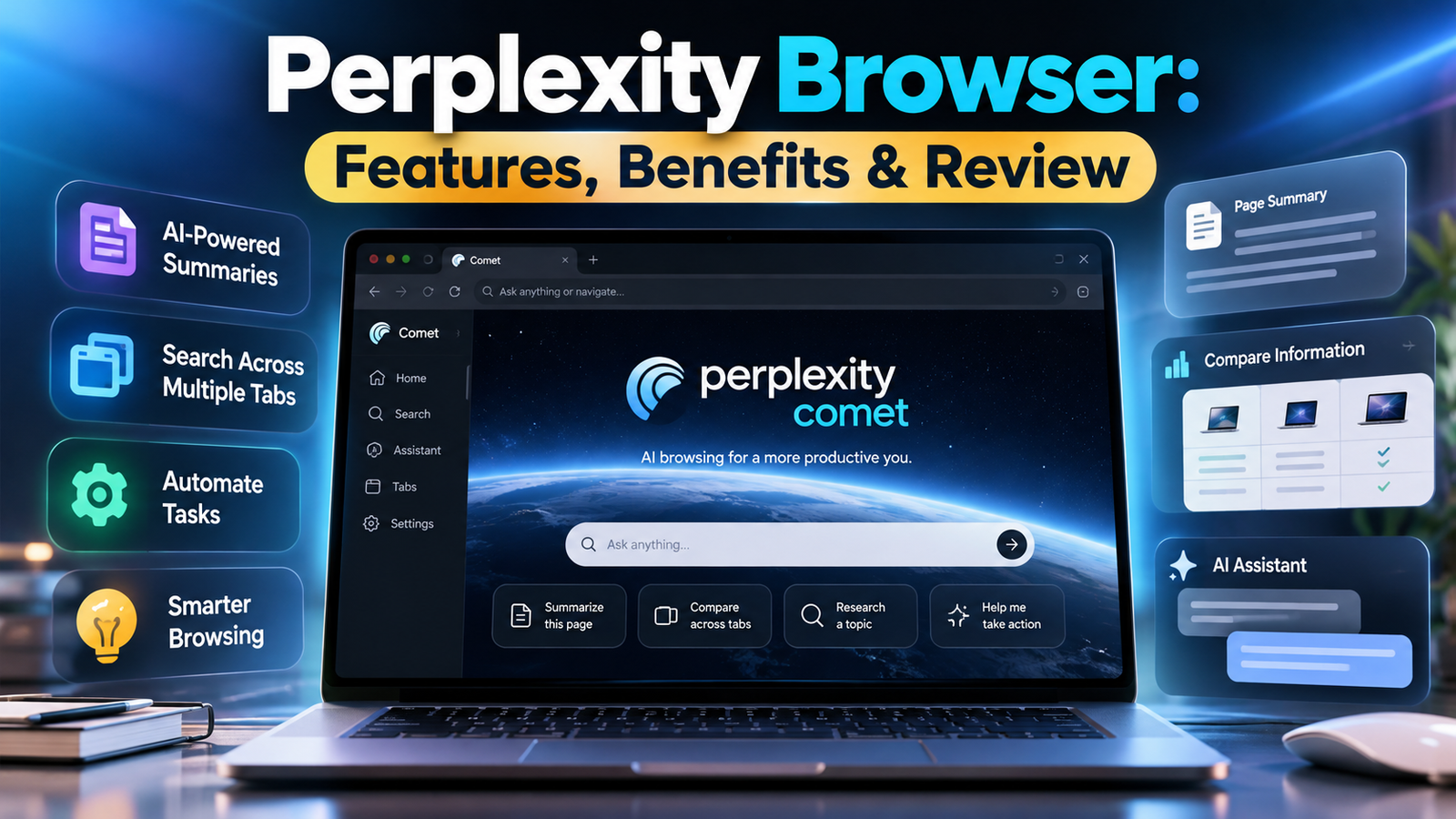
The Perplexity browser is an AI-powered browsing experience designed to help people find information, understand web pages, and complete everyday online tasks more efficiently. Its official name is Comet, a browser developed by Perplexity that combines traditional web browsing with an integrated AI assistant.
Unlike a conventional browser, which primarily helps you access websites, Comet allows you to ask questions about the pages you visit, summarize information, compare content across tabs, and get assistance with multi-step tasks. This can be useful for students, researchers, developers, marketers, and professionals who regularly work with large amounts of online information.
However, an AI browser is not automatically better for every situation. Its usefulness depends on the task, the quality of the information it retrieves, and the amount of control you want over automated actions. This guide explains how the Perplexity browser works, its main features, availability, privacy considerations, advantages, limitations, and how it compares with traditional browsers.
What Is the Perplexity Browser?
The Perplexity browser, known as Comet, is a web browser built around an AI assistant. It combines website navigation, search, page understanding, and task assistance in a single interface. Instead of repeatedly switching between browser tabs and a separate chatbot, users can ask questions about the information they are already viewing.
For example, imagine researching several laptops. You could open product pages in different tabs and ask the assistant to compare their processors, memory, battery life, and prices. Rather than manually collecting every detail, you can use AI to organize the information and identify important differences.
Comet is intended to make browsing more interactive and task-oriented. Its AI assistant can help users understand information and carry out supported workflows. However, its responses and actions still require appropriate human oversight, especially when money, private information, or important decisions are involved.
How Is It Different From a Traditional Browser?
A traditional browser such as Chrome primarily provides access to websites, extensions, bookmarks, and browser settings. Comet adds an AI assistant that can work with the context of the current page and, where supported, information from multiple open tabs.
The main difference is how users interact with information. In a conventional workflow, you might open several articles, read them individually, and write your own summary. With an AI browser, you can ask for a summary or comparison directly and then check the original sources.
This does not mean that Comet replaces the websites themselves or eliminates the need to verify information. It changes how you navigate, interpret, and use the information those websites provide.
How Does the Perplexity Browser Work?
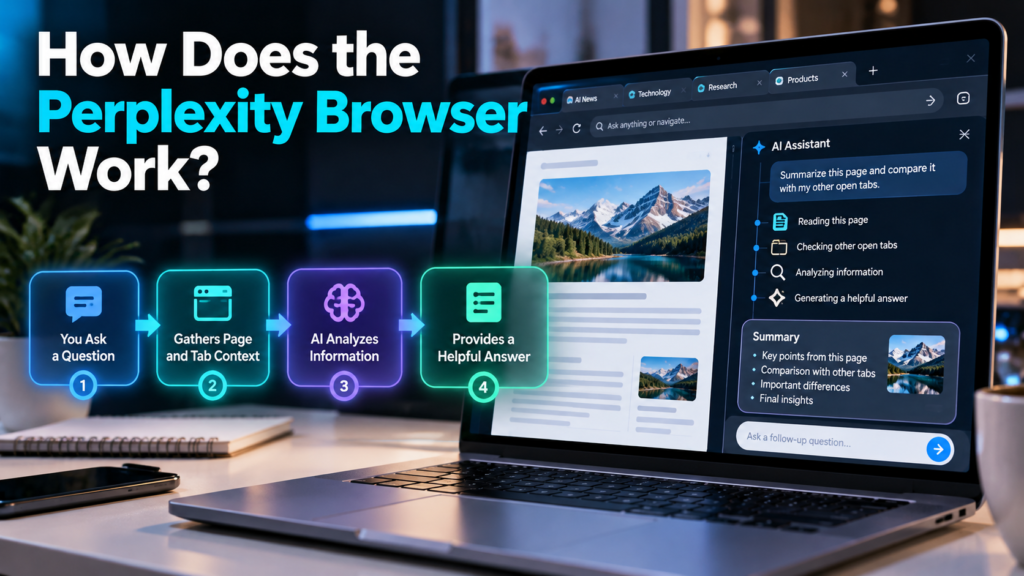
Comet combines a browser interface with AI models and web-search capabilities. When you ask a question, the assistant can use relevant page content and search results to generate an answer. Depending on the task, it may also interact with websites to help complete a workflow.
The process generally involves four stages:
- Understanding your request: The AI interprets what you want to accomplish.
- Gathering information: It uses the current webpage, available tabs, or web search to collect relevant context.
- Processing the information: The model summarizes, compares, explains, or organizes the material.
- Assisting with the task: It presents an answer or, where supported, performs browser actions to help achieve your goal.
The important distinction is that Comet does more than generate text. Some features allow it to act as an AI agent, meaning the software can perform multiple steps toward a requested outcome.
However, these capabilities do not guarantee a correct result. Website layouts can change, information may be incomplete, and an AI assistant can misunderstand instructions. Users should review important actions before allowing them to proceed.
Key Features of the Perplexity Browser
Comet’s main attraction is the integration of AI directly into browsing. Its features are particularly useful when research involves several pages or when a task requires more than a simple search.
1. AI-Powered Page Summaries
The browser assistant can help explain and summarize online content without requiring you to copy text into a separate AI chatbot.
For example, if you open a lengthy article about machine learning, you can request a summary of its main arguments, the evidence it presents, and the conclusions it reaches.
This is useful when reviewing research papers, technical documentation, news reports, and educational resources. You can also ask follow-up questions to explore unfamiliar concepts.
A summary should still be checked against the original page, particularly when the article contains numerical results, technical details, or controversial claims.
2. Search Across Multiple Tabs
Research often involves opening several pages to compare information. Comet can help synthesize information across open tabs, reducing the need to switch between pages and take notes manually.
Consider a student researching renewable energy. They might open reports about solar power, wind power, and battery storage, then ask the assistant to compare the technologies by cost, reliability, and environmental impact.
The assistant can organize the information into a useful overview. The student should still verify that each comparison uses consistent measurements and reliable sources.
3. An AI Assistant for Everyday Tasks
Comet is designed to help with more than answering questions. Its assistant can support multi-step browser workflows, including gathering information, organizing tasks, and helping users interact with websites.
Possible applications include:
- Comparing products across several shopping pages.
- Gathering information for a research project.
- Finding relevant details in online documents.
- Helping draft an email based on information already available.
- Organizing information from multiple webpages.
Some tasks may require account access, additional permissions, or user confirmation. Availability can also vary by platform and feature.
4. Context-Aware Assistance
A conventional search engine usually treats each query as a separate request. An AI browser can use relevant context from the current page or open tabs to make follow-up questions more useful.
For instance, after opening a software documentation page, you could ask what a particular function does, which parameters it accepts, or how it relates to another feature described in the documentation.
This reduces the need to explain the entire context repeatedly. It is especially useful for complex subjects where each question builds on the previous one.
However, context awareness does not mean the browser understands everything on a website. Dynamic content, restricted pages, and poorly structured information can still create problems.
Practical Uses of the Perplexity Browser
The value of an AI browser depends on the work you do. It is most helpful when information is spread across multiple sources or when several small steps are required to complete a task.
For Students and Researchers
Students can use Comet to summarize reading material, explain unfamiliar terms, compare research findings, and create an initial outline for a report. Researchers can use it to organize information from multiple sources and identify questions that need further investigation.
However, AI-generated summaries should not replace original research. Important claims, statistics, and quotations should be verified using the original papers or publications.
For Bloggers and Marketers
Bloggers and digital marketers can use the browser to compare competing articles, collect topic ideas, examine search-intent patterns, and organize research before writing.
For example, a writer preparing an article about machine learning can review several technical resources and ask the assistant to identify recurring themes and differences. The writer should then check those findings and develop original explanations rather than relying entirely on generated summaries.
For Developers
Developers can use Comet to understand technical documentation, compare API methods, and investigate unfamiliar programming errors.
An assistant can help explain what a function does or identify possible causes of an error. Generated code and configuration advice should still be tested before being used in a production environment.
For Online Shoppers
Comet can help users compare specifications, identify differences between products, and organize prices from available listings.
For example, someone shopping for a laptop could ask for a comparison of processor performance, RAM, storage, battery life, and warranty information.
Before purchasing, users should confirm current prices, delivery charges, warranty terms, and seller details directly on the relevant product pages.
Advantages of Using the Perplexity Browser
Comet offers several practical benefits for people who spend significant time online.
Less manual research: Users can request summaries and comparisons as a starting point instead of reading every page in full before identifying relevant information.
Fewer interruptions: An integrated assistant can answer questions about the current page without requiring a separate chatbot window.
Support for complex workflows: Agentic features can help coordinate several browser actions, potentially reducing repetitive work.
More useful follow-up questions: The assistant can use relevant browsing context, making it easier to explore a topic without repeatedly providing background information.
Flexible applications: The same general approach can support studying, product research, technical learning, and professional tasks.
The biggest advantage is convenience. Comet can reduce the effort required to collect and organize information, leaving users more time to assess the results and make decisions.
However, faster information gathering is not necessarily the same as better research. Source quality, careful reasoning, and independent verification remain important.
Limitations and Risks You Should Know
An AI-powered browser introduces capabilities that traditional browsers do not necessarily have. It also introduces additional risks, especially when the assistant can interact with logged-in websites or private information.
AI Errors and Misleading Summaries
Like other large language model systems, AI assistants can produce incorrect statements, overlook important details, or misunderstand source material. A confident answer is not proof that the answer is accurate.
This matters when comparing products, researching health information, reviewing financial details, or making business decisions.
To reduce the risk, open the original sources, check important figures, and distinguish between what a source explicitly states and what the AI has inferred.
Privacy and Data Handling
Comet’s privacy practices may involve local storage of browsing information and the processing of relevant browsing context by remote servers when necessary to fulfill AI requests. The exact handling depends on the feature, permissions, account settings, and applicable privacy terms.
Local storage should not be confused with a guarantee that all information stays on your device.
Before using an AI browser with sensitive material:
- Review its privacy and data-sharing settings.
- Be cautious about granting access to email, calendars, or other connected services.
- Avoid sending confidential business documents unless the applicable policies permit it.
- Check which permissions are active and revoke those you no longer need.
Security Risks of AI Agents
AI agents can face a threat known as prompt injection. This occurs when a website or document contains malicious instructions intended to manipulate an AI system that reads the content.
For example, an agent processing an untrusted webpage might encounter hidden instructions that attempt to redirect its behavior or expose information. The user may not notice these instructions because they are not necessarily displayed as ordinary text.
This is an important security challenge for AI-powered browsers, although the existence of this risk does not mean every browsing session is compromised.
Practical precautions include:
- Avoid giving an AI agent unnecessary access to sensitive accounts.
- Review actions before sending messages, submitting forms, or making purchases.
- Use extra caution with banking, business administration, and confidential email.
- Keep the browser updated and review its security controls.
Website Compatibility and Automation Errors
Not every website works equally well with browser automation. Some pages rely on dynamic interfaces, verification steps, pop-ups, or complex authentication processes.
As a result, an assistant might fail to complete a task, enter information incorrectly, or require manual intervention. Users should treat automation as assistance rather than a guarantee that a workflow will finish correctly.
Perplexity Browser vs. Google Chrome vs. Microsoft Edge
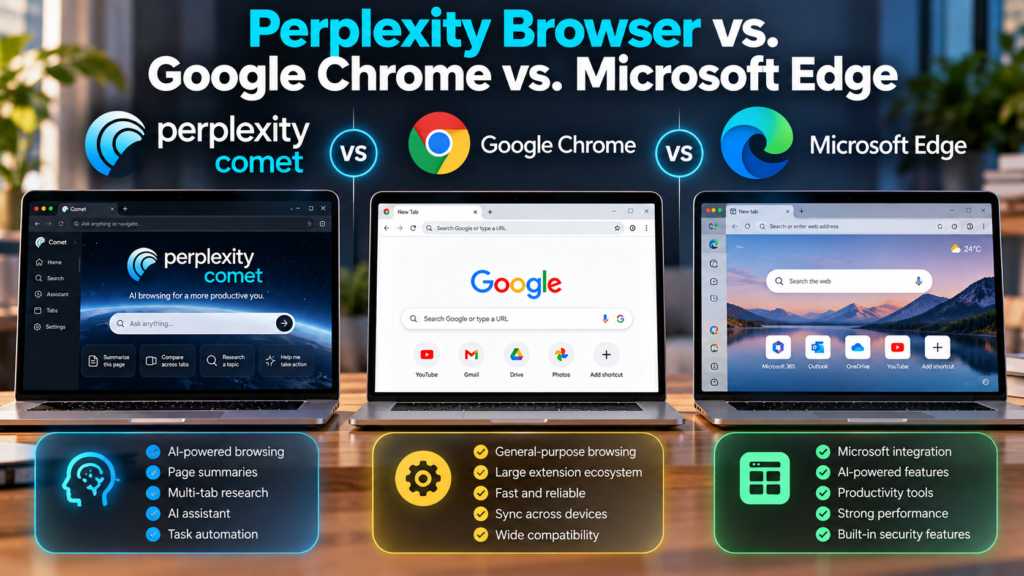
The best browser depends on whether you prioritize traditional browsing, AI assistance, or integration with existing software.
| Feature | Perplexity Comet | Google Chrome | Microsoft Edge |
|---|---|---|---|
| Main focus | AI-assisted browsing | General-purpose browsing | General browsing and Microsoft integration |
| AI experience | Integrated Perplexity assistant | Google AI features vary by product and account | Copilot integration and related AI features |
| Page summaries | AI-assisted summaries | Available through supported AI features and extensions | Available through supported AI features |
| Multi-step assistance | Designed to support agentic browser workflows | Depends on available integrations and features | Depends on available integrations and features |
| Extensions | Check current compatibility | Extensive extension ecosystem | Supports compatible extensions, including many Chromium extensions |
| Best suited for | Research and AI-assisted tasks | Everyday browsing and broad compatibility | Users who benefit from Microsoft services |
These are broad product distinctions, not a guarantee that every feature is available to every user. AI functionality, extension compatibility, and account requirements can change over time.
Chrome remains a strong choice for users who prioritize a mature browser ecosystem and established workflows. Edge may be more convenient for people who rely heavily on Microsoft services. Comet is worth considering if you want an AI assistant integrated into the browsing experience itself.
Is the Perplexity Browser Free?
Comet’s availability and pricing can change, and access to individual AI capabilities may depend on the platform, subscription, or account conditions.
It is important to distinguish between the browser itself and the broader Perplexity subscription. A feature being available in Comet does not automatically mean that every related AI capability is unlimited or included in every plan.
Before installing it, check the current official product information for:
- Whether the browser is available in your region.
- Which features are included without a paid subscription.
- Whether particular AI tasks have usage limits.
- Whether advanced capabilities require a subscription.
- Which operating systems and device versions are supported.
Do not choose a paid plan solely because you expect to use the browser. First, identify the features you need and determine whether the available version meets your requirements.
How to Get Started With the Perplexity Browser
Getting started is straightforward, although the exact steps may vary by device.
- Find the official Comet download. Use Perplexity’s official product page or the relevant app store to avoid unofficial installers.
- Check device compatibility. Confirm that your operating system meets the current requirements.
- Install the browser. Follow the installation instructions for your device.
- Review privacy settings. Check browsing-data controls, permissions, and any available account integrations.
- Try a simple research task. Ask the assistant to summarize an article or compare information across two pages.
- Verify the result. Check the original sources and correct any missing or inaccurate details.
- Test automation cautiously. Begin with low-risk tasks before considering workflows that involve private accounts or important actions.
Comet has been offered across desktop and mobile platforms, including Mac, Windows, iOS, and Android. Availability of individual features may vary by platform and version.
Tips for Getting Better Results From Comet
The quality of an AI browser’s output depends partly on how clearly you define the task. Broad requests can produce broad answers, while specific instructions make it easier to judge whether the result meets your needs.
For example, instead of asking, “Compare these laptops,” try:
“Compare these three laptops by processor, RAM, storage, battery life, warranty, and current listed price. Identify any specifications that are missing and do not assume that an unlisted feature is included.”
This instruction provides a clear structure and discourages unsupported assumptions.
Other useful practices include:
- Specify the outcome: Explain whether you need a summary, comparison, checklist, or recommendation.
- Set boundaries: Identify which websites or sources should be considered.
- Ask for uncertainty to be highlighted: Request that missing details and conflicting information be identified.
- Check the source material: Open important references instead of relying only on a generated summary.
- Keep sensitive actions under your control: Review messages, purchases, and account changes before confirming them.
These practices are useful with any AI assistant, but they become especially important when the assistant can interact with websites on your behalf.
Frequently Asked Questions
1. What is the Perplexity browser called?
It is called Comet. It is an AI-powered browser developed by Perplexity with an integrated assistant for research, page understanding, and supported browser tasks.
2. Is the Perplexity browser free?
Pricing and feature access can change. Check the current official product information to confirm which browser features are free and whether particular capabilities require a subscription.
3. Is Comet better than Google Chrome?
Neither browser is best for everyone. Comet emphasizes integrated AI assistance, while Chrome is a general-purpose browser with a broad extension ecosystem. Your preferred workflow determines which is more suitable.
4. Can the Perplexity browser summarize websites?
Yes. Comet can help summarize webpage content and synthesize information across supported open tabs. You should verify important details against the original sources.
5. Is the Perplexity browser safe to use?
It can be used for ordinary browsing, but no browser or AI agent is risk-free. Review privacy settings, limit unnecessary permissions, and carefully supervise actions involving sensitive accounts.
6. Does Comet work on mobile devices?
Comet has been made available on supported mobile platforms, including iOS and Android. Specific features and system requirements can vary by device and version.
7. Can Comet perform tasks automatically?
Comet is designed to assist with multi-step tasks through agentic browsing features. However, success depends on the website and task, and users should review consequential actions before they are completed.
Conclusion
The Perplexity browser represents a shift from traditional browsing toward AI-assisted interaction with the web. Through Comet, users can ask questions about pages, summarize research, compare information across tabs, and receive help with supported multi-step tasks without constantly switching between separate applications.
Its strongest use case is reducing the effort involved in gathering and organizing information. Students, developers, marketers, and professionals may find this particularly valuable when working across many sources.
Nevertheless, the browser should be treated as an assistant rather than an unquestionable authority. AI-generated summaries can contain errors, automated workflows may fail, and access to personal information creates privacy and security considerations.
If you are considering Comet, start with ordinary research tasks, evaluate the quality of its answers, and review its permissions before connecting sensitive accounts. The most useful AI browser is not necessarily the one that automates the most actions, but the one that saves time while keeping you informed and in control.


1 comment on “Perplexity Browser: Features, Benefits, Privacy, and How It Works”