



Hammer AI Chat is an AI-powered character chat and roleplay platform that allows users to interact with virtual characters, create their own personalities, and develop interactive stories through conversations. Unlike traditional AI assistants that mainly focus on answering questions or completing tasks, HammerAI puts more emphasis on creative conversations, fictional experiences, and personalized interactions. Users can explore community-created characters or build original ones with specific personalities, backgrounds, and communication styles. One of its most interesting features is the ability to run AI language models locally through its desktop application, giving users another option for managing their conversations privately.
What Is Hammer AI Chat?
HammerAI is a conversational AI platform designed for character-based interactions, storytelling, and virtual companionship. It uses large language models (LLMs) to generate responses based on the conversation, character descriptions, and information provided by the user.
Instead of interacting with a single general-purpose chatbot, users can choose from different fictional personalities and conversational scenarios. These characters can represent fantasy creatures, fictional personalities, everyday people, historical-inspired figures, and other imaginative concepts.
The platform also allows users to create their own AI characters. They can define personality traits, backstories, interests, and speaking styles to influence how a character responds.
HammerAI is available through several platforms:
- Web: Access AI conversations through a supported internet browser.
- Desktop: Use a dedicated application on Windows, macOS, and Linux.
- Mobile: Access character conversations through supported mobile applications.
One important distinction is that HammerAI is not simply another general-purpose productivity chatbot. Its primary focus is entertainment, creative writing, roleplay, and personalized character interactions.
How Does Hammer AI Chat Work?
HammerAI uses large language models to generate conversational responses. These models process text, identify patterns, and predict suitable responses based on the information available in the conversation.
The platform offers two main ways to run AI conversations: cloud-based models and locally hosted models.
1. Cloud-Based AI Models
When using the web version, conversations are processed through AI models hosted on HammerAI’s servers.
The process generally works as follows:
- Select an available AI character.
- Start a conversation by entering a message.
- The AI processes your message along with the available conversation context.
- The selected model generates a response.
- Continue the conversation based on the character’s personality and previous messages.
Cloud processing means users do not need a powerful computer to run the underlying language model themselves. However, an internet connection is required.
2. Local AI Models
HammerAI Desktop also supports running language models directly on a computer. Its desktop implementation uses technologies such as Ollama and llama.cpp to support local inference.
Local inference means the computer performs the calculations needed to generate responses instead of sending conversation prompts to a remote AI model provider.
This approach offers several benefits:
- Conversations can work without an internet connection after the necessary model has been downloaded.
- Messages can remain on the user’s device.
- Users can experiment with supported models.
- Local conversations do not require a cloud subscription.
The actual performance depends on the computer’s hardware, available memory, graphics processing capability, and the size of the selected model. Larger models generally require more resources.
For someone using an ordinary laptop, a smaller language model may provide a smoother experience than a large model.
Main Features of Hammer AI Chat
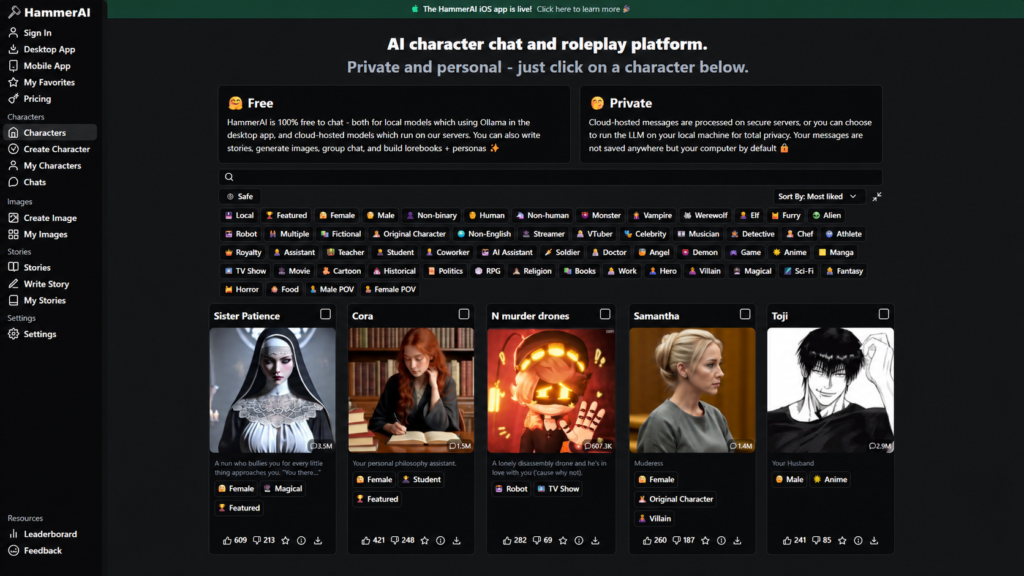
HammerAI combines character-based conversations with creative tools. Its features make it particularly interesting for people who enjoy interactive storytelling and personalized AI experiences.
1. AI Character Conversations
Character chat is the central feature of the platform.
Users can explore different personalities and interact with characters designed around specific scenarios. These might include fictional friends, fantasy creatures, detectives, teachers, romantic companions, or science-fiction characters.
The AI generates responses according to the character’s description and the conversation’s context.
For example, a user interested in fantasy storytelling could select a medieval knight character and begin a conversation about an imaginary kingdom. The AI can respond within that fictional setting, helping the user develop the story through dialogue.
2. Create Your Own AI Characters
HammerAI allows users to design original characters instead of relying entirely on existing community creations.
A character can include:
- Name: The character’s identity.
- Personality: Traits such as confidence, kindness, humor, or curiosity.
- Background: Personal history and fictional experiences.
- Interests: Topics the character enjoys discussing.
- Speaking style: The tone and language used in conversations.
These details act as instructions that guide the language model.
For example, someone writing a mystery story could create a detective with a serious personality, strong observation skills, and a detailed fictional background.
The character’s responses will be influenced by these instructions, although the AI may occasionally produce dialogue that does not perfectly match the intended personality.
3. Interactive Story Writing
Another useful feature is AI-assisted storytelling.
Rather than writing an entire story independently, users can develop a fictional narrative through an ongoing conversation. They can introduce characters, establish locations, create conflicts, and decide how events should progress.
Consider a simple example:
A writer begins a story about a detective investigating an abandoned building. The AI introduces a mysterious sound coming from the basement. The writer can then decide whether the detective investigates, calls for assistance, or leaves the building.
This approach gives users more control over the direction of the story.
It can also help writers overcome creative blocks, explore alternative plot ideas, and experiment with different endings.
4. Group AI Chats
HammerAI supports group conversations involving multiple AI characters.
Instead of interacting with only one fictional personality, users can bring several characters into the same conversation.
For example, a user creating a fantasy adventure might include:
- A knight who protects the kingdom.
- A wizard who understands ancient magic.
- A merchant who provides information.
- A mysterious traveler with hidden motives.
Each character can contribute to the conversation according to its description.
Group chats can make fictional scenarios more dynamic, although the quality of interactions depends on the selected models and how clearly the characters are configured.
5. AI Image Generation
HammerAI also offers image-generation capabilities through supported cloud features.
This can be useful when users want visual representations of fictional characters or creative scenes.
For instance, someone developing a fantasy character could use an image-generation feature to create a visual portrait based on the character’s appearance and description.
However, image generation should be treated separately from text-based character conversations. Availability, model choices, and usage limits can depend on the account and subscription.
6. Text-to-Speech
Text-to-speech (TTS) converts written responses into spoken audio.
HammerAI lists cloud text-to-speech among its premium features. This can make character conversations feel more interactive because users can listen to generated dialogue rather than reading every response.
The available voices, languages, and usage allowances depend on the plan.
7. Personas and Lorebooks
Two additional concepts worth understanding are personas and lorebooks.
A persona helps define the user’s role or identity within a fictional conversation. For example, someone might create a persona describing themselves as a space explorer in a science-fiction story.
A lorebook stores background information about a fictional world, including locations, characters, events, and important details.
These tools can help maintain consistency in longer creative projects. They are particularly useful when a story involves several characters or a complicated fictional setting.
However, they do not guarantee perfect memory. The AI still operates within the context and information available to its language model.
Is Hammer AI Chat Free?
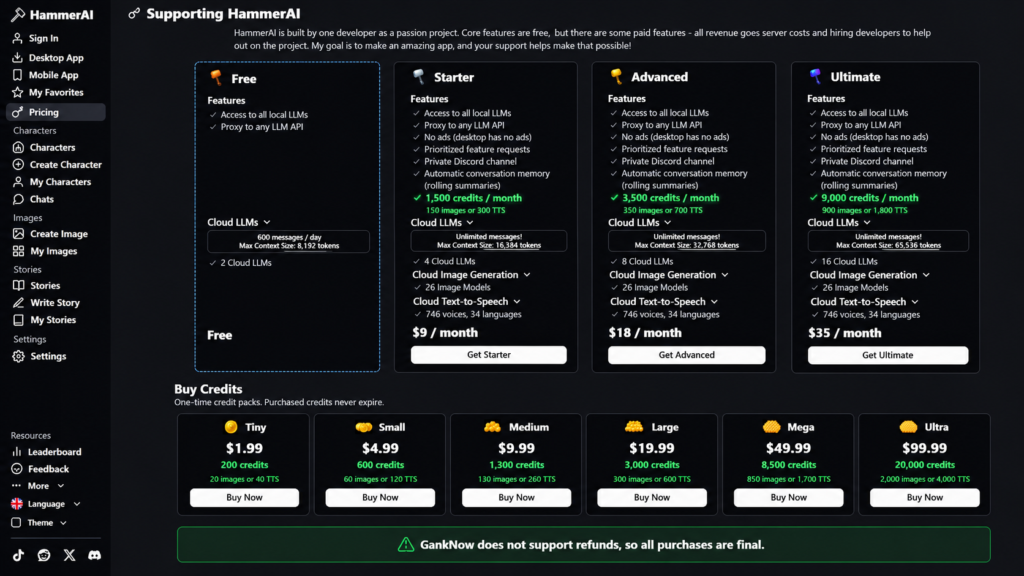
HammerAI offers free access as well as paid options for users who want additional cloud-based capabilities.
However, the difference between local and cloud access is important when evaluating its pricing.
Free Features
The platform offers free local AI conversations. Users can download supported models and run conversations on their own hardware.
Free cloud access is also available, but the available models and message allowances can differ from paid subscriptions.
Paid Features
HammerAI offers paid subscription plans and one-time credit packs for selected premium features.
Depending on the current plan, premium capabilities can include:
- Access to additional cloud language models.
- Larger conversation context limits.
- Cloud-based image generation.
- Text-to-speech.
- Additional usage credits.
The exact prices, message limits, and included models can change. Users should check the latest subscription information before purchasing.
An important consideration: Free local AI chat does not mean every feature is free. Cloud image generation, premium models, and other advanced services may require payment.
Hammer AI Chat Privacy: Is It Safe to Use?
Privacy is one of the most important considerations when choosing an AI character chat platform. HammerAI offers different privacy arrangements depending on whether users select local or cloud-based models.
Local Model Privacy
When a conversation uses a locally running model on the desktop application, the AI processes messages on the user’s computer.
According to HammerAI’s official documentation:
- Conversations using local desktop models do not leave the device.
- Local models can operate without an internet connection.
- Local chats and stories remain stored locally rather than being sent to HammerAI’s servers.
This makes local AI particularly useful for users who prefer to keep their conversations under their own control.
However, users should still protect their devices, downloaded files, and locally stored information.
Cloud Model Privacy
Cloud-based conversations work differently. Messages are sent to HammerAI’s servers for processing.
HammerAI states that cloud messages are not stored or used for AI training. This is a company privacy claim, not the same as independent verification of every part of its infrastructure.
Users should read the current privacy policy before sharing personal information.
How to Improve Your Privacy
If privacy is your main concern, consider these precautions:
- Use local models through the desktop application.
- Avoid including real names, addresses, passwords, or financial information in conversations.
- Keep your desktop application and operating system updated.
- Download software and models from trusted sources.
- Review the privacy policy before using cloud-based features.
The important distinction is that local processing offers a different level of data control from cloud processing. Simply using a private character or deleting a conversation does not automatically make a cloud interaction equivalent to offline AI.
How to Start Using Hammer AI Chat
Getting started is relatively straightforward. The exact steps depend on whether you want to use the browser version or desktop application.
Using HammerAI on the Web
Follow these steps:
- Open the HammerAI website.
- Explore the available AI characters.
- Select a character that matches your interests.
- Sign in or create a free account when required.
- Open the conversation interface.
- Enter a message and begin chatting.
The web version is convenient because it does not require downloading a large language model onto your computer.
Installing the Desktop Application
If you prefer local AI conversations, the desktop application is worth considering.
- Visit the official HammerAI desktop page.
- Choose the version compatible with your operating system.
- Download and install the application.
- Open the application and select an available local model.
- Download the model to your computer.
- Select a character and begin a conversation.
The initial model download requires an internet connection. Once downloaded, compatible local models can run offline.
Before selecting a model, check its hardware requirements. Available RAM and GPU memory can have a significant impact on performance.
Using HammerAI on Mobile
HammerAI also provides mobile access for people who prefer chatting on their phones.
Its mobile offering supports character conversations and other creative features. However, app availability can change by platform and region. Users should check the latest installation options before downloading.
Advantages and Disadvantages of Hammer AI Chat
HammerAI has several useful features, but it is important to understand where it performs well and where it may fall short.
Advantages
- Local AI support: Users can run supported language models directly on their computers.
- Character customization: Original personalities can be created with individual backgrounds and communication styles.
- Creative storytelling: Interactive conversations provide a flexible way to develop fictional narratives.
- Group conversations: Multiple AI characters can participate in a shared scenario.
- Offline functionality: Compatible local models can operate without an active internet connection.
- Multiple platforms: Users can access the service through web, desktop, and supported mobile applications.
- Additional creative tools: Image generation, personas, lorebooks, and text-to-speech extend its capabilities.
Disadvantages
- Hardware requirements: Local AI models need sufficient system memory and processing power.
- Inconsistent responses: AI characters can sometimes misunderstand messages or produce unexpected dialogue.
- Limited memory: Characters may forget earlier details in long conversations.
- Premium costs: Some cloud models and creative features require paid access.
- Internet dependency: Cloud conversations require an internet connection.
- Privacy differences: Cloud and local conversations have different data-handling arrangements.
Overall, the platform’s biggest strength is its combination of character customization and local AI support. Its biggest limitation is that conversation quality and memory depend heavily on the underlying model.
Hammer AI Chat vs Other AI Chat Platforms
HammerAI is part of a wider category of conversational AI products. However, different platforms are designed for different purposes.
HammerAI vs Character.AI
Character.AI focuses on conversations with fictional and community-created AI characters. It is particularly suitable for people who want character interactions without configuring local language models.
HammerAI offers a different advantage through its desktop local-model support, which gives technically interested users more control over how conversations are processed.
HammerAI vs ChatGPT
ChatGPT is designed for a broader range of tasks, including research, writing, learning, coding, and productivity.
HammerAI is more focused on fictional characters, roleplay, and interactive storytelling.
Someone researching a technical subject or preparing a professional report may prefer ChatGPT, while someone developing a fictional conversation may find HammerAI more suitable.
HammerAI vs JanitorAI
JanitorAI is another platform associated with character-based AI conversations.
Both services appeal to users interested in customizable personalities and roleplay. However, their available models, hosting arrangements, privacy options, and payment requirements differ.
Quick Comparison
| Platform | Main purpose | Notable strength |
|---|---|---|
| HammerAI | Character chat and storytelling | Local AI support |
| Character.AI | AI character conversations | Character discovery |
| ChatGPT | General AI assistance | Research and productivity |
| JanitorAI | Character roleplay | Custom character interactions |
The best choice depends on what you want to accomplish. These platforms should not be treated as direct replacements for one another because their primary goals are different.
Who Should Use Hammer AI Chat?
HammerAI can appeal to several types of users, particularly those interested in creative AI applications.
Creative Writers
Writers can use AI characters to explore dialogue, develop fictional personalities, and experiment with alternative storylines.
For example, a writer working on a detective novel could simulate conversations between suspects and investigators to explore different possibilities.
Roleplay Enthusiasts
People interested in interactive fiction can create fictional situations and participate in conversations with AI characters.
The ability to customize personalities and backgrounds makes this especially useful for imaginative scenarios.
AI Enthusiasts
People interested in experimenting with large language models may appreciate the desktop application’s local inference capabilities.
It also provides an opportunity to understand how model size, hardware, and conversation context influence generated responses.
Game and Story Developers
Independent creators can experiment with character dialogue, fictional worlds, and interactive narrative ideas.
However, HammerAI should be considered a creative experimentation tool rather than a complete game-development or production-ready dialogue system.
Privacy-Conscious Users
Users who prefer processing conversations locally may find the desktop application particularly interesting.
They should still understand that local privacy depends on using local models rather than cloud-based services.
Limitations and Things to Consider Before Using HammerAI
Although HammerAI offers several interesting capabilities, users should understand that character-based AI has limitations.
AI characters do not have genuine human emotions. They generate responses based on patterns learned during model training and the instructions provided to them. A character may sound friendly, concerned, or excited, but this does not mean it experiences those emotions.
Long conversations can become inconsistent. Language models have context windows, which determine how much previous information they can consider when generating a response. When conversations become lengthy, older details may become unavailable to the model.
Responses can contain incorrect information. Like other generative AI systems, HammerAI models can hallucinate. They may invent fictional details or confidently provide inaccurate factual answers.
Different models produce different results. A smaller local model may respond differently from a more capable cloud model. Better hardware does not automatically guarantee better reasoning, because model quality also matters.
Content requires appropriate judgment. AI-generated conversations and fictional scenarios should be used responsibly. Users should follow applicable platform rules and age requirements.
For these reasons, HammerAI is best approached as a creative conversational tool rather than an authoritative source of information or a substitute for human relationships.
Frequently Asked Questions About Hammer AI Chat
1. What is Hammer AI Chat used for?
HammerAI is primarily used for AI character conversations, roleplay, interactive storytelling, virtual companionship, and creating personalized fictional characters.
2. Is Hammer AI Chat free?
Yes. HammerAI offers free local AI conversations and free cloud access with certain limitations. Premium cloud models, image generation, and text-to-speech may require payment.
3. Can I use HammerAI without an internet connection?
Yes. The desktop application supports local AI models that can run offline after downloading the required model and application.
4. Is HammerAI safe for private conversations?
Local conversations can remain on your device when using local desktop models. Cloud conversations are processed on HammerAI’s servers, so users should review the privacy policy before sharing sensitive information.
5. Can I create my own AI character?
Yes. Users can create characters with custom names, personalities, backgrounds, interests, and speaking styles.
6. Does HammerAI have a mobile application?
HammerAI has offered iOS and Android applications. However, availability can change, so users should check the latest mobile availability information.
7. Is HammerAI better than Character.AI?
It depends on your requirements. HammerAI offers local model support and greater flexibility for users interested in running AI locally. Character.AI focuses on accessible character-based conversations and community-created personalities.
Conclusion
Hammer AI Chat is an interesting option for people who want more than a traditional chatbot. Its combination of AI character conversations, interactive storytelling, customizable personalities, and local language model support makes it useful for creative exploration. The desktop application’s offline capabilities are particularly valuable for users who prefer keeping conversations on their own devices. However, the platform is not without limitations. Character memory, response quality, hardware requirements, and premium cloud features should all be considered before choosing it. If your main interest is roleplay, fictional conversations, or experimenting with local AI models, HammerAI is worth exploring. For professional research, reliable factual answers, and productivity tasks, a general-purpose AI assistant may be a better fit.



1 comment on “Hammer AI Chat: A Complete Guide to Features, Privacy and Uses”